Join us at FabCon Atlanta from March 16 - 20, 2026, for the ultimate Fabric, Power BI, AI and SQL community-led event. Save $200 with code FABCOMM.
Register now!Vote for your favorite vizzies from the Power BI Dataviz World Championship submissions. Vote now!
Solved! Go to Solution.
Hi @Clint ,
Try to make the following change, however without any data is difficult to pin point the correct syntax
Project Desc in Scope =
SWITCH (
TRUE (),
ISINSCOPE ( 'Exceptions Reporting'[Description] ), BLANK (),
ISINSCOPE ( 'Projects'[Project Name] ), MAX ( 'Projects'[Project Description] )
)
Regards
Miguel Félix
Proud to be a Super User!
Check out my blog: Power BI em PortuguêsHi @Clint ,
Based on what you refer you may need a ISINSCOPE has you refered however this needs to be calculated in the correct way since if you do a isinscope for the program name that is the parent that will return values in all lines.
Another option can be the HASONEVALUE for the exception.
Can you please share a mockup data or sample of your PBIX file. You can use a onedrive, google drive, we transfer or similar link to upload your files.
If the information is sensitive please share it trough private message.
Regards
Miguel Félix
Proud to be a Super User!
Check out my blog: Power BI em PortuguêsHi Miguel,
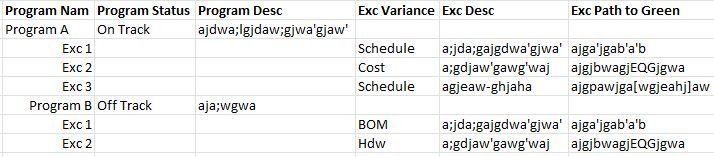
The image I attached is a mock-up of what the report should look like. Here is the measure I tried to use to get the Program related data to show only at the Program level:
Hi @Clint ,
Try to make the following change, however without any data is difficult to pin point the correct syntax
Project Desc in Scope =
SWITCH (
TRUE (),
ISINSCOPE ( 'Exceptions Reporting'[Description] ), BLANK (),
ISINSCOPE ( 'Projects'[Project Name] ), MAX ( 'Projects'[Project Description] )
)
Regards
Miguel Félix
Proud to be a Super User!
Check out my blog: Power BI em PortuguêsThank you Miguel - That did the trick. Much appreciated.
Vote for your favorite vizzies from the Power BI World Championship submissions!
If you love stickers, then you will definitely want to check out our Community Sticker Challenge!
Check out the January 2026 Power BI update to learn about new features.
| User | Count |
|---|---|
| 57 | |
| 52 | |
| 40 | |
| 17 | |
| 16 |
| User | Count |
|---|---|
| 112 | |
| 108 | |
| 39 | |
| 34 | |
| 27 |