cancel
Showing results for 
Search instead for 
Did you mean: 

The Power BI Data Visualization World Championships is back! It's time to submit your entry. Live now!

Reply
gesbos1
Regular Visitor

Matrix Sorting Multiple Columns and Values

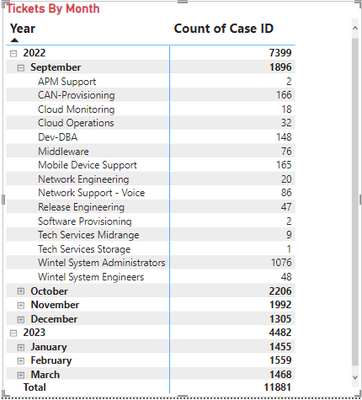
Hi.  Long time Excel / Power Query users coming over to Power BI.  In Excel, sorting pivot tables at multiple layers is as easy as right clicking and selecting sort. In the visual below, I would like to first sort by the Year/Month Column and then by the Count of Case ID in descending order. How can i do this? (hopefully in an easy straight-forward way like excel)


gesbos1_0-1679835465875.png


2 REPLIES 2
gesbos1
Regular Visitor

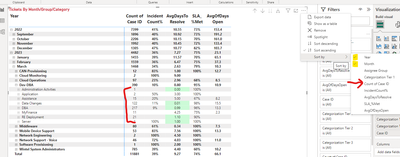
Let me see if I can explain it better. I want to sort by year, then month, then Count of Case ID (see visual below). I can find no way to add that 3rd sort layer. If you see the red line bracket outling Count of Case ID....they are not sorted largest to smallest. I want them sorted 216, 122, 21, 15....etc.   In excel this is super simple. Can't find a way to do it in PBI. Is it doable??


gesbos1_0-1679871983231.png


vicky_
Super User
Super User

If you hover over the visual, you can go to the top-right corner and click on ... > sort by > Count CaseID or you can click on the header for Count CaseID.

Helpful resources

Announcements
Power BI DataViz World Championships

Power BI Dataviz World Championships

The Power BI Data Visualization World Championships is back! It's time to submit your entry.

January Power BI Update Carousel

Power BI Monthly Update - January 2026

Check out the January 2026 Power BI update to learn about new features.

FabCon Atlanta 2026 carousel

FabCon Atlanta 2026

Join us at FabCon Atlanta, March 16-20, for the ultimate Fabric, Power BI, AI and SQL community-led event. Save $200 with code FABCOMM.