Get Fabric or SQL Certified for Free.
Get certified for free when you join Fabric Data Days 2026 and dive into Fabric, Power BI, SQL, AI, and other essential data skills.
Join now- Power BI forums
- Get Help with Power BI
- Desktop
- Service
- Report Server
- Power Query
- Mobile Apps
- Developer
- DAX Commands and Tips
- Custom Visuals Development Discussion
- Health and Life Sciences
- Power BI Spanish forums
- Translated Spanish Desktop
- Training and Consulting
- Instructor Led Training
- Dashboard in a Day for Women, by Women
- Galleries
- Data Stories Gallery
- Themes Gallery
- Contests Gallery
- QuickViz Gallery
- Quick Measures Gallery
- Visual Calculations Gallery
- Notebook Gallery
- Translytical Task Flow Gallery
- TMDL Gallery
- R Script Showcase
- Webinars and Video Gallery
- Ideas
- Custom Visuals Ideas (read-only)
- Issues
- Issues
- Events
- Upcoming Events
Data Days is here! Join us now for 60+ days of learning, challenges, and connection. Learn more
- Power BI forums
- Forums
- Get Help with Power BI
- Desktop
- Re: Matrix Rows Based on Date Slicer
- Subscribe to RSS Feed
- Mark Topic as New
- Mark Topic as Read
- Float this Topic for Current User
- Bookmark
- Subscribe
- Printer Friendly Page


- Mark as New
- Bookmark
- Subscribe
- Mute
- Subscribe to RSS Feed
- Permalink
- Report Inappropriate Content
Matrix Rows Based on Date Slicer
Hello community,
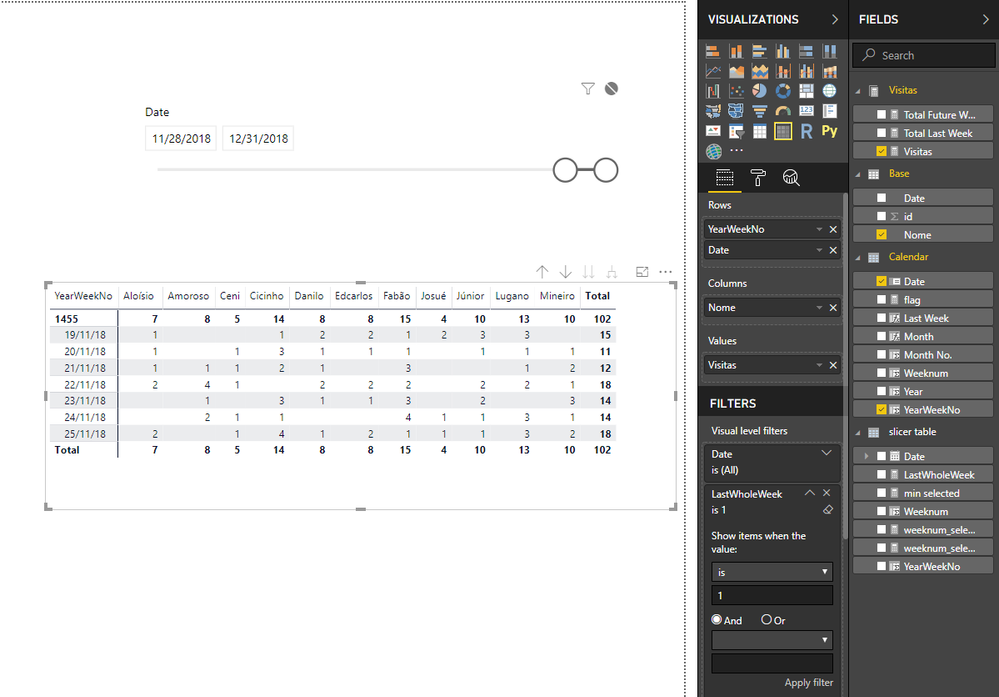
Is it possible to have a date slicer dynamically changing a Matrix rows?
For instance: if min date of slicer is 28/nov/18 (today) Matrix rows should displays all days of last week.
Sample : https://drive.google.com/open?id=1CzKayMIk99I3JJ4qH7mhEILIuW3nF4Ns
Thanks in advance
Solved! Go to Solution.


- Mark as New
- Bookmark
- Subscribe
- Mute
- Subscribe to RSS Feed
- Permalink
- Report Inappropriate Content
Hi @Fcoatis
To workaround this,
1.create a new table as a new calnedar table used in slicer.
enter in "New Table"
slicer table = CALENDAR("01/01/18","12/31/18")

Create calculated columns in this table
Weeknum = WEEKNUM([Date],2)
min selected = MIN('slicer table'[Date])

weeknum_selected = WEEKNUM([min selected])

weeknum_selected-1 = WEEKNUM([min selected])-1

LastWholeWeek = IF(MAX('Calendar'[Weeknum])=WEEKNUM([min selected])-1,1,0)

- Mark as New
- Bookmark
- Subscribe
- Mute
- Subscribe to RSS Feed
- Permalink
- Report Inappropriate Content
Hi @Fcoatis
To workaround this,
1.create a new table as a new calnedar table used in slicer.
enter in "New Table"
slicer table = CALENDAR("01/01/18","12/31/18")

Create calculated columns in this table
Weeknum = WEEKNUM([Date],2)
min selected = MIN('slicer table'[Date])

weeknum_selected = WEEKNUM([min selected])

weeknum_selected-1 = WEEKNUM([min selected])-1

LastWholeWeek = IF(MAX('Calendar'[Weeknum])=WEEKNUM([min selected])-1,1,0)
- Mark as New
- Bookmark
- Subscribe
- Mute
- Subscribe to RSS Feed
- Permalink
- Report Inappropriate Content
Thank you Maggie,
That´s what I was trying to figure out.
Kind regards.
Fabio Coatis
- Mark as New
- Bookmark
- Subscribe
- Mute
- Subscribe to RSS Feed
- Permalink
- Report Inappropriate Content
Just for those interested in my adaptation of Maggie´s solution, I´m sharing the knowledge.
Thank you guys.
https://drive.google.com/open?id=1MnQ5HzmCs37oK3oXbNM13kiQOW-R2H_6


- Mark as New
- Bookmark
- Subscribe
- Mute
- Subscribe to RSS Feed
- Permalink
- Report Inappropriate Content
Hi,
I think you can use a relative date slicer for this.
https://docs.microsoft.com/en-us/power-bi/visuals/desktop-slicer-filter-date-range
Please mark my post as solution, this will also help others.
Please give Kudos for support.
Marcus Wegener works as Full Stack Power BI Engineer at BI or DIE.
His mission is clear: "Get the most out of data, with Power BI."
twitter - LinkedIn - YouTube - website - podcast - Power BI Tutorials
- Mark as New
- Bookmark
- Subscribe
- Mute
- Subscribe to RSS Feed
- Permalink
- Report Inappropriate Content
Thanks for the suggestion,
but I have a Visual that depends on current date slicer filter, I wanted the other one (Matrix) to dynamicaly change rows.
Best regards
- Mark as New
- Bookmark
- Subscribe
- Mute
- Subscribe to RSS Feed
- Permalink
- Report Inappropriate Content
Hi,
i think you have to think different. 🙂
The date slicer filters on page level and should return the date range.
The more granular filter for the visual, you should set on the visual level. (Maybe with a Top filter on Date.)
Please mark my post as solution, this will also help others.
Please give Kudos for support.
Marcus Wegener works as Full Stack Power BI Engineer at BI or DIE.
His mission is clear: "Get the most out of data, with Power BI."
twitter - LinkedIn - YouTube - website - podcast - Power BI Tutorials

Helpful resources

Fabric Data Days 2026
Don't miss out on Data Days, June 15 through August 7. Learn Fabric, Power BI, SQL, AI and more.

Power BI Monthly Update - May 2026
Check out the May 2026 Power BI update to learn about new features.

Power BI DataViz World Championships - June 2026
A new Power BI DataViz World Championship is coming this June! Don't miss out on submitting your entry.

| User | Count |
|---|---|
| 23 | |
| 23 | |
| 21 | |
| 17 | |
| 14 |


| User | Count |
|---|---|
| 58 | |
| 50 | |
| 37 | |
| 29 | |
| 24 |


