This time we’re going bigger than ever. Fabric, Power BI, SQL, AI and more. We're covering it all. You won't want to miss it.
Learn moreLevel up your Power BI skills this month - build one visual each week and tell better stories with data! Get started
Hello community,
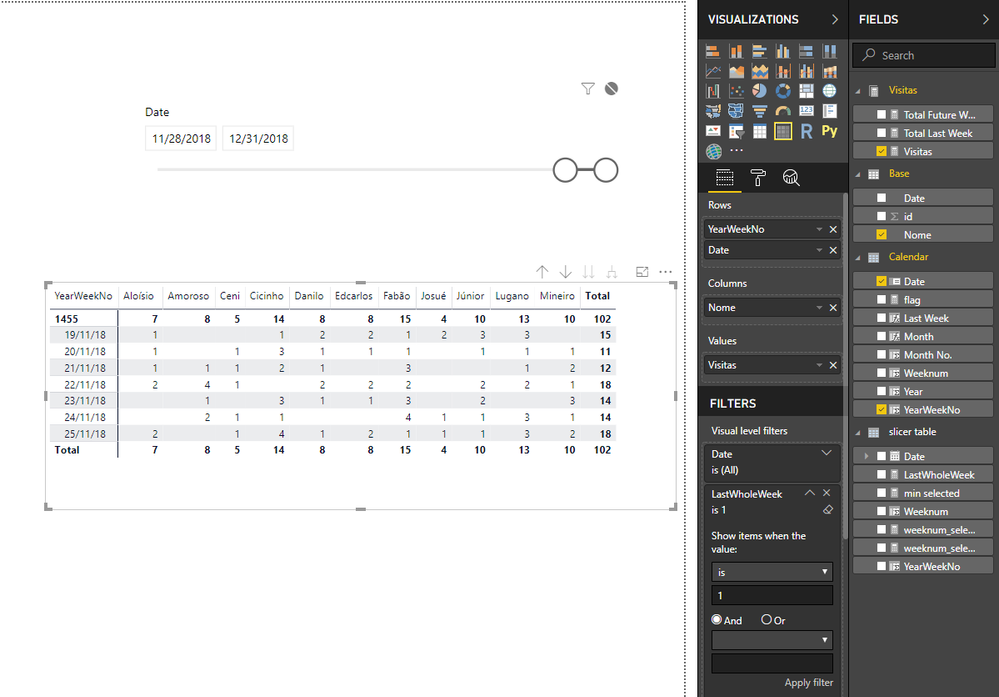
Is it possible to have a date slicer dynamically changing a Matrix rows?
For instance: if min date of slicer is 28/nov/18 (today) Matrix rows should displays all days of last week.
Sample : https://drive.google.com/open?id=1CzKayMIk99I3JJ4qH7mhEILIuW3nF4Ns
Thanks in advance
Solved! Go to Solution.
Hi @Fcoatis
To workaround this,
1.create a new table as a new calnedar table used in slicer.
enter in "New Table"
slicer table = CALENDAR("01/01/18","12/31/18")
Create calculated columns in this table
Weeknum = WEEKNUM([Date],2)
min selected = MIN('slicer table'[Date])
weeknum_selected = WEEKNUM([min selected])
weeknum_selected-1 = WEEKNUM([min selected])-1
LastWholeWeek = IF(MAX('Calendar'[Weeknum])=WEEKNUM([min selected])-1,1,0)
Hi @Fcoatis
To workaround this,
1.create a new table as a new calnedar table used in slicer.
enter in "New Table"
slicer table = CALENDAR("01/01/18","12/31/18")
Create calculated columns in this table
Weeknum = WEEKNUM([Date],2)
min selected = MIN('slicer table'[Date])
weeknum_selected = WEEKNUM([min selected])
weeknum_selected-1 = WEEKNUM([min selected])-1
LastWholeWeek = IF(MAX('Calendar'[Weeknum])=WEEKNUM([min selected])-1,1,0)
Thank you Maggie,
That´s what I was trying to figure out.
Kind regards.
Fabio Coatis
Just for those interested in my adaptation of Maggie´s solution, I´m sharing the knowledge.
Thank you guys.
https://drive.google.com/open?id=1MnQ5HzmCs37oK3oXbNM13kiQOW-R2H_6
Hi,
I think you can use a relative date slicer for this.
https://docs.microsoft.com/en-us/power-bi/visuals/desktop-slicer-filter-date-range
Marcus Wegener works as Full Stack Power BI Engineer at BI or DIE.
His mission is clear: "Get the most out of data, with Power BI."
twitter - LinkedIn - YouTube - website - podcast - Power BI Tutorials
Thanks for the suggestion,
but I have a Visual that depends on current date slicer filter, I wanted the other one (Matrix) to dynamicaly change rows.
Best regards
Hi,
i think you have to think different. 🙂
The date slicer filters on page level and should return the date range.
The more granular filter for the visual, you should set on the visual level. (Maybe with a Top filter on Date.)
Marcus Wegener works as Full Stack Power BI Engineer at BI or DIE.
His mission is clear: "Get the most out of data, with Power BI."
twitter - LinkedIn - YouTube - website - podcast - Power BI Tutorials
Check out the April 2026 Power BI update to learn about new features.
Sign up to receive a private message when registration opens and key events begin.
If you have recently started exploring Fabric, we'd love to hear how it's going. Your feedback can help with product improvements.
| User | Count |
|---|---|
| 34 | |
| 29 | |
| 29 | |
| 21 | |
| 18 |
| User | Count |
|---|---|
| 68 | |
| 45 | |
| 33 | |
| 24 | |
| 23 |