
cancel
Showing results for 
Search instead for 
Did you mean: 

Get Fabric certified for FREE! Don't miss your chance! Learn more

Reply
melina
Helper IV
Helper IV

Matrix Preview

Hi All,


I want to use matrix preview because matrix preview has feature wrap text.Why when i drag my data to insert into row placeholder, the data only display one column?

It is including on the matrix preview limitation?

Thanks for the detail explanation.

2 ACCEPTED SOLUTIONS
sokg
Solution Supplier
Solution Supplier

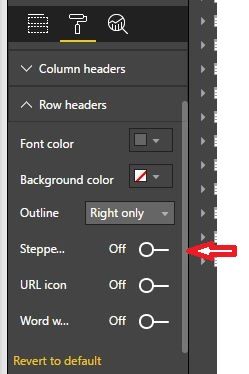
Click the third button until you see all rows

Capture10.JPG


and then in format panel check off the stepped layout (off)


Capture11.JPG

View solution in original post

Wow, Thanks! Smiley Wink


View solution in original post

5 REPLIES 5
sokg
Solution Supplier
Solution Supplier

Can you show us an example???

hi,


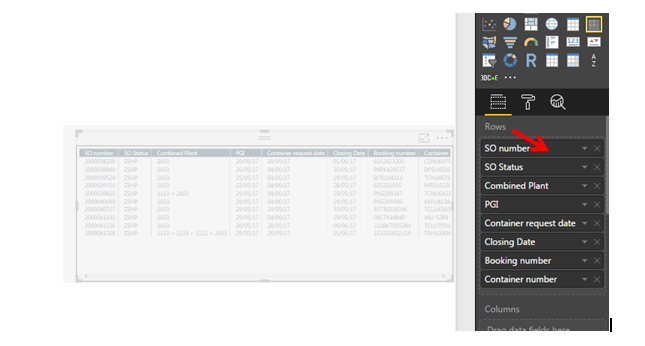
If im using just matrix, all the data will display when i drag the data to the row as picture below:

Capture.PNG

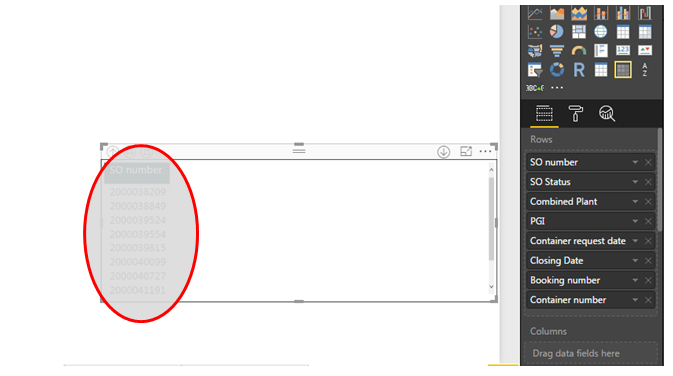
But, when i using matrix preview, only 1 column appear like picture below :

Capture2.PNG

I had try to drag into value, but still cannot do like matrix. I would like to use matrix preview because it has wrap text features.

sokg
Solution Supplier
Solution Supplier

Click the third button until you see all rows

Capture10.JPG


and then in format panel check off the stepped layout (off)


Capture11.JPG

Wow, Thanks! Smiley Wink


sokg
Solution Supplier
Solution Supplier


Don't forget to check this post as solved!!!!

Helpful resources

Announcements
Sticker Challenge 2026 Carousel

Join our Community Sticker Challenge 2026

If you love stickers, then you will definitely want to check out our Community Sticker Challenge!

January Power BI Update Carousel

Power BI Monthly Update - January 2026

Check out the January 2026 Power BI update to learn about new features.

FabCon Atlanta 2026 carousel

FabCon Atlanta 2026

Join us at FabCon Atlanta, March 16-20, for the ultimate Fabric, Power BI, AI and SQL community-led event. Save $200 with code FABCOMM.