cancel
Showing results for 
Search instead for 
Did you mean: 

The Power BI Data Visualization World Championships is back! Get ahead of the game and start preparing now! Learn more

Reply
tomvs
Frequent Visitor

Running Total in Direct Query with multiple filter

Hi all,


I'm trying to get a running total as in the table below, would need the formula for the column Running Total.

I need to use Direct Query, already have Unrestricted Measures activated.


- My running total needs to be filtered per "Company" (e.g. 640, 641, 642, always numerical),

- My time horizon is labelled as "Period" (so not in a date format, but a numerical 1 ,2 ,3, 4 ....)

- I can have multiple rows with values for 1 period (e.g. 3 separate rows for company 640 in period 2)

=> the "Running Total" column should report the summed running total at the end of a period (as e.g. in period 2 for 640)


Struggling to get this to work, all help is welcome!

Thanks already!


CompanyPeriodInvestment AmountRunning Total
6401100100
640250250
640250250
640250250
6403150400
641111
641256
64131016
642130003000
642220005000
6423500010000
1 ACCEPTED SOLUTION
Eric_Zhang
Microsoft Employee
Microsoft Employee


@tomvs wrote:

Hi all,


I'm trying to get a running total as in the table below, would need the formula for the column Running Total.

I need to use Direct Query, already have Unrestricted Measures activated.


- My running total needs to be filtered per "Company" (e.g. 640, 641, 642, always numerical),

- My time horizon is labelled as "Period" (so not in a date format, but a numerical 1 ,2 ,3, 4 ....)

- I can have multiple rows with values for 1 period (e.g. 3 separate rows for company 640 in period 2)

=> the "Running Total" column should report the summed running total at the end of a period (as e.g. in period 2 for 640)


Struggling to get this to work, all help is welcome!

Thanks already!


Company Period Investment Amount Running Total
640 1 100 100
640 2 50 250
640 2 50 250
640 2 50 250
640 3 150 400
641 1 1 1
641 2 5 6
641 3 10 16
642 1 3000 3000
642 2 2000 5000
642 3 5000 10000

@tomvs

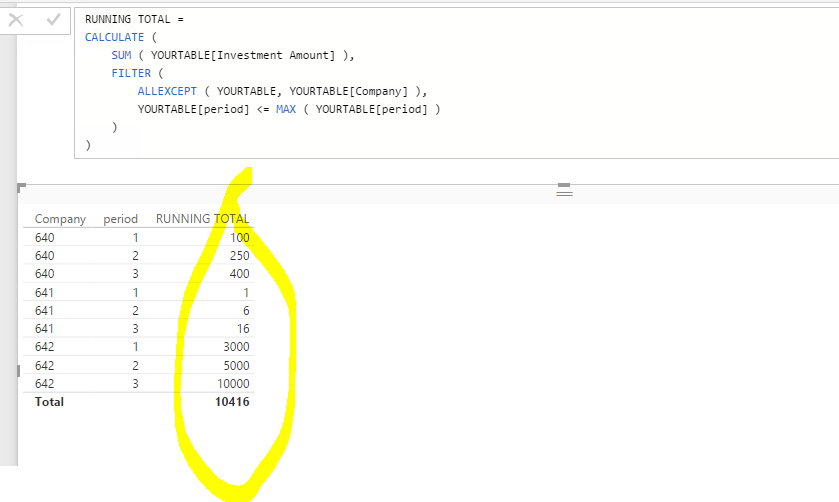
Try a measure like 

RUNNING TOTAL =
CALCULATE (
    SUM ( YOURTABLE[Investment Amount] ),
    FILTER (
        ALLEXCEPT ( YOURTABLE, YOURTABLE[Company] ),
        YOURTABLE[period] <= MAX ( YOURTABLE[period] )
    )
)

Capture.PNG

View solution in original post

2 REPLIES 2
Eric_Zhang
Microsoft Employee
Microsoft Employee


@tomvs wrote:

Hi all,


I'm trying to get a running total as in the table below, would need the formula for the column Running Total.

I need to use Direct Query, already have Unrestricted Measures activated.


- My running total needs to be filtered per "Company" (e.g. 640, 641, 642, always numerical),

- My time horizon is labelled as "Period" (so not in a date format, but a numerical 1 ,2 ,3, 4 ....)

- I can have multiple rows with values for 1 period (e.g. 3 separate rows for company 640 in period 2)

=> the "Running Total" column should report the summed running total at the end of a period (as e.g. in period 2 for 640)


Struggling to get this to work, all help is welcome!

Thanks already!


Company Period Investment Amount Running Total
640 1 100 100
640 2 50 250
640 2 50 250
640 2 50 250
640 3 150 400
641 1 1 1
641 2 5 6
641 3 10 16
642 1 3000 3000
642 2 2000 5000
642 3 5000 10000

@tomvs

Try a measure like 

RUNNING TOTAL =
CALCULATE (
    SUM ( YOURTABLE[Investment Amount] ),
    FILTER (
        ALLEXCEPT ( YOURTABLE, YOURTABLE[Company] ),
        YOURTABLE[period] <= MAX ( YOURTABLE[period] )
    )
)

Capture.PNG

@Eric_Zhang My good vibes of the day go to you my friend, works perfectly and makes perfect sense looking at it in hindsight. Can leverage this to solve some other issues as well, thanks a lot!

Helpful resources

Announcements
Power BI DataViz World Championships

Power BI Dataviz World Championships

The Power BI Data Visualization World Championships is back! Get ahead of the game and start preparing now!

December 2025 Power BI Update Carousel

Power BI Monthly Update - December 2025

Check out the December 2025 Power BI Holiday Recap!

FabCon Atlanta 2026 carousel

FabCon Atlanta 2026

Join us at FabCon Atlanta, March 16-20, for the ultimate Fabric, Power BI, AI and SQL community-led event. Save $200 with code FABCOMM.