cancel
Showing results for 
Search instead for 
Did you mean: 

The Power BI Data Visualization World Championships is back! Get ahead of the game and start preparing now! Learn more

Reply
Anonymous
Not applicable

Matrix Graph equivalent

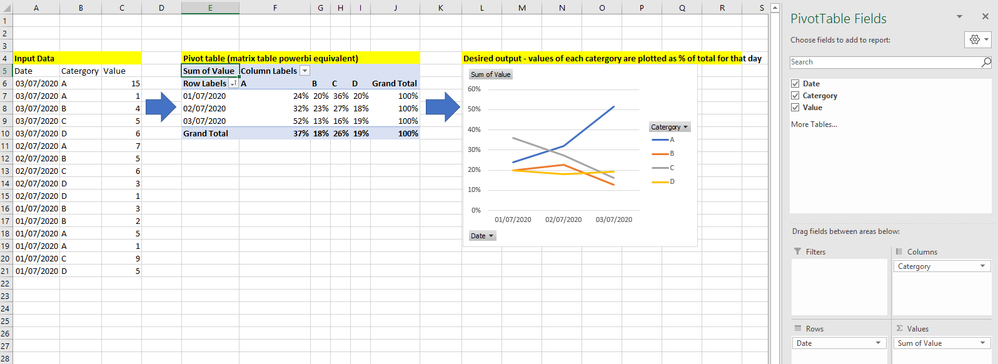
I have a table on input data formatted as per below (left of image).

I'm trying to plot the trend in value for each catergory overtime as a percentage of each days total (graph, right of image).


In excel i would first create a pivot table (middle image), with date's as rows, and the catergory pivoted to create 4 columns, and then values summed and displayed as % of row total. That would then automatically produce the desired graph as a pivot chart.


I can create a desired table in powerbi via the matrix table - but i'm then unable to then create the corresponding graph. Can anyone advise how i can create a graph in that format in powerbi?


example.PNG


1 ACCEPTED SOLUTION
MFelix
Super User
Super User

Hi @Anonymous 


Create the follwing measure:

% of total by date = SUM('Table'[Value]) / CALCULATE(SUM('Table'[Value]), ALLSELECTED('Table'[Category]))


Now create the line chart with the following setup:

  •  Axis: Date (Categorical)
  • Legend: Category
  • Values [%of total by date]

Check PBIX file attach.


Regards

Miguel Félix


Did I answer your question? Mark my post as a solution!

Proud to be a Super User!

Check out my blog: Power BI em Português


View solution in original post

2 REPLIES 2
MFelix
Super User
Super User

Hi @Anonymous 


Create the follwing measure:

% of total by date = SUM('Table'[Value]) / CALCULATE(SUM('Table'[Value]), ALLSELECTED('Table'[Category]))


Now create the line chart with the following setup:

  •  Axis: Date (Categorical)
  • Legend: Category
  • Values [%of total by date]

Check PBIX file attach.


Regards

Miguel Félix


Did I answer your question? Mark my post as a solution!

Proud to be a Super User!

Check out my blog: Power BI em Português


Anonymous
Not applicable

Hi Felix - that answer worked perfectly, thank you so much! Also, much appreciate the quick response

Helpful resources

Announcements
Power BI DataViz World Championships

Power BI Dataviz World Championships

The Power BI Data Visualization World Championships is back! Get ahead of the game and start preparing now!

December 2025 Power BI Update Carousel

Power BI Monthly Update - December 2025

Check out the December 2025 Power BI Holiday Recap!

FabCon Atlanta 2026 carousel

FabCon Atlanta 2026

Join us at FabCon Atlanta, March 16-20, for the ultimate Fabric, Power BI, AI and SQL community-led event. Save $200 with code FABCOMM.

Top Solution Authors