cancel
Showing results for 
Search instead for 
Did you mean: 

Get Fabric Certified for FREE during Fabric Data Days. Don't miss your chance! Request now

Reply
wpf_
Post Prodigy
Post Prodigy

Why aren't my Matrix totals not correct?

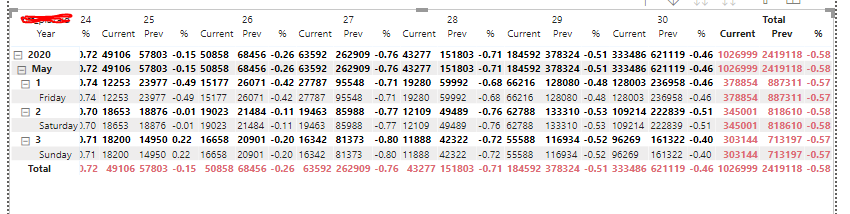
I have a matrix that have have dates in rows, locations in columns, and current months sum for each location, previous years of the exact month sum, and percentage change between the two as the values.  However the total of each row is not correct.  In the image below, i omitted the different column locations.  The values of each column are accurate as i crossed referenced with the real data, but the total for current, prev (in red) are not when I add them up manually.  Is there any setting that is causing this? Thanks.


wpf__0-1593730847317.png


4 REPLIES 4
amitchandak
Super User
Super User

@wpf_ , if you formula/measure use row context to get the calculation then Grand total also need that,try like this

sumx(Summarize(Table, Table[Year], Table[Month], Table[?], "_1",[Measure]),[_1])


Where Table[?] is column group by

and Measure is your current measure

Share with Power BI Enthusiasts: Full Power BI Video (20 Hours) YouTube
Microsoft Fabric Series 60+ Videos YouTube
Microsoft Fabric Hindi End to End YouTube

Hi @amitchandak ,


Thanks for your reply.  I kind of understand why my totals aren't correct.  Can you please see my reply above.  This is a head scratcher.  Kind of like the chicken or the egg scenario. Thanks. 

AllisonKennedy
Super User
Super User

What is the formula you're using for the three measures? See if this post helps:
https://community.powerbi.com/t5/DAX-Commands-and-Tips/Dealing-with-Measure-Totals/td-p/63376

Please @mention me in your reply if you want a response.

Copying DAX from this post? Click here for a hack to quickly replace it with your own table names

Has this post solved your problem? Please Accept as Solution so that others can find it quickly and to let the community know your problem has been solved.
If you found this post helpful, please give Kudos C

I work as a Microsoft trainer and consultant, specialising in Power BI and Power Query.
www.excelwithallison.com

Hi @AllisonKennedy ,


Thanks for your reply.  I tried the suggestion that you refered me to but it didnt work.  But I kind of know why it is doing it now.  To better explain it here is my table again with the locations 21 - 30 (each representing a location).  
 

wpf__0-1593793939693.png

Just focusing on the 'current' measure.  Location 30 needs to have its value multipled by 2.1, and all other locations are just sumed up regularly. The values are taken by two methods: method1 and method2. 


Current = IF(SELECTEDVALUE('Table'[Location])=30,
SUMX('Table', ('Table'[Method1]+'Table'[Method2])*2.1),
SUMX('Table', 'Table'[Method1] + 'Table'[Method2])
)
 
So the problem is when the Total Current is summed, it is getting the current from all locations and that includes location 30.  And it does not use the calculated Current of Location 30, becaue of the nature of the condition.  
 
I am trying to find logic to take in the Current of 30, but if I do that, the Current of the other locations would use that as well in their values.  Is there any way to reference the Total column so I can include that in the IF statement.  Or do you have a better alternative from what I am doing?  Thanks. 


Helpful resources

Announcements
November Power BI Update Carousel

Power BI Monthly Update - November 2025

Check out the November 2025 Power BI update to learn about new features.

Fabric Data Days Carousel

Fabric Data Days

Advance your Data & AI career with 50 days of live learning, contests, hands-on challenges, study groups & certifications and more!

FabCon Atlanta 2026 carousel

FabCon Atlanta 2026

Join us at FabCon Atlanta, March 16-20, for the ultimate Fabric, Power BI, AI and SQL community-led event. Save $200 with code FABCOMM.

Top Solution Authors