Join us at FabCon Atlanta from March 16 - 20, 2026, for the ultimate Fabric, Power BI, AI and SQL community-led event. Save $200 with code FABCOMM.
Register now!The Power BI Data Visualization World Championships is back! It's time to submit your entry. Live now!
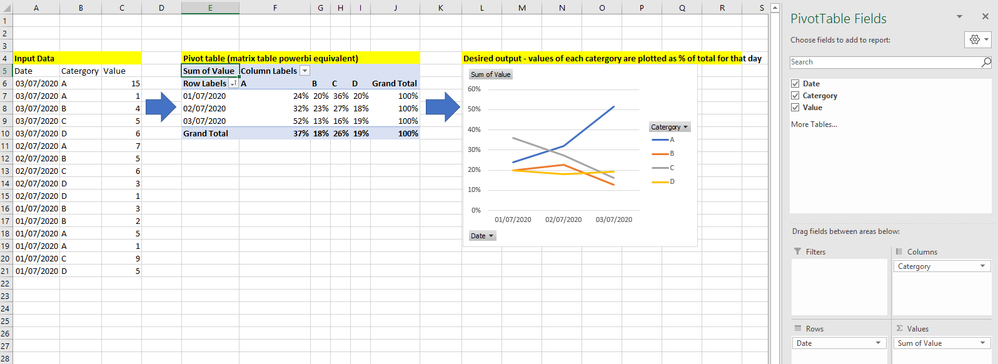
I have a table on input data formatted as per below (left of image).
I'm trying to plot the trend in value for each catergory overtime as a percentage of each days total (graph, right of image).
In excel i would first create a pivot table (middle image), with date's as rows, and the catergory pivoted to create 4 columns, and then values summed and displayed as % of row total. That would then automatically produce the desired graph as a pivot chart.
I can create a desired table in powerbi via the matrix table - but i'm then unable to then create the corresponding graph. Can anyone advise how i can create a graph in that format in powerbi?
Solved! Go to Solution.
Hi @Anonymous
Create the follwing measure:
% of total by date = SUM('Table'[Value]) / CALCULATE(SUM('Table'[Value]), ALLSELECTED('Table'[Category]))
Now create the line chart with the following setup:
Check PBIX file attach.
Regards
Miguel Félix
Proud to be a Super User!
Check out my blog: Power BI em PortuguêsHi @Anonymous
Create the follwing measure:
% of total by date = SUM('Table'[Value]) / CALCULATE(SUM('Table'[Value]), ALLSELECTED('Table'[Category]))
Now create the line chart with the following setup:
Check PBIX file attach.
Regards
Miguel Félix
Proud to be a Super User!
Check out my blog: Power BI em PortuguêsHi Felix - that answer worked perfectly, thank you so much! Also, much appreciate the quick response
The Power BI Data Visualization World Championships is back! It's time to submit your entry.
| User | Count |
|---|---|
| 50 | |
| 42 | |
| 36 | |
| 31 | |
| 29 |
| User | Count |
|---|---|
| 129 | |
| 129 | |
| 59 | |
| 48 | |
| 47 |