cancel
Showing results for 
Search instead for 
Did you mean: 

The Power BI Data Visualization World Championships is back! Get ahead of the game and start preparing now! Learn more

Reply
Alan_Gould
Frequent Visitor

Matrix: Conditional format on KPIs

Hi, 


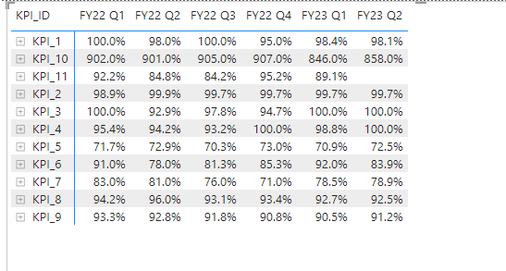
Is it possible to create a conditional format on KPIs by row? 


Or is there a workaround? I.e. could I create a new measure? The below KPI matrix table has different targets for different KPIs and I would like to shade to colours if out performing or underperforming. 


Alan_Gould_0-1674793687372.png


Thanks 

Alan 


2 ACCEPTED SOLUTIONS
m_alireza
Solution Specialist
Solution Specialist

Hi @Alan_Gould ,

Is this what you are looking for?
Screenshot 2023-01-27 132536.png

You can try something like this measure. You will have to change the columns/tables/fields to match yours as well as add the extra KPIs. You will also need to change the performance range of what constitutes underperforming and overperforming. I added a "Red" and "Green" but you can change them to a hex code.


SWITCH (
    TRUE (),
    MAX ( 'Table'[Performance] ) < 80
        && MAX ( 'Table'[KPI ID] ) = "KPI1", "Red",
    MAX ( 'Table'[Performance] ) < 90
        && MAX ( 'Table'[KPI ID] ) = "KPI2", "Red",
    MAX ( 'Table'[Performance] ) < 90
        && MAX ( 'Table'[KPI ID] ) = "KPI3", "Red",
    MAX ( 'Table'[Performance] ) < 70
        && MAX ( 'Table'[KPI ID] ) = "KPI4", "Red",
    "Green"
)


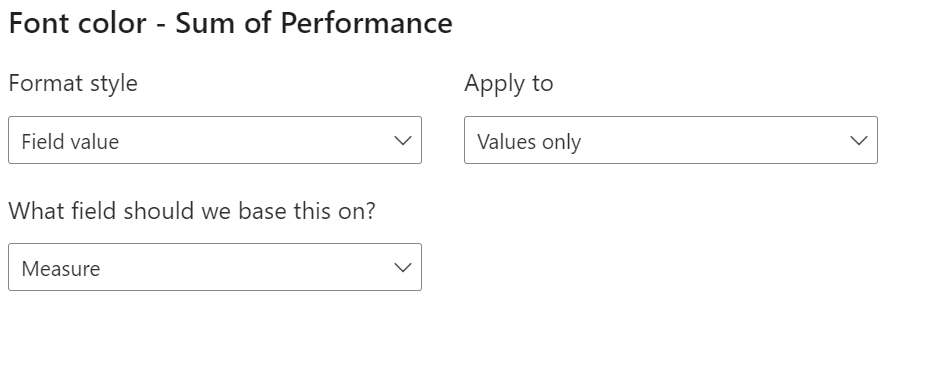
Once you create the measure, add a conditional formatting on your Value Field; Format style should be "Field Value" and field based on should be your measure name e.g.:Screenshot 2023-01-27 132445.png

View solution in original post

Yes it would still work. You just add an extra condition e.g. 

SWITCH (
    TRUE (),
    MAX ( 'Table'[Performance] ) < 20
        && MAX ( 'Table'[KPI ID ) = "KPI1", "Red",
          MAX ( 'Table'[Performance] ) < 60
        && MAX ( 'Table'[KPI ID) = "KPI1", "Yellow",
"Green"

that would color numbers below 60 but above 20 as yellow
anything below 20 would be red
anything above 60 green

View solution in original post

4 REPLIES 4
m_alireza
Solution Specialist
Solution Specialist

Hi @Alan_Gould ,

Is this what you are looking for?
Screenshot 2023-01-27 132536.png

You can try something like this measure. You will have to change the columns/tables/fields to match yours as well as add the extra KPIs. You will also need to change the performance range of what constitutes underperforming and overperforming. I added a "Red" and "Green" but you can change them to a hex code.


SWITCH (
    TRUE (),
    MAX ( 'Table'[Performance] ) < 80
        && MAX ( 'Table'[KPI ID] ) = "KPI1", "Red",
    MAX ( 'Table'[Performance] ) < 90
        && MAX ( 'Table'[KPI ID] ) = "KPI2", "Red",
    MAX ( 'Table'[Performance] ) < 90
        && MAX ( 'Table'[KPI ID] ) = "KPI3", "Red",
    MAX ( 'Table'[Performance] ) < 70
        && MAX ( 'Table'[KPI ID] ) = "KPI4", "Red",
    "Green"
)


Once you create the measure, add a conditional formatting on your Value Field; Format style should be "Field Value" and field based on should be your measure name e.g.:Screenshot 2023-01-27 132445.png

Hi @m_alireza


Quick question, how should I think about writing this if I wanted to have Red if below a certain value, but yellow if between Red and Green thresholds? Would the Switch function still be okay?


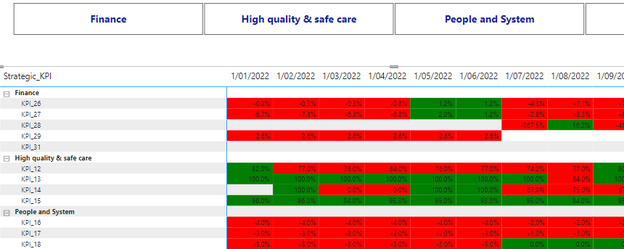
The results so far look great! 


Alan_Gould_0-1675142500039.png


Thanks, 
Alan 

Yes it would still work. You just add an extra condition e.g. 

SWITCH (
    TRUE (),
    MAX ( 'Table'[Performance] ) < 20
        && MAX ( 'Table'[KPI ID ) = "KPI1", "Red",
          MAX ( 'Table'[Performance] ) < 60
        && MAX ( 'Table'[KPI ID) = "KPI1", "Yellow",
"Green"

that would color numbers below 60 but above 20 as yellow
anything below 20 would be red
anything above 60 green

Fantastic!


Works perfectly! Thank you very much 🙂

Helpful resources

Announcements
Power BI DataViz World Championships

Power BI Dataviz World Championships

The Power BI Data Visualization World Championships is back! Get ahead of the game and start preparing now!

December 2025 Power BI Update Carousel

Power BI Monthly Update - December 2025

Check out the December 2025 Power BI Holiday Recap!

FabCon Atlanta 2026 carousel

FabCon Atlanta 2026

Join us at FabCon Atlanta, March 16-20, for the ultimate Fabric, Power BI, AI and SQL community-led event. Save $200 with code FABCOMM.