Get certified for free when you join Fabric Data Days 2026 and dive into Fabric, Power BI, SQL, AI, and other essential data skills.
Join nowData Days is here! Join us now for 60+ days of learning, challenges, and connection. Learn more
Is it possible to format the agregated number with comma "," in a Matrix count and sum or any other agregation?
Solved! Go to Solution.
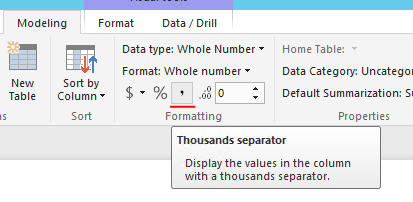
You can click on the field, unlselect the thousand separator under Modeling tab.
Regards,
Generally you do that in the data view, just click your measure or column and specify the formatting in the ribbon such as commas, decimal places, etc.
When creating a visualization of a "Matrix" and I select a column to use as my "Values", and then I select "Count" (number of widgets), it displays the count without commas breaking up the thousands. Not sure how I would be able to format that within a data view when widgets isn't a number. Not finding anywhere to change the format.
@dchoward - Did you ever get an answer to this issue?
I am trying to do the same thing and can't find it anywhere.
No, I was never able to format the record count. Have been living with the default without any commas.
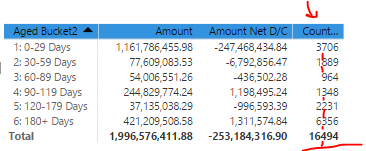
This solution does not do want I need. The count function in a table on a text field does not allow selecting Formatting. Here is an example of the table I like to add comma's in the count column.
Don't miss out on Data Days, June 15 through August 7. Learn Fabric, Power BI, SQL, AI and more.
Check out the May 2026 Power BI update to learn about new features.
| User | Count |
|---|---|
| 23 | |
| 23 | |
| 20 | |
| 18 | |
| 14 |
| User | Count |
|---|---|
| 58 | |
| 51 | |
| 41 | |
| 30 | |
| 24 |