Get Fabric or SQL Certified for Free.
Get certified for free when you join Fabric Data Days 2026 and dive into Fabric, Power BI, SQL, AI, and other essential data skills.
Join now- Power BI forums
- Get Help with Power BI
- Desktop
- Service
- Report Server
- Power Query
- Mobile Apps
- Developer
- DAX Commands and Tips
- Custom Visuals Development Discussion
- Health and Life Sciences
- Power BI Spanish forums
- Translated Spanish Desktop
- Training and Consulting
- Instructor Led Training
- Dashboard in a Day for Women, by Women
- Galleries
- Data Stories Gallery
- Themes Gallery
- Contests Gallery
- QuickViz Gallery
- Quick Measures Gallery
- Visual Calculations Gallery
- Fabric Apps Gallery
- Notebook Gallery
- Translytical Task Flow Gallery
- TMDL Gallery
- R Script Showcase
- Webinars and Video Gallery
- Ideas
- Custom Visuals Ideas (read-only)
- Issues
- Issues
- Events
- Upcoming Events
July 7 - July 17 | Round 2 of the Power BI Dataviz World Championships. Don't miss your chance! Learn more
- Power BI forums
- Forums
- Get Help with Power BI
- Desktop
- Re: Matrix Column Head Order
- Subscribe to RSS Feed
- Mark Topic as New
- Mark Topic as Read
- Float this Topic for Current User
- Bookmark
- Subscribe
- Printer Friendly Page

- Mark as New
- Bookmark
- Subscribe
- Mute
- Subscribe to RSS Feed
- Permalink
- Report Inappropriate Content
Matrix Column Head Order

Is there a way to change the order of the column heads in a Matrix table. Currently it displays in alphabetical ascending order. I would like to reverse that if possible. A prefered option would to be able to put it in a custom order. Are either of these options available?
Solved! Go to Solution.


- Mark as New
- Bookmark
- Subscribe
- Mute
- Subscribe to RSS Feed
- Permalink
- Report Inappropriate Content
@Anonymous
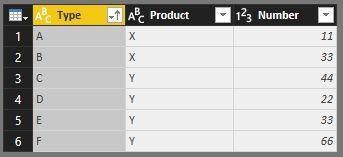
We can do that with following steps. Assuming we have a table like below. We can add a reverse index.
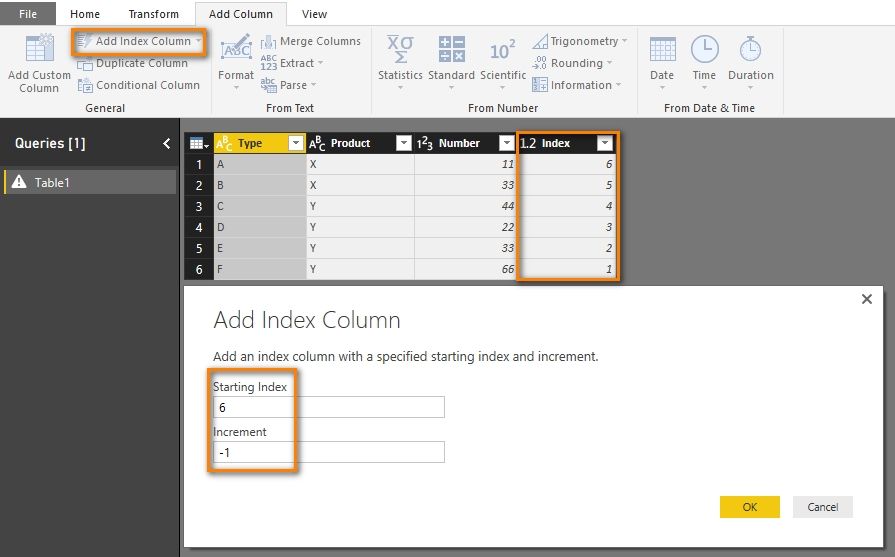
Close and apply Query Editor, select the Type column and make it sort by column of Index.
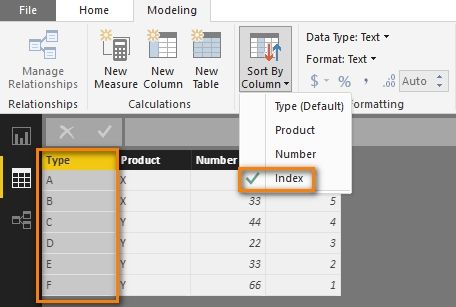
Now the order of the column heads will follow the Index.

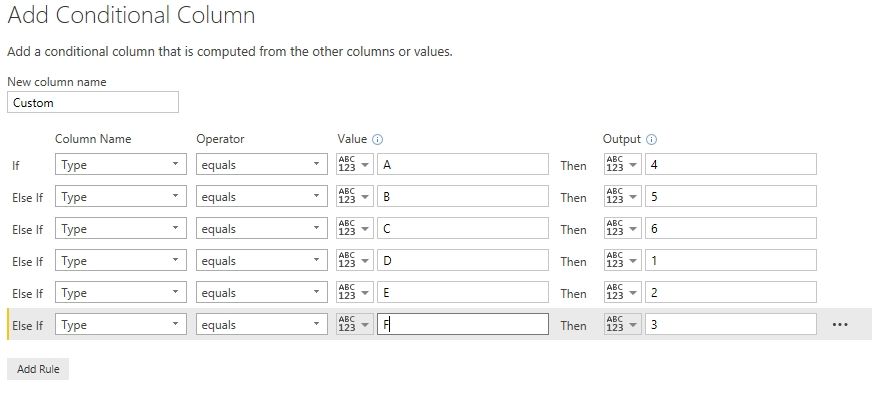
If you want to put it in a custom order, you can customize the index yourself. For example, you can create a conditional column in Query Editor.

Best Regards,
Herbert
- Mark as New
- Bookmark
- Subscribe
- Mute
- Subscribe to RSS Feed
- Permalink
- Report Inappropriate Content
This solution is incorrect
- Mark as New
- Bookmark
- Subscribe
- Mute
- Subscribe to RSS Feed
- Permalink
- Report Inappropriate Content
Is there a way to implement this when in Direct Query mode? I had it working in import mode, but now the needs of my project have required direct queries


- Mark as New
- Bookmark
- Subscribe
- Mute
- Subscribe to RSS Feed
- Permalink
- Report Inappropriate Content
I don't think this exists as of yet. I have been searching for a while. I even created my query to sort so that data would come into the query editor window in the proper chronologic order like this,
  order by case when [Month] like '%Jan%' then 1
					   when [Month] like '%Feb%' then 2
					   when [Month] like '%Mar%' then 3
					   when [Month] like '%Apr%' then 4
					   when [Month] like '%May%' then 5
					   when [Month] like '%Jun%' then 6
					   when [Month] like '%Jul%' then 7
					   when [Month] like '%Aug%' then 8
					   when [Month] like '%Sep%' then 9
					   when [Month] like '%Oct%' then 10
					   when [Month] like '%Nov%' then 11
					   when [Month] like '%Dec%' then 12
					   end
Still nada! If this isn't a suggestion for an improvement, I don't know what is. 
- Mark as New
- Bookmark
- Subscribe
- Mute
- Subscribe to RSS Feed
- Permalink
- Report Inappropriate Content
I solved it by sorting by another column that I called date order
- Mark as New
- Bookmark
- Subscribe
- Mute
- Subscribe to RSS Feed
- Permalink
- Report Inappropriate Content
@Anonymous
Hey I agree there are work arounds. I solved it the same way. Most things MS are Drag and Drop and I am hoping to usher that same motif into life here.
Thank you for a great suggestion!


- Mark as New
- Bookmark
- Subscribe
- Mute
- Subscribe to RSS Feed
- Permalink
- Report Inappropriate Content
Thanks. This worked out perfectly.
- Mark as New
- Bookmark
- Subscribe
- Mute
- Subscribe to RSS Feed
- Permalink
- Report Inappropriate Content
Thanks Herbert...this should help quite a bit!
Tim


- Mark as New
- Bookmark
- Subscribe
- Mute
- Subscribe to RSS Feed
- Permalink
- Report Inappropriate Content
Hi There,
You can drag your column fields in matrix visuals up and down to see the expected result.
Thanks & Regards,
Bhavesh
Bhavesh
Love the Self Service BI.
Please use the 'Mark as answer' link to mark a post that answers your question. If you find a reply helpful, please remember to give Kudos.
- Mark as New
- Bookmark
- Subscribe
- Mute
- Subscribe to RSS Feed
- Permalink
- Report Inappropriate Content
Hi there,
can you please share some screenshot for this, thanks in advance
- Mark as New
- Bookmark
- Subscribe
- Mute
- Subscribe to RSS Feed
- Permalink
- Report Inappropriate Content
Bhavesh,
The columns are not seperate categories in different columns...as shown below they are retailers all contained in one data tables column.

Helpful resources

FabCon & SQLCon – Barcelona 2026
Join us in Barcelona for FabCon and SQLCon, the Fabric, Power BI, SQL, and AI community event. Save €200 with code FABCMTY200.

Fabric Community Sticker Challenge - Barcelona 2026
If you love stickers, then you will definitely want to check out our community sticker challenge, Barcelona edition!

Power BI Monthly Update - July 2026
Check out the July 2026 Power BI update to learn about new features.

Power BI DataViz World Championships - June 2026
A new Power BI DataViz World Championship is coming this June! Don't miss out on submitting your entry.

| User | Count |
|---|---|
| 30 | |
| 26 | |
| 23 | |
| 23 | |
| 14 |


| User | Count |
|---|---|
| 46 | |
| 33 | |
| 20 | |
| 18 | |
| 16 |


