Forum Discussion

Matrix Column Head Order
Is there a way to change the order of the column heads in a Matrix table. Currently it displays in alphabetical ascending order. I would like to reverse that if possible. A prefered option would to be able to put it in a custom order. Are either of these options available?
Anonymous
We can do that with following steps. Assuming we have a table like below. We can add a reverse index.
Close and apply Query Editor, select the Type column and make it sort by column of Index.
Now the order of the column heads will follow the Index.
If you want to put it in a custom order, you can customize the index yourself. For example, you can create a conditional column in Query Editor.
Best Regards,
Herbert
30 Replies
 v-haibl-msftMicrosoft Employee
Anonymous
We can do that with following steps. Assuming we have a table like below. We can add a reverse index.
Close and apply Query Editor, select the Type column and make it sort by column of Index.
Now the order of the column heads will follow the Index.
If you want to put it in a custom order, you can customize the index yourself. For example, you can create a conditional column in Query Editor.
Best Regards,
Herbert
- AnonymousNot applicable
Is there a way to implement this when in Direct Query mode? I had it working in import mode, but now the needs of my project have required direct queries
- S184019Advocate III
I don't think this exists as of yet. I have been searching for a while. I even created my query to sort so that data would come into the query editor window in the proper chronologic order like this,
  order by case when [Month] like '%Jan%' then 1
					   when [Month] like '%Feb%' then 2
					   when [Month] like '%Mar%' then 3
					   when [Month] like '%Apr%' then 4
					   when [Month] like '%May%' then 5
					   when [Month] like '%Jun%' then 6
					   when [Month] like '%Jul%' then 7
					   when [Month] like '%Aug%' then 8
					   when [Month] like '%Sep%' then 9
					   when [Month] like '%Oct%' then 10
					   when [Month] like '%Nov%' then 11
					   when [Month] like '%Dec%' then 12
					   end
Still nada! If this isn't a suggestion for an improvement, I don't know what is. :smileytongue:
- AnonymousNot applicable
Hi,
I had a similar issue.
interestingly it is working for one Matrix and not for Another.
I have recheck each and everything.Any suggestions
- S184019Advocate III
Anonymous
There seems to be a bug in the order system. The way around it is to make sure that you have numbers as numbers, text as text, and dates as dates. Then make sure that you click on the field list on the right side. click on the field you want to be sorted. Then click off the field, but onto another field in the same table of the field list.
Then click back on the field and then the modeling should show up as sort by column. When it does, choose the field you want to sort the field by. So for example maybe you want to sort your organization by date. Click on org then off of org then back on to org. Then int he modeling tab at the top, the Sort by Column button will be available. Click on that and then chose date. This will sort your org by date. Hope this helps.
- AnonymousNot applicable
Thanks Herbert...this should help quite a bit!
Tim
- AnonymousNot applicable
I went about this a different way, seems effective so far.
I have my three main regions "AMERICAS", "EMEA" and "APAC".
The sort keeps trying to put them in:
AMERICAS
APAC
EMEAI want:
AMERICAS
EMEA
APACI tried the table method with sorting, but that broke some of my measures.
Here is what I did:
I built my matrix table, then I clicked on the "Columns" dropdown, then clicked "New Group":
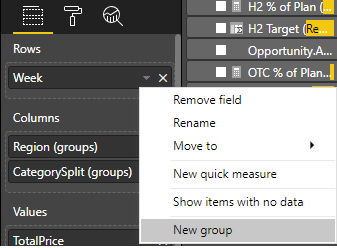
From there, I created one group per value - Important here: Name the groups with the index prefix ( ie. 1:, 2:, 3: ):
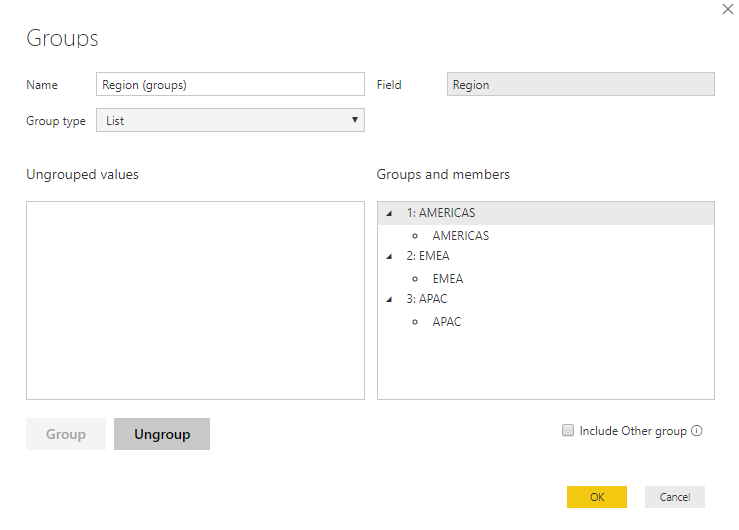 Once complete, the columns come in with the prefixed index. This will sort based on the index you specify in the grouping.
This is nice and clean because it doesn't affect your data for filtering, grouping, etc, and is pretty simple to implement.
- S184019Advocate III
Anonymous Maybe this will help. Create an index column like this:
Ordercol = if('tablename'[region] = "AMERICAS", 1,
if('tablename'[region] = "EMEA", 2, 3)).
This order column then can be treated like an indicies. Now make sure that the column is a number so go to modeling and change the data type to whole number.
Then select the region field and and make sure it is highlighted in the field list. Next, go to modeling and then in the banner, look for 'Sort' and choose 'Sort by Column' and this time select Ordercol as your sort order. Please let me know if this doesn't work.
 SpredSheetAaronNew Member
This results in a Circular Dependency.
 TuyenbuiFrequent Visitor
Thank you! I worked very well for me.
- CuriosiTNew Member
Perfect! Thanks so much! 🙂
 MarcoG2000Frequent Visitor
Hi, another alternative would be to use the IF function in Dax.
Example
Order = If([Reitailer] =”A”;1;
If([Reitailer] =”B”;2;3))
After it applies the sorting of the Reitailer column with the Order column.- AnonymousNot applicable
This solution is incorrect as well. PowerBi highlights in red the function
 lavanaya_kapoorNew Member
need help in arranging this in order 0-5 <6-15 days< 15-30 days< 30+ days as this is the bucket group based on data.
- BhaveshPatelSuper User
Hi There,
You can drag your column fields in matrix visuals up and down to see the expected result.
Thanks & Regards,
Bhavesh
- AnonymousNot applicable
Bhavesh,
The columns are not seperate categories in different columns...as shown below they are retailers all contained in one data tables column.
- AnonymousNot applicable
Hi there,
can you please share some screenshot for this, thanks in advance
 rohampourmehrFrequent Visitor
Quick follow up question on this topic:
This works perfectly in the Desktop version, however the Sort Order is automatically overideen to the deafult once uploaded to the Online Workspace. Any Solutions?
- AnonymousNot applicable
For this topic- ok. Because, here uses a Matrix with a Table, where it showed how to reorganize the Table. But when do you want to sort by a measure and columns? (example: structure of a Dimension containing only "measures" separately). How to create multiple sorts by measures and columns? (% accumulated order descending + State + Name + etc
- AnonymousNot applicable
Thank you
 HugoJesusHelper IV
Hey everyone,
Someone can help me out with this topic??
Re: Matrix Sort Column - Microsoft Power BI CommunityBest Regard's
Hugo Jesus

