Get certified for free when you join Fabric Data Days 2026 and dive into Fabric, Power BI, SQL, AI, and other essential data skills.
Join nowJuly 7 - July 17 | Round 2 of the Power BI Dataviz World Championships. Don't miss your chance! Learn more
Hi there,
Here is a snippet of my data.
| Company | Category | Hours | Unique Key | Week | Denominator Hours |
| Brazil | A | 40 | Brazil22018 | 1/13/2018 | 40 |
| Brazil | A | 32 | Brazil32018 | 1/20/2018 | 40 |
| Brazil | A | 40 | Brazil42018 | 1/27/2018 | 40 |
| Brazil | B | 8 | Brazil32018 | 1/20/2018 | 40 |
| Brazil | C | 40 | Brazil12018 | 1/6/2018 | 0 |
| Brazil | A | 43 | Brazil52018 | 2/3/2018 | 40 |
| Brazil | A | 40 | Brazil62018 | 2/10/2018 | 40 |
| Brazil | A | 34 | Brazil72018 | 2/17/2018 | 40 |
| Brazil | B | 6 | Brazil72018 | 2/17/2018 | 40 |
| Brazil | C | 40 | Brazil82018 | 2/24/2018 | 0 |
On Power BI matrix I am trying to calculate the monthly % of total hours to denominator hours by category for month. So that for category a in month of Jan the calculation shud be = Sum of total hours in month of jan i.e 112 hours / sum of total denominator hours in month of jan i.e 120.
Similary for category B the calculation should be 6.66% i.e 8hours /120hours.
Is there a way to do this?
Regards
Solved! Go to Solution.
Hi,
You'll need to either add a calculated column for the month, or connect the date to a Date Dimension table and use the month from there.
Monthly Hours Pct =
CALCULATE (
SUM ( Table1[Hours] ) / 120,
ALLEXCEPT ( Table1, Table1[Month], Table1[Category] )
)To get a calculated column for the month you could use the following.
Month = Table1[Date].[Month]
Hi @Anonymous
Create a column
year-month = FORMAT([Week],"yyyymm")
Create measures
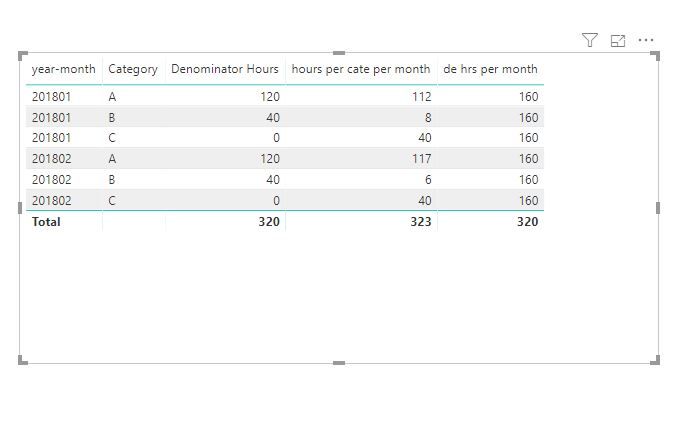
de hrs per month = CALCULATE(SUM('Table'[Denominator Hours]),ALLEXCEPT('Table','Table'[year-month]))
hours per cate per month = CALCULATE(SUM('Table'[Hours]),ALLEXCEPT('Table','Table'[Category],'Table'[year-month]))
to get monthly % of total hours to denominator hours by category for month,
Use [hours per cate per month]/[de hrs per month]
Best Regards
Maggie
Community Support Team _ Maggie Li
If this post helps, then please consider Accept it as the solution to help the other members find it more quickly.
Hi @Anonymous
Create a column
year-month = FORMAT([Week],"yyyymm")
Create measures
de hrs per month = CALCULATE(SUM('Table'[Denominator Hours]),ALLEXCEPT('Table','Table'[year-month]))
hours per cate per month = CALCULATE(SUM('Table'[Hours]),ALLEXCEPT('Table','Table'[Category],'Table'[year-month]))
to get monthly % of total hours to denominator hours by category for month,
Use [hours per cate per month]/[de hrs per month]
Best Regards
Maggie
Community Support Team _ Maggie Li
If this post helps, then please consider Accept it as the solution to help the other members find it more quickly.
Thank you Maggie!!
Hi,
You'll need to either add a calculated column for the month, or connect the date to a Date Dimension table and use the month from there.
Monthly Hours Pct =
CALCULATE (
SUM ( Table1[Hours] ) / 120,
ALLEXCEPT ( Table1, Table1[Month], Table1[Category] )
)To get a calculated column for the month you could use the following.
Month = Table1[Date].[Month]
Join us in Barcelona for FabCon and SQLCon, the Fabric, Power BI, SQL, and AI community event. Save €200 with code FABCMTY200.
Join Fabric Data Days 2026: 60 days of free live/on-demand sessions, challenges, study groups, and certification opportunities.
| User | Count |
|---|---|
| 22 | |
| 20 | |
| 14 | |
| 13 | |
| 13 |
| User | Count |
|---|---|
| 62 | |
| 40 | |
| 39 | |
| 39 | |
| 38 |