This time we’re going bigger than ever. Fabric, Power BI, SQL, AI and more. We're covering it all. You won't want to miss it.
Learn moreLevel up your Power BI skills this month - build one visual each week and tell better stories with data! Get started
I have two tables, one showing people's IDs, Locations and Start Date and End Date of people's locations , the other one showing incidents with Incident Date and people's IDs.
I want to find out where the people were when the incidents happened. So it's about matching the Incident Date with the Start/End Date to get the Location.
How can I achieve this in Power BI?
Solved! Go to Solution.
Hi @jadewind,
I haven't created ant relationship between the two tables. You can check the attached PBIX file to get more details about how to create the calculated column.
Thanks,
Lydia Zhang
Hi @jadewind,
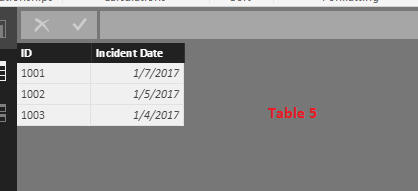
Do you want to get the location when Incident Date equals to the Start Date or End Date? If that is the case, I make a test using the following two tables.
In Table5, you can just create a calculated column using the formula below, then create a table visual using the calculated column and other fields.
GetLocation = CALCULATE(FIRSTNONBLANK(Table4[Locations],Table4[Locations]),FILTER(Table4,(Table4[Start Date]=Table5[Incident Date]||Table4[End Date]=Table5[Incident Date])&&Table4[ID]=Table5[ID]))
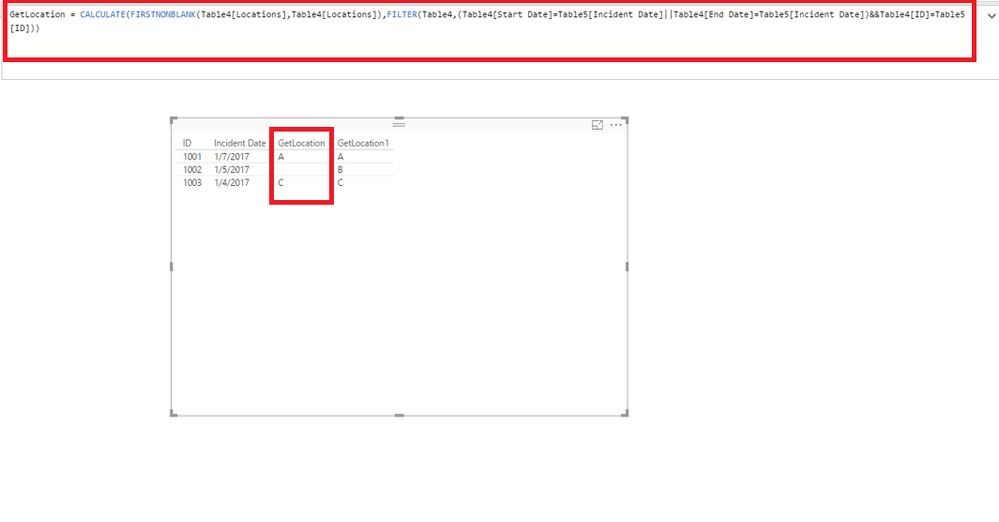
However, if you want to get the location when Incident Date is between Start Dare and End Date, just create a calculated column using the formula below, then create a table visual using the calculated column and other fields.
GetLocation1 = CALCULATE(FIRSTNONBLANK(Table4[Locations],Table4[Locations]),FILTER(Table4,Table4[Start Date]<=Table5[Incident Date]&&Table5[Incident Date]<=Table4[End Date]&&Table4[ID]=Table5[ID]))
Thanks,
Lydia Zhang
Or I think the bit after <= has to be a measure not a column?
Hi @jadewind,
I haven't created ant relationship between the two tables. You can check the attached PBIX file to get more details about how to create the calculated column.
Thanks,
Lydia Zhang
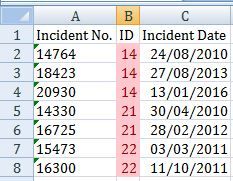
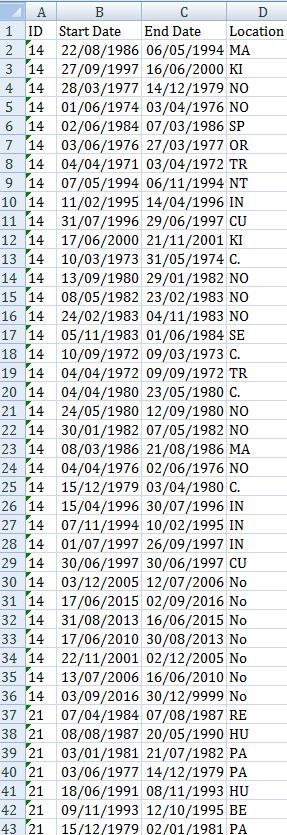
Thanks Lydia for trying to help. However your formula does not work when I started the second row. I think it has something to do with the relationship between two tables. I cannot link the two tables directly because the ID fields in both tables have duplicates - meaning each ID can have multiple locations through different dates, and each ID can have multiple incidents. However each incident has a unique Incident No.
Not sure how I can upload a sample xlsx document but I have attached a couple of snapshots below. One table contains the incident dates, the other table contains the locations data. I have tried linking the two tables using another Date or ID table but still couldn't use your formula (eg. the formula wouldn't recoganize the "Incident Date" field).
Do you have any suggestions?
Check out the April 2026 Power BI update to learn about new features.
Sign up to receive a private message when registration opens and key events begin.
If you have recently started exploring Fabric, we'd love to hear how it's going. Your feedback can help with product improvements.
| User | Count |
|---|---|
| 39 | |
| 28 | |
| 27 | |
| 22 | |
| 18 |
| User | Count |
|---|---|
| 67 | |
| 37 | |
| 32 | |
| 26 | |
| 25 |