cancel
Showing results for 
Search instead for 
Did you mean: 

We've captured the moments from FabCon & SQLCon that everyone is talking about, and we are bringing them to the community, live and on-demand. Starts on April 14th. Register now

Reply
jadewind
Advocate I
Advocate I

Matching dates

I have two tables, one showing people's IDs, Locations and Start Date and End Date of people's locations , the other one showing incidents with Incident Date and people's IDs. 


I want to find out where the people were when the incidents happened. So it's about matching the Incident Date with the Start/End Date to get the Location.


How can I achieve this in Power BI?

1 ACCEPTED SOLUTION
Anonymous
Not applicable

Hi  @jadewind

I haven't created ant relationship between the two tables. You can check the attached PBIX file to get more details about how to create the calculated column.

Thanks,
Lydia Zhang

View solution in original post

4 REPLIES 4
Anonymous
Not applicable

Hi @jadewind,

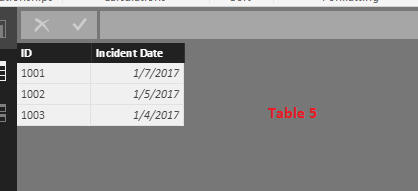
Do you want to get the location when Incident Date equals to the Start Date or End Date? If that is the case, I make a test using the following two tables.
1.PNG

2.PNG

In Table5, you can just create a calculated column using the formula below, then create a table visual using the calculated column and other fields.

GetLocation = CALCULATE(FIRSTNONBLANK(Table4[Locations],Table4[Locations]),FILTER(Table4,(Table4[Start Date]=Table5[Incident Date]||Table4[End Date]=Table5[Incident Date])&&Table4[ID]=Table5[ID]))
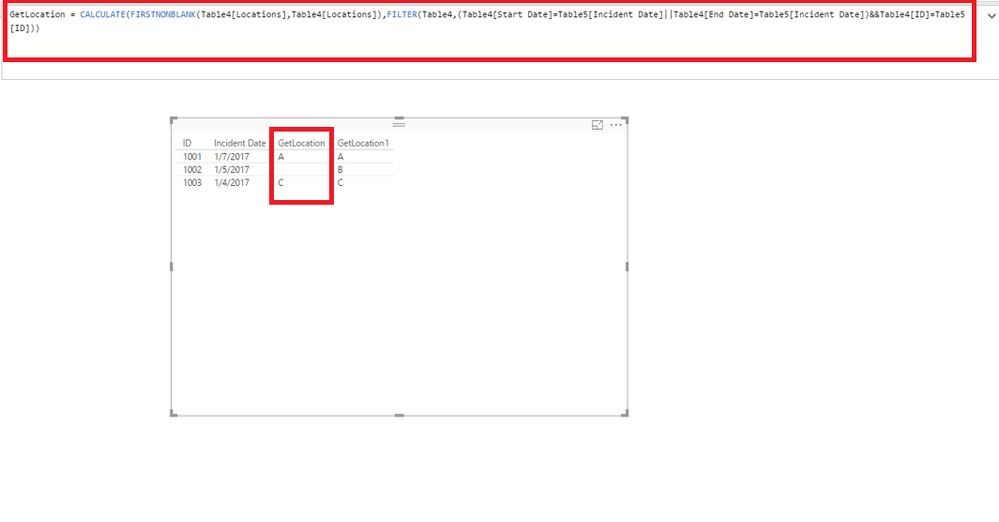
3.PNG

However, if you want to get the location when Incident Date is between Start Dare and End Date, just create a calculated column using the formula below, then create a table visual using the calculated column and other fields.

GetLocation1 = CALCULATE(FIRSTNONBLANK(Table4[Locations],Table4[Locations]),FILTER(Table4,Table4[Start Date]<=Table5[Incident Date]&&Table5[Incident Date]<=Table4[End Date]&&Table4[ID]=Table5[ID]))
4.PNG


Thanks,
Lydia Zhang

Or I think the bit after <= has to be a measure not a column?

Anonymous
Not applicable

Hi  @jadewind

I haven't created ant relationship between the two tables. You can check the attached PBIX file to get more details about how to create the calculated column.

Thanks,
Lydia Zhang

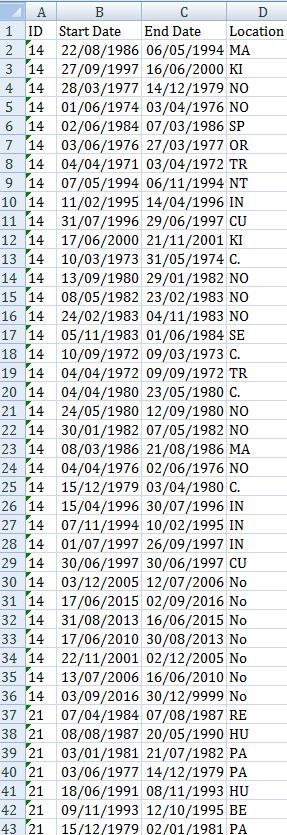
Thanks Lydia for trying to help. However your formula does not work when I started the second row. I think it has something to do with the relationship between two tables. I cannot link the two tables directly because the ID fields in both tables have duplicates - meaning each ID can have multiple locations through different dates, and each ID can have multiple incidents. However each incident has a unique Incident No. 


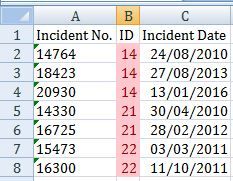
Not sure how I can upload a sample xlsx document but I have attached a couple of snapshots below. One table contains the incident dates, the other table contains the locations data. I have tried linking the two tables using another Date or ID table but still couldn't use your formula (eg. the formula wouldn't recoganize the "Incident Date" field). 


Do you have any suggestions?

incidents.JPG

locations.JPG

Helpful resources

Announcements
New to Fabric survey Carousel

New to Fabric Survey

If you have recently started exploring Fabric, we'd love to hear how it's going. Your feedback can help with product improvements.

Power BI DataViz World Championships carousel

Power BI DataViz World Championships - June 2026

A new Power BI DataViz World Championship is coming this June! Don't miss out on submitting your entry.

Join our Fabric User Panel

Join our Fabric User Panel

Share feedback directly with Fabric product managers, participate in targeted research studies and influence the Fabric roadmap.

March Power BI Update Carousel

Power BI Community Update - March 2026

Check out the March 2026 Power BI update to learn about new features.