Get Fabric or SQL Certified for Free.
Get certified for free when you join Fabric Data Days 2026 and dive into Fabric, Power BI, SQL, AI, and other essential data skills.
Join now- Power BI forums
- Get Help with Power BI
- Desktop
- Service
- Report Server
- Power Query
- Mobile Apps
- Developer
- DAX Commands and Tips
- Custom Visuals Development Discussion
- Health and Life Sciences
- Power BI Spanish forums
- Translated Spanish Desktop
- Training and Consulting
- Instructor Led Training
- Dashboard in a Day for Women, by Women
- Galleries
- Data Stories Gallery
- Themes Gallery
- Contests Gallery
- QuickViz Gallery
- Quick Measures Gallery
- Visual Calculations Gallery
- Notebook Gallery
- Translytical Task Flow Gallery
- TMDL Gallery
- R Script Showcase
- Webinars and Video Gallery
- Ideas
- Custom Visuals Ideas (read-only)
- Issues
- Issues
- Events
- Upcoming Events
Data Days is here! Join us now for 60+ days of learning, challenges, and connection. Learn more
- Power BI forums
- Forums
- Get Help with Power BI
- Desktop
- Re: Mapping the Data with multiple source
- Subscribe to RSS Feed
- Mark Topic as New
- Mark Topic as Read
- Float this Topic for Current User
- Bookmark
- Subscribe
- Printer Friendly Page

- Mark as New
- Bookmark
- Subscribe
- Mute
- Subscribe to RSS Feed
- Permalink
- Report Inappropriate Content
Mapping the Data with multiple source
Hi All,
Good Day!
I've been trying to solve this issue for days. Need your help on how to resolve this problem.
I have 3 sources of table
SSD table
| Customer Grouping | Product Grouping |
| Restaurant A | SKU A |
| Restaurant B | SKU B |
| Restaurant C | SKU C |
| Restaurant D | SKU D |
| Restaurnt E | SKU E |
PSD table
| Customer Grouping | Product Grouping |
| Restaurant X | SKU A |
| Restaurant B | SKU B |
| Restaurant C | SKU C |
| Restaurant D | SKU D |
| Restaurant Z | SKU F |
As you can see SSD and PSD table have almost the same customers the difference is these two come from different source
Both PSD AND PSD have dates which is connected to my calendar table
Outlet Table (From excel file
| Customer Grouping | Outlet # |
| Restaurant X | 1 |
| Restaurant B | 2 |
| Restaurant C | 2 |
| Restaurant D | 2 |
| Restaurant Z | 1 |
| Restaurant A | 1 |
| 1 |
These are the table from different sources, what I need to do are the following
1. Get distinct count of Grouping customer of SSD and PSD for the past 6 months.
(I already have a DAX calculating the distinct count of Grouping customer SSD and PSD . After getting the Distinct count of grouping customer of ssd and psd for the past 6 months.)
2. I need to map it to Outlet Table Customer grouping column to get the sum of outlet #.
( This is the part that I couldnt solve would appreciate so much if you could help me.)
I have been thinking of trying another approach which is creating a new table to get the psd and ssd distinct data and use it to map to customer grouping. Instead of creating a DAX.
Solved! Go to Solution.


- Mark as New
- Bookmark
- Subscribe
- Mute
- Subscribe to RSS Feed
- Permalink
- Report Inappropriate Content
Hi @Anonymous ,
You can create intermediate calculated table like DAX below, then create relationships with your three original tables with "Both" of Cross filter direction.
Distinct Customer Grouping= UNION(DISTINCT('SSD'[Customer Grouping]), DISTINCT('PSD'[Customer Grouping]),DISTINCT('Outlet'[Customer Grouping]))
Best Regards,
Amy
Community Support Team _ Amy
If this post helps, then please consider Accept it as the solution to help the other members find it more quickly.
- Mark as New
- Bookmark
- Subscribe
- Mute
- Subscribe to RSS Feed
- Permalink
- Report Inappropriate Content
Hi @Anonymous ,
Does that make sense? If so, kindly mark the proper reply as a solution to help others having the similar issue and close the case. If not, let me know and I'll try to help you further.
Best regards
Amy
- Mark as New
- Bookmark
- Subscribe
- Mute
- Subscribe to RSS Feed
- Permalink
- Report Inappropriate Content
Hi @Anonymous ,
You can create intermediate calculated table like DAX below, then create relationships with your three original tables with "Both" of Cross filter direction.
Distinct Customer Grouping= UNION(DISTINCT('SSD'[Customer Grouping]), DISTINCT('PSD'[Customer Grouping]),DISTINCT('Outlet'[Customer Grouping]))
Best Regards,
Amy
Community Support Team _ Amy
If this post helps, then please consider Accept it as the solution to help the other members find it more quickly.


- Mark as New
- Bookmark
- Subscribe
- Mute
- Subscribe to RSS Feed
- Permalink
- Report Inappropriate Content
The table route may be the way to go. Would still be DAX.
I am going to assume that you have the DAX for the distinct customers, you could do this:
Measure =
  VAR __Customers = [Distinct Customers] //this is your measure
  VAR __Table =
    ADDCOLUMNS(
      'Outlet Table',
      "Final",IF([Customer Grouping] IN __Customers,[Outlet #],0)
    )
RETURN
  SUMX(__Table,[Final])
Follow on LinkedIn
@ me in replies or I'll lose your thread!!!
Instead of a Kudo, please vote for this idea
Become an expert!: Enterprise DNA
External Tools: MSHGQM
YouTube Channel!: Microsoft Hates Greg
Latest book!: DAX For Humans
DAX is easy, CALCULATE makes DAX hard...
- Mark as New
- Bookmark
- Subscribe
- Mute
- Subscribe to RSS Feed
- Permalink
- Report Inappropriate Content
Hi @Greg_Deckler,
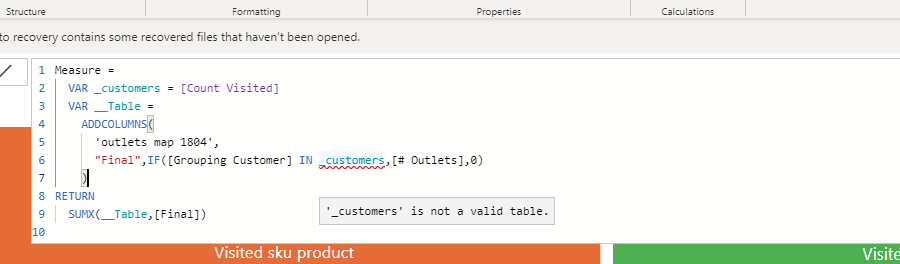
Thank you for replying. I tried the measure you suggested. its giving me this error.
- Mark as New
- Bookmark
- Subscribe
- Mute
- Subscribe to RSS Feed
- Permalink
- Report Inappropriate Content
__Customers is supposed to be the distinct list of customers that you said you had, not their count, so something like:
VAR __Customers = DISTINCT('Table'[Column])
This returns a table of values, which is what you want for the measure.
Follow on LinkedIn
@ me in replies or I'll lose your thread!!!
Instead of a Kudo, please vote for this idea
Become an expert!: Enterprise DNA
External Tools: MSHGQM
YouTube Channel!: Microsoft Hates Greg
Latest book!: DAX For Humans
DAX is easy, CALCULATE makes DAX hard...
- Mark as New
- Bookmark
- Subscribe
- Mute
- Subscribe to RSS Feed
- Permalink
- Report Inappropriate Content
Hello @Greg_Deckler
My apologies, the name of the measure is wrong. This is the measure I created if it expands. As you can see the measure is trying to get values other than psd and ssd during the last 6 months with condition, but it does not allow me since it says that it is not a valid table
Helpful resources

Fabric Data Days 2026
Don't miss out on Data Days, June 15 through August 7. Learn Fabric, Power BI, SQL, AI and more.

Power BI Monthly Update - May 2026
Check out the May 2026 Power BI update to learn about new features.

Power BI DataViz World Championships - June 2026
A new Power BI DataViz World Championship is coming this June! Don't miss out on submitting your entry.

| User | Count |
|---|---|
| 23 | |
| 21 | |
| 20 | |
| 19 | |
| 13 |


| User | Count |
|---|---|
| 58 | |
| 50 | |
| 38 | |
| 31 | |
| 27 |


