cancel
Showing results for 
Search instead for 
Did you mean: 

Level up your Power BI skills this month - build one visual each week and tell better stories with data! Get started

Reply
adityavighne
Continued Contributor

Mapping columns

Hi,


I have data in a sheet with column names

Date

Facebook Fans

Twitter Messages

Tweets

FB Posts

Twitter followers

FB followers


now I want to create a new table with columns

SM platform with data - Facebook and Twitter


No.             SM Platform

1                Facebook

2                Twitter


so I can create a relationship in between these two tables and create a slicer of SM platform for use in reports

1 ACCEPTED SOLUTION
petrovnikitamai
Resolver V
Resolver V

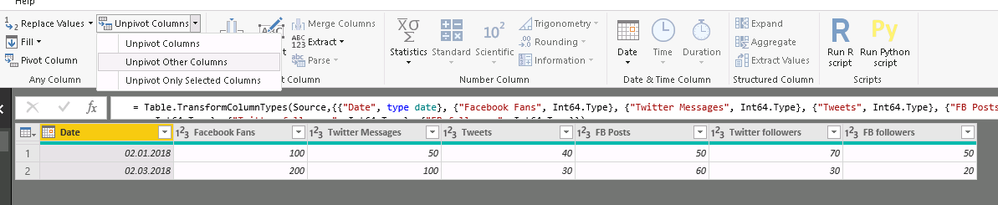
Try to change your main table with unpivot table function in power query.

image.png

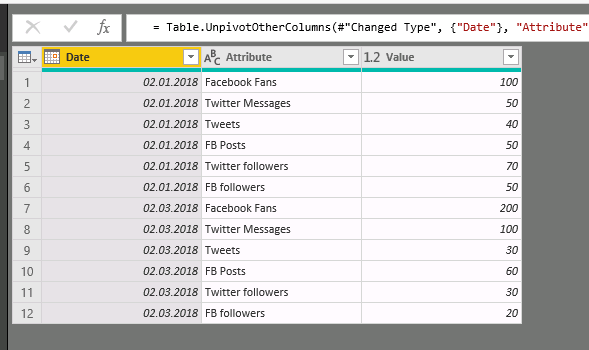
U get this:

image.png

After this u can create relationship between your tables by Attribute column.

View solution in original post

2 REPLIES 2
petrovnikitamai
Resolver V
Resolver V

Try to change your main table with unpivot table function in power query.

image.png

U get this:

image.png

After this u can create relationship between your tables by Attribute column.

Anonymous
Not applicable

@adityavighne  - 

First problem is they don't have a common structure (e.g. FB doesn't have Tweets.) That said, you could do the following:

1. Create 2 copies of the table in Power Query

2.a For the FB table, set all of the Twitter columns to null and add a calculated column (platform) ="Facebook".

2.b For the Twitter table, set all of the FB columns to null and add a calculated column (platform) ="Twitter".

Note: A Twitter and FB column may mean the same thing on the 2 different platforms (e.g. FB followers and Twitter followers). In that case, instead of setting the other to zero, you could rename the associated column to "Followers" and delete the other one.

3. Append the tables as a new (combined) table.


Cheers!

Nathan

Helpful resources

Announcements
April Power BI Update Carousel

Power BI Monthly Update - April 2026

Check out the April 2026 Power BI update to learn about new features.

Fabric SQL PBI Data Days

Data Days 2026 coming soon!

Sign up to receive a private message when registration opens and key events begin.

New to Fabric survey Carousel

New to Fabric Survey

If you have recently started exploring Fabric, we'd love to hear how it's going. Your feedback can help with product improvements.

Power BI DataViz World Championships carousel

Power BI DataViz World Championships - June 2026

A new Power BI DataViz World Championship is coming this June! Don't miss out on submitting your entry.