Don't miss your chance to take exam DP-600 or DP-700 on us!
Request nowLearn from the best! Meet the four finalists headed to the FINALS of the Power BI Dataviz World Championships! Register now
Hi,
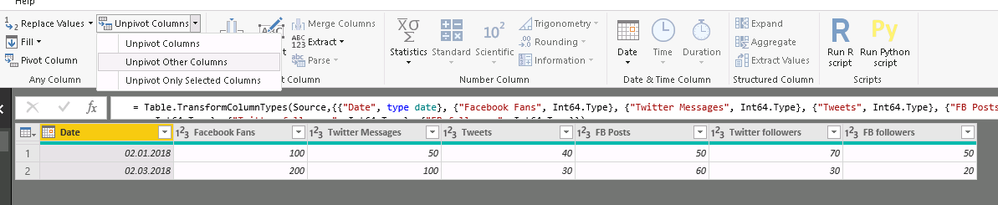
I have data in a sheet with column names
Date
Facebook Fans
Twitter Messages
Tweets
FB Posts
Twitter followers
FB followers
now I want to create a new table with columns
SM platform with data - Facebook and Twitter
No. SM Platform
1 Facebook
2 Twitter
so I can create a relationship in between these two tables and create a slicer of SM platform for use in reports
Solved! Go to Solution.
Try to change your main table with unpivot table function in power query.
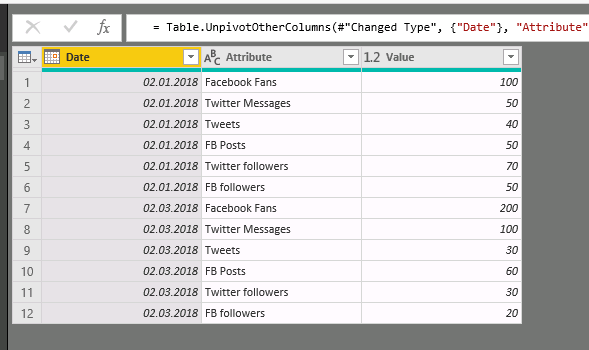
U get this:
After this u can create relationship between your tables by Attribute column.
Try to change your main table with unpivot table function in power query.
U get this:
After this u can create relationship between your tables by Attribute column.
First problem is they don't have a common structure (e.g. FB doesn't have Tweets.) That said, you could do the following:
1. Create 2 copies of the table in Power Query
2.a For the FB table, set all of the Twitter columns to null and add a calculated column (platform) ="Facebook".
2.b For the Twitter table, set all of the FB columns to null and add a calculated column (platform) ="Twitter".
Note: A Twitter and FB column may mean the same thing on the 2 different platforms (e.g. FB followers and Twitter followers). In that case, instead of setting the other to zero, you could rename the associated column to "Followers" and delete the other one.
3. Append the tables as a new (combined) table.
Cheers!
Nathan
Share feedback directly with Fabric product managers, participate in targeted research studies and influence the Fabric roadmap.
Check out the February 2026 Power BI update to learn about new features.
| User | Count |
|---|---|
| 49 | |
| 40 | |
| 37 | |
| 14 | |
| 14 |
| User | Count |
|---|---|
| 86 | |
| 69 | |
| 37 | |
| 29 | |
| 26 |