Don't miss your chance to take the Fabric Data Engineer (DP-700) exam on us!
Learn moreWe've captured the moments from FabCon & SQLCon that everyone is talking about, and we are bringing them to the community, live and on-demand. Starts on April 14th. Register now
Hi all 🙂
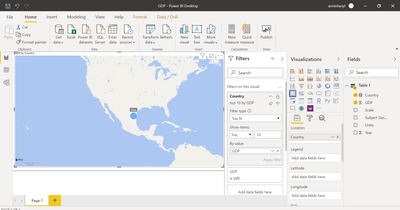
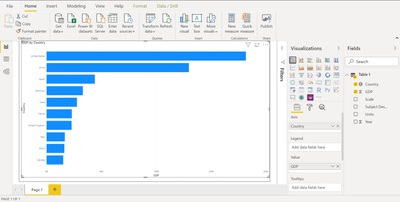
I have a question about the Map visualisation function. The purpose was to display the countries with top 10 GDP.
I set the data category as 'Country' for the column country, and the display for bar worked correctly. However, for the map view, it displayed as below. Only one blue bubble for China showed but in the wrong location. Please help to fix it.
Thanks for your help.
Solved! Go to Solution.
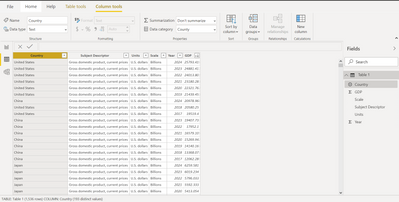
Ah there you go, you have it in that screenshot, and my guess was right - You have kept it as COUNTY and not COUNTRY.
The COUNTRY (with R) comes later down in the list. Assign that correctly and you should be good. Cheers!
Can I get the screenshot of categorization you have given for Country. There are both county and country. Just to ensure you have kept that correctly to country with r.
Ah there you go, you have it in that screenshot, and my guess was right - You have kept it as COUNTY and not COUNTRY.
The COUNTRY (with R) comes later down in the list. Assign that correctly and you should be good. Cheers!
Ah you are right! I didn't notice that.😅
Thank you luapdoniv!
If you have recently started exploring Fabric, we'd love to hear how it's going. Your feedback can help with product improvements.
A new Power BI DataViz World Championship is coming this June! Don't miss out on submitting your entry.
Share feedback directly with Fabric product managers, participate in targeted research studies and influence the Fabric roadmap.
| User | Count |
|---|---|
| 55 | |
| 39 | |
| 35 | |
| 19 | |
| 17 |
| User | Count |
|---|---|
| 73 | |
| 70 | |
| 37 | |
| 35 | |
| 26 |