cancel
Showing results for 
Search instead for 
Did you mean: 

Try your skills in the Power BI Dataviz World Championship! Round one ends June 26. Join now

Reply
Dgreen23
Helper III
Helper III

Manually Entered data

I need to be able to manually enter data and then adjust the data as well. I see the enter data option and that allows me to get the data i want in, but it doesn't allow me to append or change the data within that new table.

1 ACCEPTED SOLUTION

@Dgreen23 to change or edit data that is manually entered, click transform data, go to the manually entered table, go to the source step, and click the gear next to it and that will open the window to edit/change the data.


I would  Kudos if my solution helped. 👉 If you can spend time posting the question, you can also make efforts to give Kudos whoever helped to solve your problem. It is a token of appreciation!


Subscribe to the @PowerBIHowTo YT channel for an upcoming video on List and Record functions in Power Query!!

Learn Power BI and Fabric - subscribe to our YT channel - Click here: @PowerBIHowTo

If my solution proved useful, I'd be delighted to receive Kudos. When you put effort into asking a question, it's equally thoughtful to acknowledge and give Kudos to the individual who helped you solve the problem. It's a small gesture that shows appreciation and encouragement! ❤


Did I answer your question? Mark my post as a solution. Proud to be a Super User! Appreciate your Kudos 🙂
Feel free to email me with any of your BI needs.

View solution in original post

4 REPLIES 4
camargos88
Community Champion
Community Champion

Hi @Dgreen23 ,


Can you give more details about it ? I've done it without problems.


Ricardo


Did I answer your question? Mark my post as a solution!

Proud to be a Super User!


@camargos88,


Sure. A good for instance is our companies goals. We manually enter those in a table within a power bi. After they're entered I cannot change them on an individual basis. 


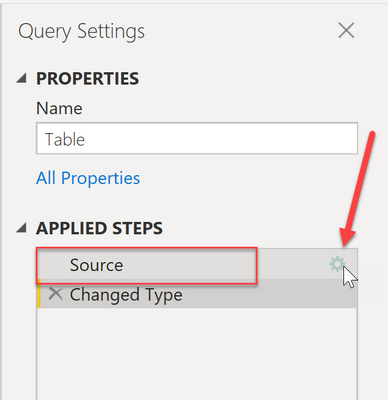
@Dgreen23 to change or edit data that is manually entered, click transform data, go to the manually entered table, go to the source step, and click the gear next to it and that will open the window to edit/change the data.


I would  Kudos if my solution helped. 👉 If you can spend time posting the question, you can also make efforts to give Kudos whoever helped to solve your problem. It is a token of appreciation!


Subscribe to the @PowerBIHowTo YT channel for an upcoming video on List and Record functions in Power Query!!

Learn Power BI and Fabric - subscribe to our YT channel - Click here: @PowerBIHowTo

If my solution proved useful, I'd be delighted to receive Kudos. When you put effort into asking a question, it's equally thoughtful to acknowledge and give Kudos to the individual who helped you solve the problem. It's a small gesture that shows appreciation and encouragement! ❤


Did I answer your question? Mark my post as a solution. Proud to be a Super User! Appreciate your Kudos 🙂
Feel free to email me with any of your BI needs.

@Dgreen23 here is the screenshot to make it more specific.


image.png


Subscribe to the @PowerBIHowTo YT channel for an upcoming video on List and Record functions in Power Query!!

Learn Power BI and Fabric - subscribe to our YT channel - Click here: @PowerBIHowTo

If my solution proved useful, I'd be delighted to receive Kudos. When you put effort into asking a question, it's equally thoughtful to acknowledge and give Kudos to the individual who helped you solve the problem. It's a small gesture that shows appreciation and encouragement! ❤


Did I answer your question? Mark my post as a solution. Proud to be a Super User! Appreciate your Kudos 🙂
Feel free to email me with any of your BI needs.

Helpful resources

Announcements
Fabric Data Days is here Carousel

Fabric Data Days 2026

Don't miss out on Data Days, June 15 through August 7. Learn Fabric, Power BI, SQL, AI and more.

Power BI DataViz World Championships carousel

Power BI DataViz World Championships - June 2026

A new Power BI DataViz World Championship is coming this June! Don't miss out on submitting your entry.