Get Fabric or SQL Certified for Free.
Get certified for free when you join Fabric Data Days 2026 and dive into Fabric, Power BI, SQL, AI, and other essential data skills.
Join now- Power BI forums
- Get Help with Power BI
- Desktop
- Service
- Report Server
- Power Query
- Mobile Apps
- Developer
- DAX Commands and Tips
- Custom Visuals Development Discussion
- Health and Life Sciences
- Power BI Spanish forums
- Translated Spanish Desktop
- Training and Consulting
- Instructor Led Training
- Dashboard in a Day for Women, by Women
- Galleries
- Data Stories Gallery
- Themes Gallery
- Contests Gallery
- QuickViz Gallery
- Quick Measures Gallery
- Visual Calculations Gallery
- Fabric Apps Gallery
- Notebook Gallery
- Translytical Task Flow Gallery
- TMDL Gallery
- R Script Showcase
- Webinars and Video Gallery
- Ideas
- Custom Visuals Ideas (read-only)
- Issues
- Issues
- Events
- Upcoming Events
July 28 - August 9 | Final Round of the Power BI Dataviz World Championships. This is your chance. Learn more
- Power BI forums
- Forums
- Get Help with Power BI
- Desktop
- Re: Manual sort
- Subscribe to RSS Feed
- Mark Topic as New
- Mark Topic as Read
- Float this Topic for Current User
- Bookmark
- Subscribe
- Printer Friendly Page

- Mark as New
- Bookmark
- Subscribe
- Mute
- Subscribe to RSS Feed
- Permalink
- Report Inappropriate Content
Manual sort
Hi,
Request your guidance for solving my issue related to manual sort
I have a visual ( stacked column chart ) in which i want to sort the data manually, say for eg: i have a time bin and starting time bin is 00:00 to 03:00 am , then 03:00 am to 06:00 am etc. In the visual I would like to have 06:00 am to 09:00 am as the starting one. how can i do the sort manually
please help
regards,
dsmitha
Solved! Go to Solution.


- Mark as New
- Bookmark
- Subscribe
- Mute
- Subscribe to RSS Feed
- Permalink
- Report Inappropriate Content
Hello @Anonymous ,
Please try the following steps :
1) On your table, create a calculated column in which you will assign your intended sort order, for instance you want 6 am to 9 am as the 1st bin, so assign it a value of 1 and so on. I call this column "Sort Index"
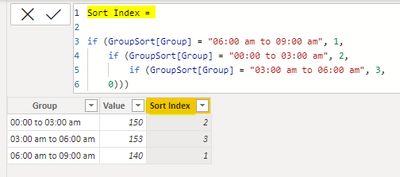
2) Next, click on the bin column, then click on option "Sort by column" under the "Column tools" ribbon. Select "Sort index" as the column to sort by.

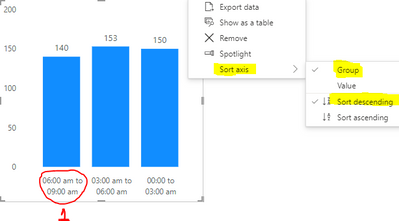
3) On your visual, click on the 3 dots on the top right, and select "Sort axis". Select axis as the bin column, and order as descending. You will notice that 06:00 am to 09:00 am is now the first bin as required.
Kind regards,
Rohit
Please mark this answer as the solution if it resolves your issue.
Appreciate your kudos! 😊


- Mark as New
- Bookmark
- Subscribe
- Mute
- Subscribe to RSS Feed
- Permalink
- Report Inappropriate Content
You create a new number column (either manually or use an index after sorting the data in power query) and use the 'sort by column' feature.

- Mark as New
- Bookmark
- Subscribe
- Mute
- Subscribe to RSS Feed
- Permalink
- Report Inappropriate Content
I tried the solution proposed adapted towards my own situation:
I want to rank the colum headers from 0-50 to 140 - 180
Instead of my current situation: 0-50, 100-140, 140-180, 50-70, 70-100
I created an indexcolumn with the formula which is working correctly.
When I want to sort by the indexcolum I get an error stating that I created a circular dependency.
Could someone help me out?

- Mark as New
- Bookmark
- Subscribe
- Mute
- Subscribe to RSS Feed
- Permalink
- Report Inappropriate Content
@Ha_Ver In case of cirulcar dependency error, create the index column in Power Query, and then use this column to sort the desired column.
- Mark as New
- Bookmark
- Subscribe
- Mute
- Subscribe to RSS Feed
- Permalink
- Report Inappropriate Content
@Ha_Ver In case of circular dependency error, try creating the index column in Power Query and then use this column to sort the desired column.
- Mark as New
- Bookmark
- Subscribe
- Mute
- Subscribe to RSS Feed
- Permalink
- Report Inappropriate Content
You create a new number column (either manually or use an index after sorting the data in power query) and use the 'sort by column' feature.
- Mark as New
- Bookmark
- Subscribe
- Mute
- Subscribe to RSS Feed
- Permalink
- Report Inappropriate Content
hi hotchilli,
that was a quick one, thanks a lot
regards,
dsmitha
- Mark as New
- Bookmark
- Subscribe
- Mute
- Subscribe to RSS Feed
- Permalink
- Report Inappropriate Content
Hello @Anonymous ,
Please try the following steps :
1) On your table, create a calculated column in which you will assign your intended sort order, for instance you want 6 am to 9 am as the 1st bin, so assign it a value of 1 and so on. I call this column "Sort Index"
2) Next, click on the bin column, then click on option "Sort by column" under the "Column tools" ribbon. Select "Sort index" as the column to sort by.
3) On your visual, click on the 3 dots on the top right, and select "Sort axis". Select axis as the bin column, and order as descending. You will notice that 06:00 am to 09:00 am is now the first bin as required.
Kind regards,
Rohit
Please mark this answer as the solution if it resolves your issue.
Appreciate your kudos! 😊
- Mark as New
- Bookmark
- Subscribe
- Mute
- Subscribe to RSS Feed
- Permalink
- Report Inappropriate Content
hi rohit_singh,
thank you very much, it solved my issue
regards,
dsmitha
Helpful resources

Fabric Community Sticker Challenge - Barcelona 2026
If you love stickers, then you will definitely want to check out our community sticker challenge, Barcelona edition!

Power BI Monthly Update - July 2026
Check out the July 2026 Power BI update to learn about new features.

Power BI DataViz World Championships - June 2026
A new Power BI DataViz World Championship is coming this June! Don't miss out on submitting your entry.

| User | Count |
|---|---|
| 28 | |
| 28 | |
| 20 | |
| 19 | |
| 19 |


| User | Count |
|---|---|
| 35 | |
| 26 | |
| 19 | |
| 18 | |
| 17 |


