FabCon is coming to Atlanta
Join us at FabCon Atlanta from March 16 - 20, 2026, for the ultimate Fabric, Power BI, AI and SQL community-led event. Save $200 with code FABCOMM.
Register now!- Power BI forums
- Get Help with Power BI
- Desktop
- Service
- Report Server
- Power Query
- Mobile Apps
- Developer
- DAX Commands and Tips
- Custom Visuals Development Discussion
- Health and Life Sciences
- Power BI Spanish forums
- Translated Spanish Desktop
- Training and Consulting
- Instructor Led Training
- Dashboard in a Day for Women, by Women
- Galleries
- Data Stories Gallery
- Themes Gallery
- Contests Gallery
- QuickViz Gallery
- Quick Measures Gallery
- Visual Calculations Gallery
- Notebook Gallery
- Translytical Task Flow Gallery
- TMDL Gallery
- R Script Showcase
- Webinars and Video Gallery
- Ideas
- Custom Visuals Ideas (read-only)
- Issues
- Issues
- Events
- Upcoming Events
The Power BI Data Visualization World Championships is back! Get ahead of the game and start preparing now! Learn more
- Power BI forums
- Forums
- Get Help with Power BI
- Desktop
- Re: Making the lookup work.
- Subscribe to RSS Feed
- Mark Topic as New
- Mark Topic as Read
- Float this Topic for Current User
- Bookmark
- Subscribe
- Printer Friendly Page


- Mark as New
- Bookmark
- Subscribe
- Mute
- Subscribe to RSS Feed
- Permalink
- Report Inappropriate Content
Making the lookup work.
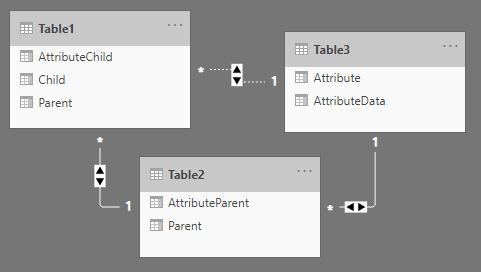
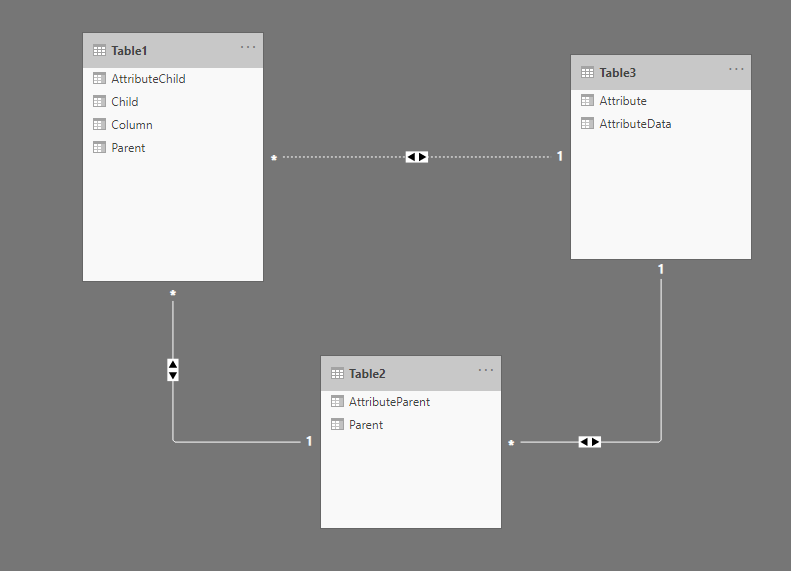
This is my data and model:
let
    Source = Table.FromRows(Json.Document(Binary.Decompress(Binary.FromText("i45WMjRU0lECYTMzM6VYHaCAEVTA3NwcLGAE4oAELSwsIAJGUAFLS0ul2FgA", BinaryEncoding.Base64), Compression.Deflate)), let _t = ((type nullable text) meta [Serialized.Text = true]) in type table [Child = _t, Parent = _t, AttributeChild = _t]),
    #"Changed Type" = Table.TransformColumnTypes(Source,{{"Child", Int64.Type}, {"Parent", Int64.Type}, {"AttributeChild", Int64.Type}})
in
    #"Changed Type"
let
Source = Table.FromRows(Json.Document(Binary.Decompress(Binary.FromText("i45WMlTSUTI0NFSK1YlWMgKyjYyMlGJjAQ==", BinaryEncoding.Base64), Compression.Deflate)), let _t = ((type nullable text) meta [Serialized.Text = true]) in type table [Parent = _t, AttributeParent = _t]),
#"Changed Type" = Table.TransformColumnTypes(Source,{{"Parent", Int64.Type}, {"AttributeParent", Int64.Type}})
in
#"Changed Type"let
Source = Table.FromRows(Json.Document(Binary.Decompress(Binary.FromText("Nci7CQBBCEDBXow30cBPLSLHwpVw/XO8wGyYblFVOfLe7z5wTouZbUHK3bcgFRFbkMrMLUhV1Rac+QE=", BinaryEncoding.Base64), Compression.Deflate)), let _t = ((type nullable text) meta [Serialized.Text = true]) in type table [Attribute = _t, AttributeData = _t]),
#"Changed Type" = Table.TransformColumnTypes(Source,{{"Attribute", Int64.Type}, {"AttributeData", type text}})
in
#"Changed Type"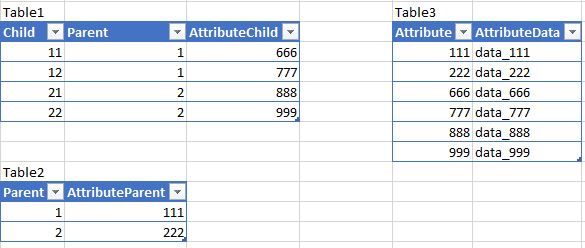
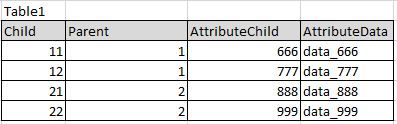
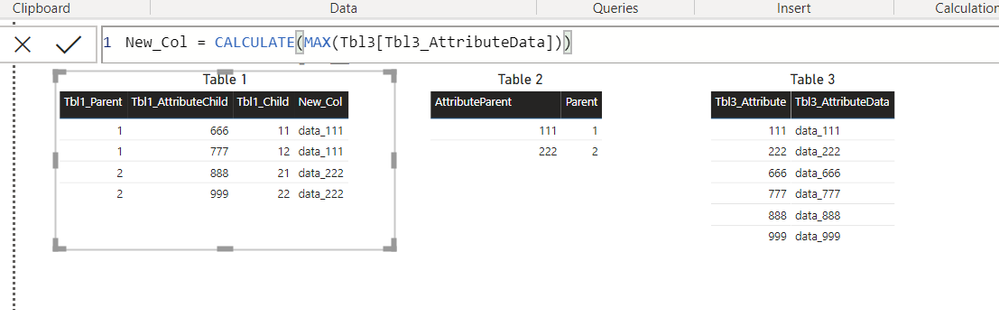
I want to add a column to Table1 which would show the Child's AttributeData. Like this:
How to do it while keeping two-directional cross filtering??? I could make the incative relationship single-direction, but not the active ones!
These all formulas fails miserably:
CALCULATE(MAX(Table3[AttributeData]),USERELATIONSHIP(Table1[AttributeChild],Table3[Attribute]))

CALCULATE(SELECTEDVALUE(Table3[AttributeData]),USERELATIONSHIP(Table1[AttributeChild],Table3[Attribute]))

LOOKUPVALUE(Table3[AttributeData],Table3[Attribute],Table1[AttributeChild])

MAXX(
    CALCULATETABLE(
        Table3,
        USERELATIONSHIP(Table1[AttributeChild],Table3[Attribute])
    ),
    Table3[AttributeData]
)

CALCULATE(
    MAX(Table3[AttributeData]),
    TREATAS(
        VALUES('Table1'[AttributeChild]),
        Table3[Attribute]
    )
)
Solved! Go to Solution.


- Mark as New
- Bookmark
- Subscribe
- Mute
- Subscribe to RSS Feed
- Permalink
- Report Inappropriate Content

- Mark as New
- Bookmark
- Subscribe
- Mute
- Subscribe to RSS Feed
- Permalink
- Report Inappropriate Content
hi @Zyg_D
I don't think you need to create a relationship between table2 and table3, just remove this relationship and keep active for the relationship between table1 and table3.
or just use lookupvalue function to create a column as below:
Calculate Column = LOOKUPVALUE(Table3[AttributeData], Table3[Attribute], Table1[Attribute Child])
Regards,
Lin
If this post helps, then please consider Accept it as the solution to help the other members find it more quickly.
- Mark as New
- Bookmark
- Subscribe
- Mute
- Subscribe to RSS Feed
- Permalink
- Report Inappropriate Content
@v-lili6-msft wrote:hi @Zyg_D
I don't think you need to create a relationship between table2 and table3, just remove this relationship and keep active for the relationship between table1 and table3.
or just use lookupvalue function to create a column as below:
Calculate Column = LOOKUPVALUE(Table3[AttributeData], Table3[Attribute], Table1[Attribute Child])
Regards,
Lin
Thanks, Lin (@v-lili6-msft), for digging into the problem. the LOOKUPVALUE that you suggested is exactly like one of my tries which you can find above and which failed in my case. However, the suggestion to reorder my relationships may work too. I thought about it myself, it's just that I fear I would need to rework many things which are already dependent on these relationships.
- Mark as New
- Bookmark
- Subscribe
- Mute
- Subscribe to RSS Feed
- Permalink
- Report Inappropriate Content
- Mark as New
- Bookmark
- Subscribe
- Mute
- Subscribe to RSS Feed
- Permalink
- Report Inappropriate Content
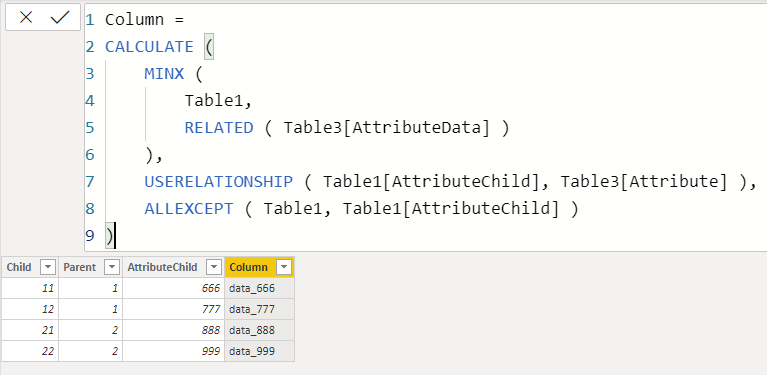
@AntrikshSharma wrote:Thanks @BA_Pete
@Zyg_D Does the following work for you?
Column =
CALCULATE (
    MINX (
        Table1,
        RELATED ( Table3[AttributeData] )
    ),
    USERELATIONSHIP ( Table1[AttributeChild], Table3[Attribute] ),
    ALLEXCEPT ( Table1, Table1[AttributeChild] )
)
@AntrikshSharma - You are the true Power BI hero, man! Many superusers and Microsoft staff failed... and you did it! It's increadible! Too bad that I can only give one thumb up 🙂 Cheers!

- Mark as New
- Bookmark
- Subscribe
- Mute
- Subscribe to RSS Feed
- Permalink
- Report Inappropriate Content
For a measure, try:
Measure = CALCULATE(MAX(table3[AttributeData]), TREATAS(VALUES(table1[AttributeChild]), table3[Attribute])
If you prefer a calculated column for table1:
Column = LOOKUPVALUE(Table3[AttributeData], Table3[Attribute], Table1[Attribute Child])
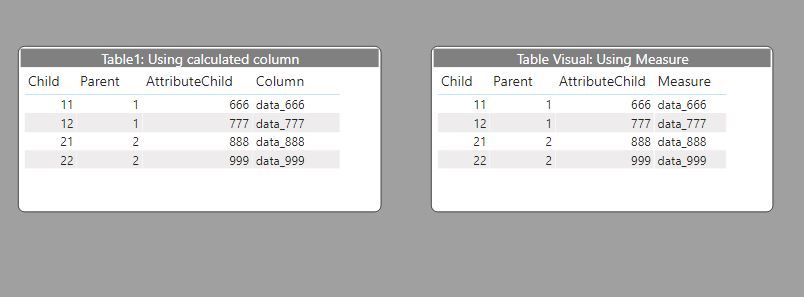
Btw, why do you need a two-directional cross filtering in many-to-one relationships?
Did I answer your question? Mark my post as a solution!
In doing so, you are also helping me. Thank you!
Proud to be a Super User!
Paul on Linkedin.

- Mark as New
- Bookmark
- Subscribe
- Mute
- Subscribe to RSS Feed
- Permalink
- Report Inappropriate Content
@Zyg_D ,
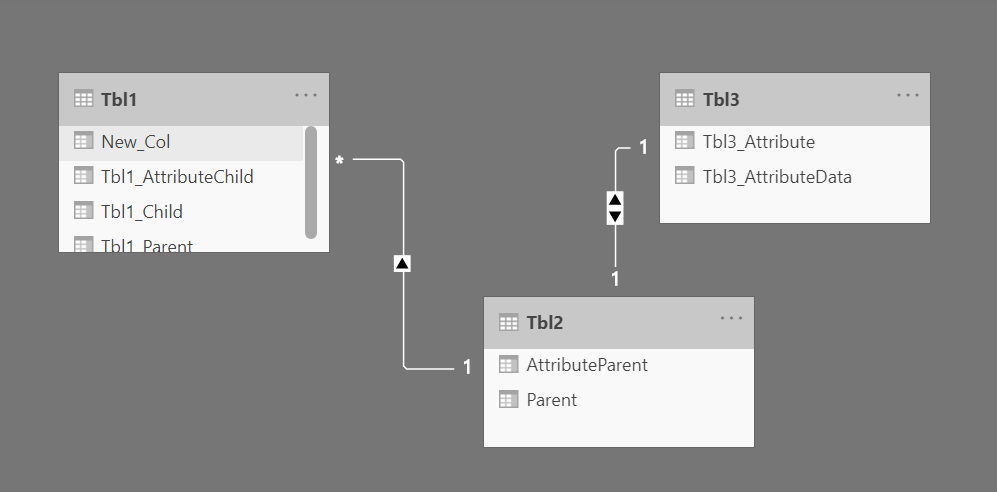
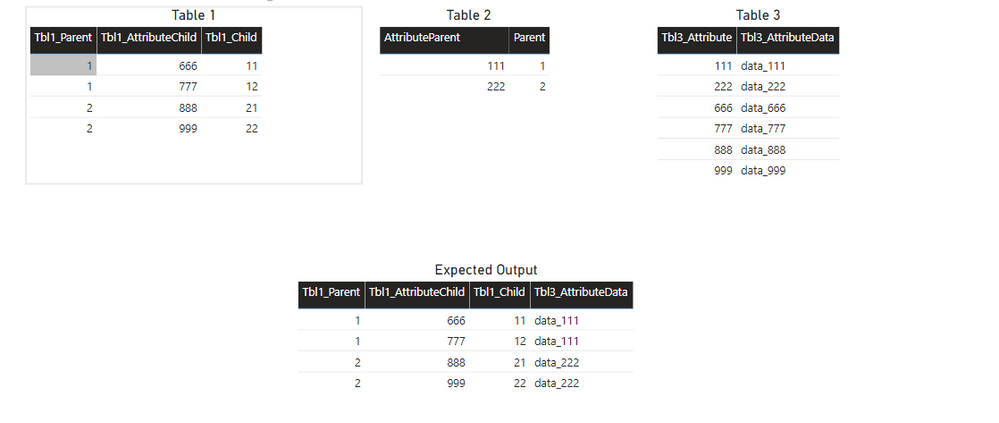
Below is the screen shot only based on relationship.
Step 1: Create the relationship like below screen shot.
Step 2: Directly take all columns from table 1 and simply take AttributeData from Table3. (refer screen shot 2).
Step 3: If you want to achieve using a dax so write column : CALCULATE(MAX(Table3[AttributeData])). (Refer screen shot 3).
Please take a quick glance at newly created dashboards : Restaurant Management Dashboard , HR Analytics Report , Hotel Management Report, Sales Analysis Report , Fortune 500 Companies Analysis , Revenue Tracking Dashboard

- Mark as New
- Bookmark
- Subscribe
- Mute
- Subscribe to RSS Feed
- Permalink
- Report Inappropriate Content
Hi @Zyg_D ,
If you want a physical column in Table 1 then just perform a merge in Power Query on Table1[AttributeChild] and Tble3[Attribute].
Pete
Now accepting Kudos! If my post helped you, why not give it a thumbs-up?
Proud to be a Datanaut!
- Mark as New
- Bookmark
- Subscribe
- Mute
- Subscribe to RSS Feed
- Permalink
- Report Inappropriate Content
@BA_Pete wrote:Hi @Zyg_D ,
If you want a physical column in Table 1 then just perform a merge in Power Query on Table1[AttributeChild] and Tble3[Attribute].
Pete
Thank you, Pete. This would work, but not always (e.g. some tables or columns in question may be calculated in DAX). So, I would like to receive an answer in DAX or a decent explanation of why a simple lookup is nearly impossible in DAX.
- Mark as New
- Bookmark
- Subscribe
- Mute
- Subscribe to RSS Feed
- Permalink
- Report Inappropriate Content
Good point re: calculated columns etc.
I'll pass over to the DAX heroes:
@Greg_Deckler @AntrikshSharma @vanessafvg @PaulDBrown @tex628 @Anonymous @Tahreem24 @amitchandak @dedelman_clng @OwenAuger @mahoneypat @nandukrishnavs @TomMartens @mwegener @edhans
Now accepting Kudos! If my post helped you, why not give it a thumbs-up?
Proud to be a Datanaut!

Helpful resources

Power BI Dataviz World Championships
The Power BI Data Visualization World Championships is back! Get ahead of the game and start preparing now!

Power BI Monthly Update - December 2025
Check out the December 2025 Power BI Holiday Recap!

FabCon Atlanta 2026
Join us at FabCon Atlanta, March 16-20, for the ultimate Fabric, Power BI, AI and SQL community-led event. Save $200 with code FABCOMM.

| User | Count |
|---|---|
| 41 | |
| 38 | |
| 36 | |
| 30 | |
| 28 |


| User | Count |
|---|---|
| 128 | |
| 88 | |
| 79 | |
| 67 | |
| 62 |


