I am reproducing the example in this link. Here is the code I am using in the script.r file:
source('./r_files/flatten_HTML.r')

############### Library Declarations ###############
libraryRequireInstall("ggplot2");
libraryRequireInstall("plotly")
####################################################

################### Actual code ####################


p <- Values %>%
  plot_ly( x = ~x_data, y = ~y_data, z = ~z_data) %>%
  add_markers() %>%
  layout(scene = list(xaxis = list(title = 'X [mm]'),
                      yaxis = list(title = 'Y [mm]'),
                      zaxis = list(title = 'Z Number')));

internalSaveWidget(p, 'out.html')
# ####################################################
#
# ################ Reduce paddings ###################
ReadFullFileReplaceString('out.html', 'out.html', ',"padding":[0-9]*,', ',"padding":0,')
# ####################################################
I have managed to reach step 10 with no issues. After adding my data elements, I always get an error stating that x_data not found.
The screenshot is shown below:
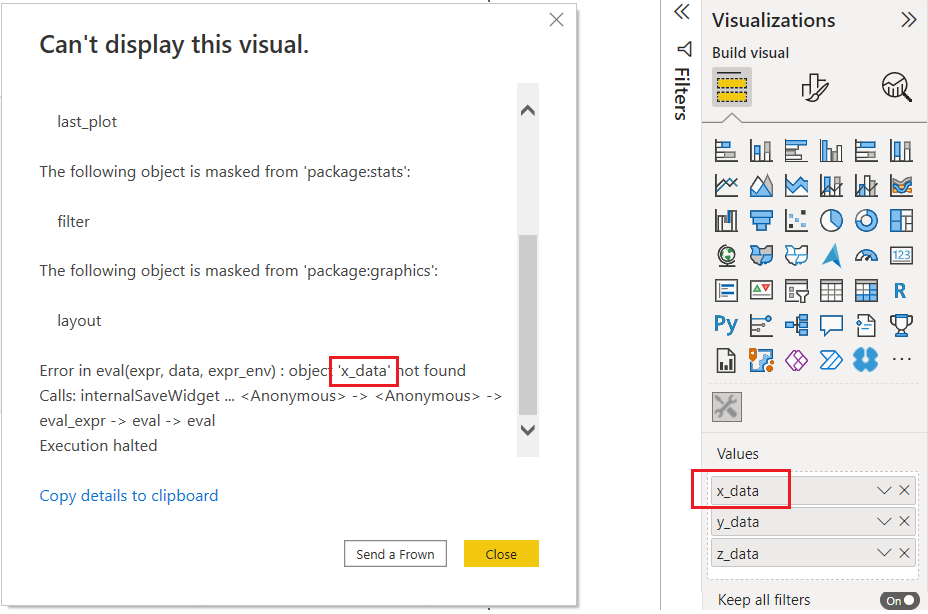
I have found this post from 2019 with the same issue but no solutions have been posted.
Can someone say what is going wrong here?
Is there any way to debug and perhaps "print" the values being used by the visualization?
Thanks in advance,
T


