
cancel
Showing results for 
Search instead for 
Did you mean: 

The Power BI Data Visualization World Championships is back! It's time to submit your entry. Live now!

Reply
kshirey
Frequent Visitor

Making an Image URL circular

Hi

I have an Image URL field. I want to add each image in that field to their own individual circle. See the cicle exampleCircle ExampleCircle Example

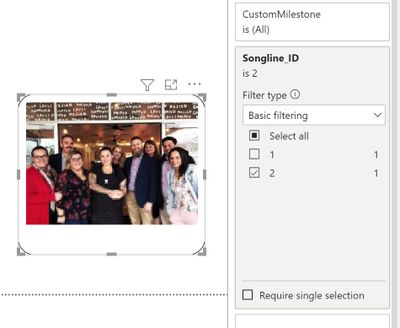
The best I've been able to do is adding a third party image visual and set the radius to the max (30). It only rounds the edges though. See circle test

songlines_test_circle.JPG

Can someone please tell me how to get the images to appear in a circle?

4 REPLIES 4
PhilipeC
New Member

Hey, I'm currently doing this using flipdash.io. So you can round image to use on a table in power bi, you get a measure just need to add you image measure or column.
here is a link with more information. 
Power BI Avatar Generator: Create Custom User Avatars

Azeemite
Regular Visitor

Any suggestion for this without manually cropping the image? 

community_pinki
Helper II
Helper II

Hey @kshirey  ,


You can do one thing crop the images in circle using online tool with the maximum 25KB in size
and then copy the image address. In the Power BI , Go to the Transform data ,
click on Table and ImageURL column and into the Applied steps in query editor click on the source and paste the copied Image address --> Close & Apply the changes.

Hi @community_pinki 

Thanks for the suggestion. Unfortunately I don't think it is going to be suitable in this case we have users who are adding their photos into the application.

The photos will then be viewed in the report.

That level of image editing would deem the solution 'too hard'.

Appreciate your suggestion though 👍

Helpful resources

Announcements
FabCon Atlanta 2026 carousel

FabCon Atlanta 2026

Join us at FabCon Atlanta, March 16-20, for the ultimate Fabric, Power BI, AI and SQL community-led event. Save $200 with code FABCOMM.