cancel
Showing results for 
Search instead for 
Did you mean: 

The Power BI Data Visualization World Championships is back! Get ahead of the game and start preparing now! Learn more

Reply
Anonymous
Not applicable

Make a Reverse Waterfall (Start from Total)

Hi

I'm looking to create a waterfall Chart that Starts with the Total and then drops off numbers at each subsequent step along the way to the end.


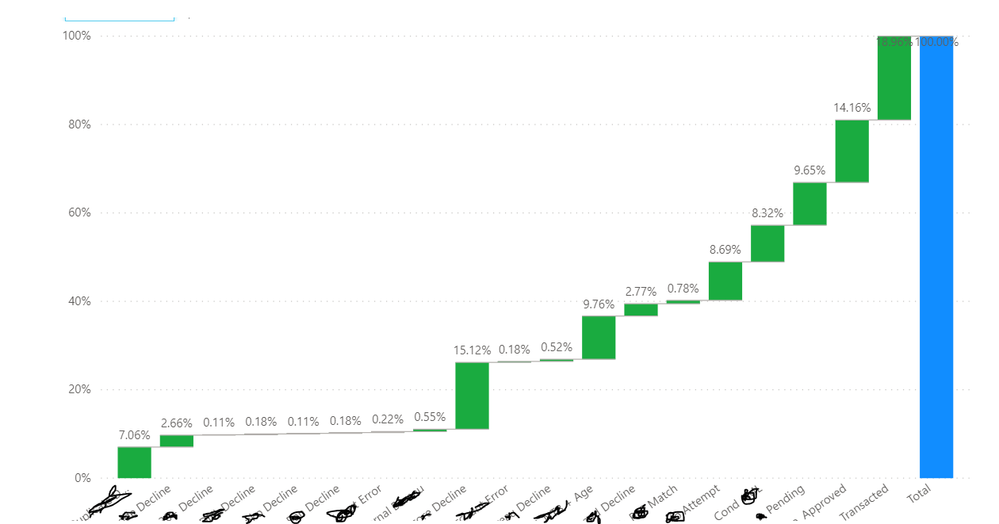
This is what I'm getting


WFChart_Now.PNG


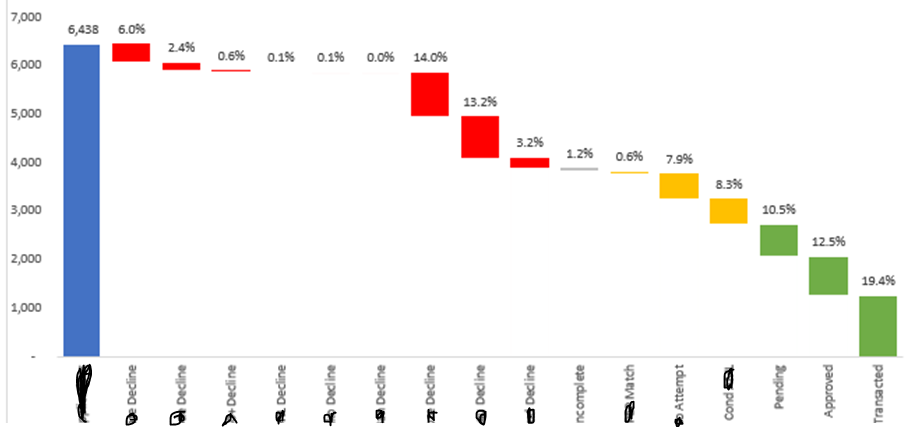
This is what I need


WFChart_Needed.PNG


So it should start with a total of 7000, then at each step, lost x% or xnumber ( I can sort out if it has to be a number or %age)


I've tried all 5 custom visuals avaialble. None of them have this option.


Any help is much appreciated.

1 ACCEPTED SOLUTION
Anonymous
Not applicable

Thanks @amitchandak 


I forgot to mention that I tried breakdown, it is not something that will help. Essentially it needs to be a clean waterfall. It seems Excel can do. Lol - lets go back to excel. 🙂

Anywho - the zoom waterfall may be the answer. I'll investigate and revert.


Thank you


View solution in original post

3 REPLIES 3
Anonymous
Not applicable

Hi there, does anyone know if reverse waterfall chart would work in Power BI?


Have looked into these links, but they do not seem helpful:

refer to the last example, if that can help

https://www.tutorialgateway.org/waterfall-chart-in-power-bi/

or

https://zoomcharts.com/en/microsoft-power-bi-custom-visuals/custom-visuals/drill-down-waterfall-visu...


Thank you.

amitchandak
Super User
Super User

@Anonymous ,

refer to the last example, if that can help

https://www.tutorialgateway.org/waterfall-chart-in-power-bi/

or

https://zoomcharts.com/en/microsoft-power-bi-custom-visuals/custom-visuals/drill-down-waterfall-visual/

Share with Power BI Enthusiasts: Full Power BI Video (20 Hours) YouTube
Microsoft Fabric Series 60+ Videos YouTube
Microsoft Fabric Hindi End to End YouTube
Anonymous
Not applicable

Thanks @amitchandak 


I forgot to mention that I tried breakdown, it is not something that will help. Essentially it needs to be a clean waterfall. It seems Excel can do. Lol - lets go back to excel. 🙂

Anywho - the zoom waterfall may be the answer. I'll investigate and revert.


Thank you


Helpful resources

Announcements
Power BI DataViz World Championships

Power BI Dataviz World Championships

The Power BI Data Visualization World Championships is back! Get ahead of the game and start preparing now!

December 2025 Power BI Update Carousel

Power BI Monthly Update - December 2025

Check out the December 2025 Power BI Holiday Recap!

FabCon Atlanta 2026 carousel

FabCon Atlanta 2026

Join us at FabCon Atlanta, March 16-20, for the ultimate Fabric, Power BI, AI and SQL community-led event. Save $200 with code FABCOMM.