Get Fabric or SQL Certified for Free.
Get certified for free when you join Fabric Data Days 2026 and dive into Fabric, Power BI, SQL, AI, and other essential data skills.
Join now- Power BI forums
- Get Help with Power BI
- Desktop
- Service
- Report Server
- Power Query
- Mobile Apps
- Developer
- DAX Commands and Tips
- Custom Visuals Development Discussion
- Health and Life Sciences
- Power BI Spanish forums
- Translated Spanish Desktop
- Training and Consulting
- Instructor Led Training
- Dashboard in a Day for Women, by Women
- Galleries
- Data Stories Gallery
- Themes Gallery
- Contests Gallery
- QuickViz Gallery
- Quick Measures Gallery
- Visual Calculations Gallery
- Fabric Apps Gallery
- Notebook Gallery
- Translytical Task Flow Gallery
- TMDL Gallery
- R Script Showcase
- Webinars and Video Gallery
- Ideas
- Custom Visuals Ideas (read-only)
- Issues
- Issues
- Events
- Upcoming Events
July 28 - August 9 | Final Round of the Power BI Dataviz World Championships. This is your chance. Learn more
- Power BI forums
- Forums
- Get Help with Power BI
- Desktop
- Re: Make Customer Count Column using Distinct Val...
- Subscribe to RSS Feed
- Mark Topic as New
- Mark Topic as Read
- Float this Topic for Current User
- Bookmark
- Subscribe
- Printer Friendly Page


- Mark as New
- Bookmark
- Subscribe
- Mute
- Subscribe to RSS Feed
- Permalink
- Report Inappropriate Content
Make Customer Count Column using Distinct Values
Hi Everyone,
I am having a bit of trouble creating a customer count column based on the below information:
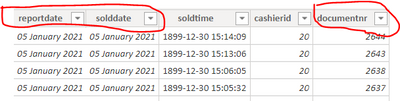
Essentially, I would like a column where customer count is equal to 1 if the document number (last column) has a distinct number on a specific "report date" and "sold date". Please may someone assist.
Kind regards,
Dylan
Solved! Go to Solution.


- Mark as New
- Bookmark
- Subscribe
- Mute
- Subscribe to RSS Feed
- Permalink
- Report Inappropriate Content
Hi @dylanndengu ,
You can use the following measure :
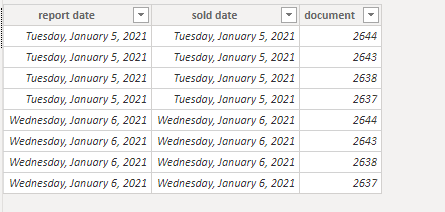
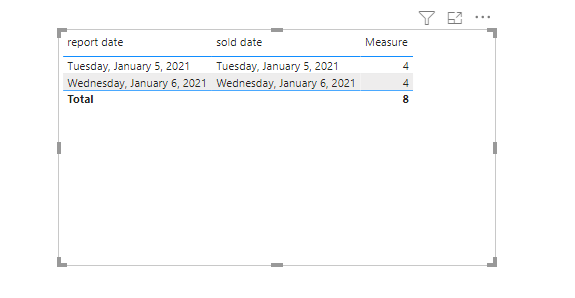
Measure = SUMX(SUMMARIZE('Table','Table'[report date],'Table'[sold date],"countofcustomer",DISTINCTCOUNT('Table'[document])),[countofcustomer])
Sample data:
Result:
If this post helps, then please consider Accept it as the solution to help the other members find it more quickly.
Best Regards,
Dedmon Dai

- Mark as New
- Bookmark
- Subscribe
- Mute
- Subscribe to RSS Feed
- Permalink
- Report Inappropriate Content
@dylanndengu Not really cleare. Based on my understanding you may create the below measure:
Measure = CALCULATE(DistinctCount(TableName[DocumentNumber]),ALLEXCEPT(TableName,TableName[ReportDate]))
Please take a quick glance at newly created dashboards : Restaurant Management Dashboard , HR Analytics Report , Hotel Management Report, Sales Analysis Report , Fortune 500 Companies Analysis , Revenue Tracking Dashboard
- Mark as New
- Bookmark
- Subscribe
- Mute
- Subscribe to RSS Feed
- Permalink
- Report Inappropriate Content
Apologies for the lack of clarity. The data I have takes into account everything a customer has bought on a specific day and assigns that transaction a number (documnetnr). The issue is if one customer buys a soda in addition to a bucket of chicken, those are recorded as 2 different transactions with the same document number. Hence, in order to calculate the actual number of customers, I need to only count distinct document numbers on a specific day, as the document numbers generated restart every 24 hours. I hope that clarifies things a bit.
- Mark as New
- Bookmark
- Subscribe
- Mute
- Subscribe to RSS Feed
- Permalink
- Report Inappropriate Content
Hi @dylanndengu ,
You can use the following measure :
Measure = SUMX(SUMMARIZE('Table','Table'[report date],'Table'[sold date],"countofcustomer",DISTINCTCOUNT('Table'[document])),[countofcustomer])
Sample data:
Result:
If this post helps, then please consider Accept it as the solution to help the other members find it more quickly.
Best Regards,
Dedmon Dai
- Mark as New
- Bookmark
- Subscribe
- Mute
- Subscribe to RSS Feed
- Permalink
- Report Inappropriate Content
This is great, thank you so much

- Mark as New
- Bookmark
- Subscribe
- Mute
- Subscribe to RSS Feed
- Permalink
- Report Inappropriate Content
@dylanndengu , nor very clear , Try measure like
Distinctcount(Table[documentnbr])
or
Countx(summarize(Table, Table[reportdate], table[soldate], "_1",Distinctcount(Table[documentnbr])),[_1])
- Mark as New
- Bookmark
- Subscribe
- Mute
- Subscribe to RSS Feed
- Permalink
- Report Inappropriate Content
Hi Amit,
Thank you for responding but I do not thing the solution will work, and it is probably due to my lack of clarity.
The data I have takes into account everything a customer has bought on a specific day and assigns that transaction a number (documnetnr). The issue is if one customer buys a soda in addition to a bucket of chicken, those are recorded as 2 different transactions with the same document number. Hence, in order to calculate the actual number of customers, I need to only count distinct document numbers on a specific day, as the document numbers generated restart every 24 hours. So you can't simply take a distinct count of the document numbers because new ones are generated every day. I'm thinking I could perhaps group by report date, sold date and document number and then do a distinct count on that? Please let me know what you think. I hope that clarifies things a bit.

Helpful resources

Fabric Community Sticker Challenge - Barcelona 2026
If you love stickers, then you will definitely want to check out our community sticker challenge, Barcelona edition!

Power BI Monthly Update - July 2026
Check out the July 2026 Power BI update to learn about new features.

Power BI DataViz World Championships - June 2026
A new Power BI DataViz World Championship is coming this June! Don't miss out on submitting your entry.

| User | Count |
|---|---|
| 28 | |
| 28 | |
| 19 | |
| 19 | |
| 19 |


| User | Count |
|---|---|
| 37 | |
| 29 | |
| 18 | |
| 17 | |
| 15 |


