FabCon is coming to Atlanta
Join us at FabCon Atlanta from March 16 - 20, 2026, for the ultimate Fabric, Power BI, AI and SQL community-led event. Save $200 with code FABCOMM.
Register now!- Power BI forums
- Get Help with Power BI
- Desktop
- Service
- Report Server
- Power Query
- Mobile Apps
- Developer
- DAX Commands and Tips
- Custom Visuals Development Discussion
- Health and Life Sciences
- Power BI Spanish forums
- Translated Spanish Desktop
- Training and Consulting
- Instructor Led Training
- Dashboard in a Day for Women, by Women
- Galleries
- Data Stories Gallery
- Themes Gallery
- Contests Gallery
- QuickViz Gallery
- Quick Measures Gallery
- Visual Calculations Gallery
- Notebook Gallery
- Translytical Task Flow Gallery
- TMDL Gallery
- R Script Showcase
- Webinars and Video Gallery
- Ideas
- Custom Visuals Ideas (read-only)
- Issues
- Issues
- Events
- Upcoming Events
The Power BI Data Visualization World Championships is back! Get ahead of the game and start preparing now! Learn more
- Power BI forums
- Forums
- Get Help with Power BI
- Desktop
- Re: MTD based on condition
- Subscribe to RSS Feed
- Mark Topic as New
- Mark Topic as Read
- Float this Topic for Current User
- Bookmark
- Subscribe
- Printer Friendly Page


- Mark as New
- Bookmark
- Subscribe
- Mute
- Subscribe to RSS Feed
- Permalink
- Report Inappropriate Content
MTD based on condition
Hi Team,
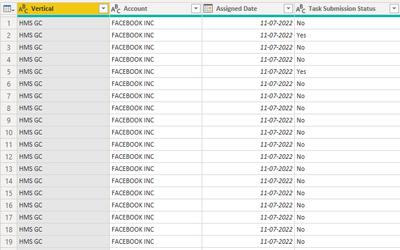
I have to calculate MTD as I have a table which has 4 columns as below, I have caluclate MTD based on the date.
Requirment = Number of yes under each account and divded by nuumber of rows from each account.
Example: If I have 75 rows for Acount A and 50 Yes, then 50/70*100 = 71.4%
this is my requirement. I will be using Vertical as slicer so values should change accoudingly.
Thanks !
Solved! Go to Solution.

- Mark as New
- Bookmark
- Subscribe
- Mute
- Subscribe to RSS Feed
- Permalink
- Report Inappropriate Content
Hi, @raassd ,
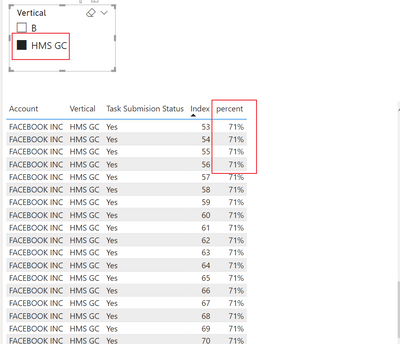
You could create a measure as follow:
percent =
DIVIDE (
    CALCULATE (
        COUNT ( [Account] ),
        FILTER (
            ALLSELECTED ( 'Table' ),
            [Account] = MAX ( 'Table'[Account] )
                && [Task Submision Status] = "Yes"
        )
    ),
    CALCULATE (
        COUNT ( [Account] ),
        FILTER ( ALLSELECTED ( 'Table' ), [Account] = MAX ( 'Table'[Account] ) )
    )
)
The final show:
Best Regards,
Community Support Team _ Yalan Wu
If this post helps, then please consider Accept it as the solution to help the other members find it more quickly.
- Mark as New
- Bookmark
- Subscribe
- Mute
- Subscribe to RSS Feed
- Permalink
- Report Inappropriate Content
Hi, @raassd ;
Is your problem solved? If so, kindly mark the proper reply as a solution to help others having the similar issue and close the case. If not, let me know and I'll try to help you further.
Best Regards,
Community Support Team _ Yalan Wu
If this post helps, then please consider Accept it as the solution to help the other members find it more quickly.
- Mark as New
- Bookmark
- Subscribe
- Mute
- Subscribe to RSS Feed
- Permalink
- Report Inappropriate Content
Hi, @raassd ,
You could create a measure as follow:
percent =
DIVIDE (
    CALCULATE (
        COUNT ( [Account] ),
        FILTER (
            ALLSELECTED ( 'Table' ),
            [Account] = MAX ( 'Table'[Account] )
                && [Task Submision Status] = "Yes"
        )
    ),
    CALCULATE (
        COUNT ( [Account] ),
        FILTER ( ALLSELECTED ( 'Table' ), [Account] = MAX ( 'Table'[Account] ) )
    )
)
The final show:
Best Regards,
Community Support Team _ Yalan Wu
If this post helps, then please consider Accept it as the solution to help the other members find it more quickly.


- Mark as New
- Bookmark
- Subscribe
- Mute
- Subscribe to RSS Feed
- Permalink
- Report Inappropriate Content
@raassd , You can join all 4 of them with one date table. there will be inactive joins which can be activated using userelationship
example
calculate( calculate( SUM(Sales[Sales Amount]),USERELATIONSHIP ('Sales'[CreateDate], 'Date'[Date])),DATESMTD('Date'[Date]))
- Mark as New
- Bookmark
- Subscribe
- Mute
- Subscribe to RSS Feed
- Permalink
- Report Inappropriate Content
My requirment is to count number of yes divided by number of rows for each account under each vertical.
Thanks !
- Mark as New
- Bookmark
- Subscribe
- Mute
- Subscribe to RSS Feed
- Permalink
- Report Inappropriate Content
@raassd , Unless you want Avg of Avg or Sum of Avg
This type of measure should help
Divide(countx(Filter(Table, Table[Task Submission Status]= "Yes") ,[account]), Count(Table[account]) )
- Mark as New
- Bookmark
- Subscribe
- Mute
- Subscribe to RSS Feed
- Permalink
- Report Inappropriate Content

- Mark as New
- Bookmark
- Subscribe
- Mute
- Subscribe to RSS Feed
- Permalink
- Report Inappropriate Content
@raassd , the measure is still not complete. can share formula with me
Can you share sample data and sample output in table format? Or a sample pbix after removing sensitive data.
- Mark as New
- Bookmark
- Subscribe
- Mute
- Subscribe to RSS Feed
- Permalink
- Report Inappropriate Content


Helpful resources

Power BI Dataviz World Championships
The Power BI Data Visualization World Championships is back! Get ahead of the game and start preparing now!

Power BI Monthly Update - December 2025
Check out the December 2025 Power BI Holiday Recap!

FabCon Atlanta 2026
Join us at FabCon Atlanta, March 16-20, for the ultimate Fabric, Power BI, AI and SQL community-led event. Save $200 with code FABCOMM.

| User | Count |
|---|---|
| 38 | |
| 36 | |
| 33 | |
| 32 | |
| 29 |


| User | Count |
|---|---|
| 129 | |
| 88 | |
| 79 | |
| 68 | |
| 63 |


