This is best Fabric, Power BI, SQL and AI community event. How do we know? The last event sold out! Save €200 with code FABCMTY200.
Register nowJuly 28 - August 9 | Final Round of the Power BI Dataviz World Championships. This is your chance. Learn more
Hello,
I know how to create a reduced Table in Table view with the following code:
CGJOBS Reduced = CALCULATETABLE(CGJOBS, CGJOBS[JOB] IN VALUES (realocJOBS [JOB]))
But I need to create this reduced table in a copy of the original using M code. Any help?
Thanks in advance
Solved! Go to Solution.
Hi @Fcoatis ,
It seems that you want to achieve the the same output in query editor.
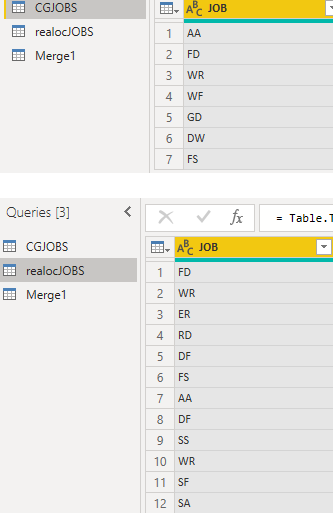
Assuming that you have the data sample like below.
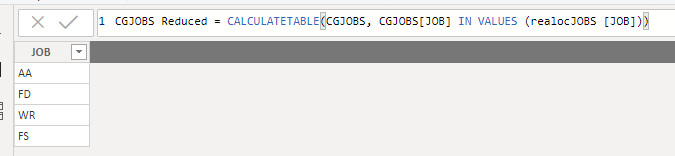
This is the output when we use your dax expression.
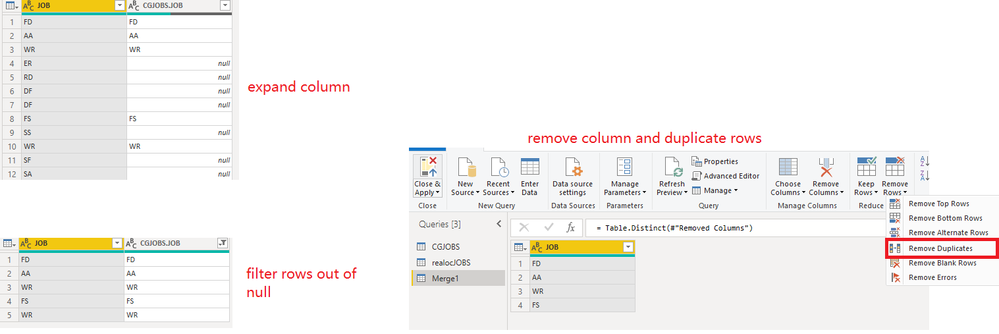
We could achieve the output above in query editor with Merge query like below.
Go to Edit Queries and click Merge Queries.
Then expand column and filter out null rows.
More details, you could refer to the Applied steps in my attachment.
Best Regards,
Cherry
Hi @Fcoatis ,
Have you solved your problem?
If you have solved, please always accept the replies making sense as solution to your question so that people who may have the same question can get the solution directly.
If you still need help, please share your data sample and your desired output so that we could help further on it.
Best Regards,
Cherry
Hi @Fcoatis ,
Have you solved your problem?
If you have solved, please always accept the replies making sense as solution to your question so that people who may have the same question can get the solution directly.
If you still need help, please share your data sample and your desired output so that we could help further on it.
Best Regards,
Cherry
Hi @Fcoatis ,
It seems that you want to achieve the the same output in query editor.
Assuming that you have the data sample like below.
This is the output when we use your dax expression.
We could achieve the output above in query editor with Merge query like below.
Go to Edit Queries and click Merge Queries.
Then expand column and filter out null rows.
More details, you could refer to the Applied steps in my attachment.
Best Regards,
Cherry
Join us in Barcelona for FabCon and SQLCon, the Fabric, Power BI, SQL, and AI community event. Save €200 with code FABCMTY200.
If you love stickers, then you will definitely want to check out our community sticker challenge, Barcelona edition!
Check out the July 2026 Power BI update to learn about new features.
| User | Count |
|---|---|
| 25 | |
| 23 | |
| 19 | |
| 17 | |
| 14 |
| User | Count |
|---|---|
| 24 | |
| 23 | |
| 20 | |
| 20 | |
| 19 |