This time we’re going bigger than ever. Fabric, Power BI, SQL, AI and more. We're covering it all. You won't want to miss it.
Learn moreGet Fabric Certified for FREE during AI Skills Fest. This week only. Secure your voucher now.
Hi Team,
I haven't get result in the below funcion from M-Query.
= Table.AddColumn(Rule1, "Rule2", each if(Text.Start([#"Temp (NTM)"] ,3) <> "DCL" or Text.Start([#"Temp (NTM)"],3) <> "DSA" or Text.Start([#"Temp (NTM)"] ,3) <> "DBC" ))
then "Placed"
else null)
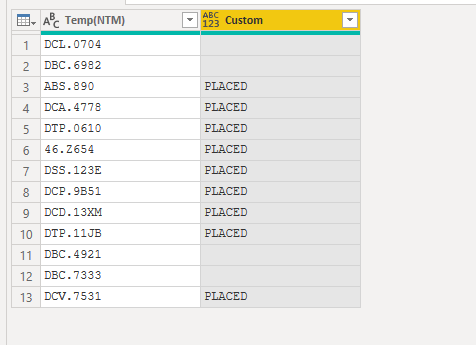
Data look liks this,

KV's
Solved! Go to Solution.
Hi @Anonymous ,
Try this:
= Table.AddColumn(#"Changed Type", "Custom", each if Text.StartsWith([#"Temp(NTM)"], "DCL") then "" else if Text.StartsWith([#"Temp(NTM)"], "DSA") then "" else if Text.StartsWith([#"Temp(NTM)"], "DBC") then "" else "PLACED")
Best Regards,
Liang
If this post helps, then please consider Accept it as the solution to help the other members find it more quickly.
Hi @Anonymous ,
Try this:
= Table.AddColumn(#"Changed Type", "Custom", each if Text.StartsWith([#"Temp(NTM)"], "DCL") then "" else if Text.StartsWith([#"Temp(NTM)"], "DSA") then "" else if Text.StartsWith([#"Temp(NTM)"], "DBC") then "" else "PLACED")
Best Regards,
Liang
If this post helps, then please consider Accept it as the solution to help the other members find it more quickly.
@Anonymous , what should happen, then is missing
Table.AddColumn(Rule1, "Rule2", each if(Text.Start([#"Temp (NTM)"] ,3) <> "DCL" or Text.Start([#"Temp (NTM)"],3) <> "DSA" or Text.Start([#"Temp (NTM)"] ,3) <> "DBC" then <> else <> ))
else is optional
Hi @amitchandak ,
i can't paste my raw data so i shared my post in screenshot.

please help me.
Thanks,
KV's
@Anonymous , I they should be and
Table.AddColumn(Rule1, "Rule2", each if(Text.Start([#"Temp (NTM)"] ,3) <> "DCL" and Text.Start([#"Temp (NTM)"],3) <> "DSA" and Text.Start([#"Temp (NTM)"] ,3) <> "DBC" ))
then "Placed"
else null)
Don't miss out on Data Days, June 15 through August 7. Learn Fabric, Power BI, SQL, AI and more.
Check out the May 2026 Power BI update to learn about new features.
| User | Count |
|---|---|
| 23 | |
| 23 | |
| 21 | |
| 20 | |
| 15 |
| User | Count |
|---|---|
| 58 | |
| 55 | |
| 42 | |
| 26 | |
| 24 |