Join us at FabCon Atlanta from March 16 - 20, 2026, for the ultimate Fabric, Power BI, AI and SQL community-led event. Save $200 with code FABCOMM.
Register now!The Power BI Data Visualization World Championships is back! Get ahead of the game and start preparing now! Learn more
Hi Everyone,
I need some advice or help to write a M syntax that matches a date that fall within a date range in another table.
E.g.
Table 1
ID | Production Date
1 | 2015
Table 2
ID | Production Start | Production End | Project Name
1 | 2008 | 2018 | DodoBird
Basically, if Table 1 production date falls within Table 2. I can merge and expand to give me "DodoBird".
http://radacad.com/dates-between-merge-join-in-power-query
I tried the above method with a subset data and somehow it expanded to about 1 mil rows (the initial row without applying this method was 200+ rows)
Thanks in Advance 🙂
Solved! Go to Solution.
Hi @Rookarumba,
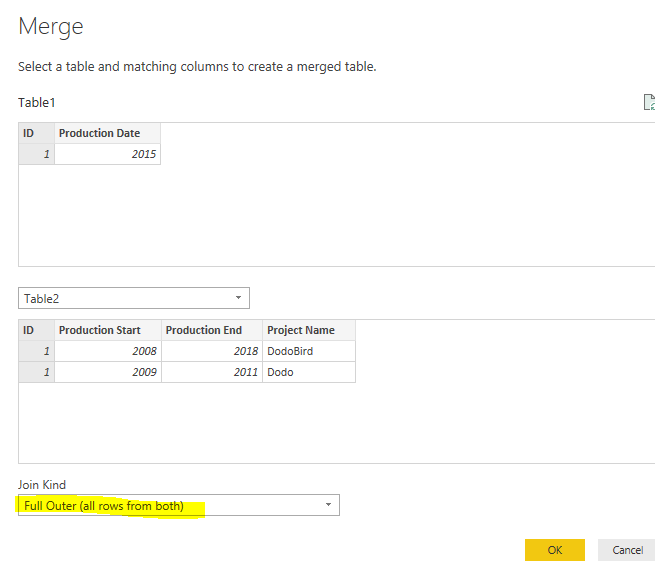
You could first merge two tables with Full Outer Join, then, filter rows based on specific condition.
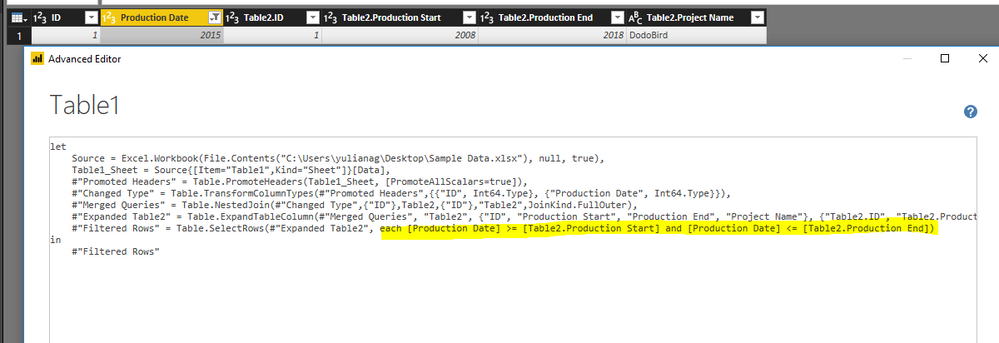
Add below filter code in Advanced editor.
#"Filtered Rows" = Table.SelectRows(#"Expanded Table2", each [Production Date] >= [Table2.Production Start] and [Production Date] <= [Table2.Production End])
Best regards,
Yuliana Gu
Hi @Rookarumba,
You could first merge two tables with Full Outer Join, then, filter rows based on specific condition.
Add below filter code in Advanced editor.
#"Filtered Rows" = Table.SelectRows(#"Expanded Table2", each [Production Date] >= [Table2.Production Start] and [Production Date] <= [Table2.Production End])
Best regards,
Yuliana Gu
What if you wanted to put in fixed dates like 1/1-2018 to 12/31/2018?
The Power BI Data Visualization World Championships is back! Get ahead of the game and start preparing now!
Check out the November 2025 Power BI update to learn about new features.
| User | Count |
|---|---|
| 59 | |
| 43 | |
| 42 | |
| 23 | |
| 17 |
| User | Count |
|---|---|
| 190 | |
| 122 | |
| 96 | |
| 66 | |
| 46 |