cancel
Showing results for 
Search instead for 
Did you mean: 

The Power BI Data Visualization World Championships is back! Get ahead of the game and start preparing now! Learn more

Reply
drburr
Frequent Visitor

M Code issue: conditional cell replacement

I am working on setting up a report for someone that needs to show the number of days between submission and completion of a request form.  The issue that i am running into is that there are 2 completion date columns, one for completion of the overall form and the other for completion of the specific item I need to report on.  All cells in the overall form column are filled in, but only some of the cells for the specific item column are filled in.  I need to overwrite the null values in the second column with the values in the first column.


This is a sample of the data:
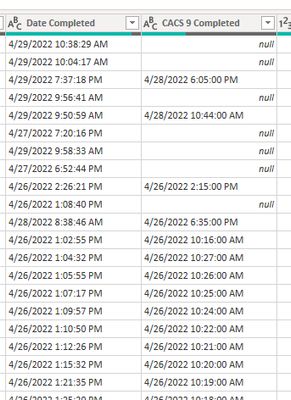
 

drburr_0-1652798432957.png


I have been researching to try to get this working and come up with the below coding in order to make this happen:

= Table.ReplaceValue(#"Changed Type", each [CACS 9 Completed], each if [CACS 9 Completed] = "null" then each [Date Completed] else [CACS 9 Completed], Replacer.ReplaceValue,{CACS 9 Completed})


This returns an error:

Expression.SyntaxError: Token Comma expected.


If I adjust the coding to add in a comma:

= Table.ReplaceValue(#"Changed Type", each [CACS 9 Completed], each if [CACS 9 Completed] = "null", then each [Date Completed] else [CACS 9 Completed], Replacer.ReplaceValue,{CACS 9 Completed})

I get:

Expression.SyntaxError: Token Then expected.


Can anyone help with any insight into where I'm going wrong with either coding items to achieve what I need?

3 REPLIES 3
lbendlin
Super User
Super User


= Table.ReplaceValue(#"Changed Type", each [CACS 9 Completed], each if [CACS 9 Completed] = null then [Date Completed] else [CACS 9 Completed], Replacer.ReplaceValue,{CACS 9 Completed})


lose the double quotes around null, and the second each.  Or use the COALESCE equivalent in Power Query

= Table.ReplaceValue(#"Changed Type", each [CACS 9 Completed], each [CACS 9 Completed] ?? [Date Completed], Replacer.ReplaceValue,{CACS 9 Completed})

I've tried both of your suggestions, and it is still returning token comma error

please post the sample data in usable form.

Helpful resources

Announcements
Power BI DataViz World Championships

Power BI Dataviz World Championships

The Power BI Data Visualization World Championships is back! Get ahead of the game and start preparing now!

December 2025 Power BI Update Carousel

Power BI Monthly Update - December 2025

Check out the December 2025 Power BI Holiday Recap!

FabCon Atlanta 2026 carousel

FabCon Atlanta 2026

Join us at FabCon Atlanta, March 16-20, for the ultimate Fabric, Power BI, AI and SQL community-led event. Save $200 with code FABCOMM.