Join us at FabCon Atlanta from March 16 - 20, 2026, for the ultimate Fabric, Power BI, AI and SQL community-led event. Save $200 with code FABCOMM.
Register now!The Power BI Data Visualization World Championships is back! Get ahead of the game and start preparing now! Learn more
I need to calculate the change in qty between last 7 days and previous 7 days. I am doing that by:
Qty Change 7d = calculate([Returned Qty],DATESBETWEEN('DateTable'[Date],TODAY()-8,TODAY()) - calculate([Returned Qty],DATESBETWEEN('DateTable'[Date],TODAY()-7,TODAY()-15))
I am using a Date Dim table and I do have week names and week numbers in the table. How do I change the DAX to only include last 7 working days (and 7 working days prior to that) & exclude Saturday and Sunday?
Many Thanks.
Solved! Go to Solution.
Hi @Anonymous,
Based on my test, you should be able to follow steps below to get your expected. ![]()
1. Use the formula below to add a calculate column in your DateTable that is 1 for workdays and 0 for non-workdays.
IsWorkday = SWITCH(WEEKDAY('DateTable'[Date]),1,0,7,0,1)
2. User the formula below to create a measure to calculate the workdays between a date and Today.
Count Of Workday =
COUNTROWS (
FILTER (
ALL ( 'DateTable' ),
'DateTable'[Date] <= TODAY ()
&& 'DateTable'[Date] >= MAX ( 'DateTable'[Date] )
&& 'DateTable'[IsWorkday] = 1
)
)
3. Then you should be able to use the formula below to create the measure to calculate the change in qty between last 7 days and previous 7 days.
Qty Change 7d =
CALCULATE (
[Returned Qty],
FILTER ( 'DateTable', [Count Of Workday] > 0 && [Count Of Workday] <= 8 )
)
- CALCULATE (
[Returned Qty],
FILTER ( 'DateTable', [Count Of Workday] > 8 && [Count Of Workday] <= 15 )
)
Regards
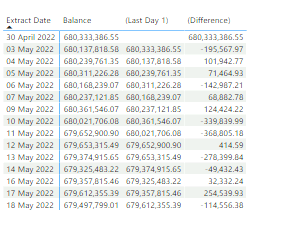
Hi all, I've created a table showing the balance and two measures to show the rpevious days balance and the difference between the two balances.
I'm trying to create a measure which works out the net difference for the last 7 days. Could someone please help?
Hi @Anonymous,
Based on my test, you should be able to follow steps below to get your expected. ![]()
1. Use the formula below to add a calculate column in your DateTable that is 1 for workdays and 0 for non-workdays.
IsWorkday = SWITCH(WEEKDAY('DateTable'[Date]),1,0,7,0,1)
2. User the formula below to create a measure to calculate the workdays between a date and Today.
Count Of Workday =
COUNTROWS (
FILTER (
ALL ( 'DateTable' ),
'DateTable'[Date] <= TODAY ()
&& 'DateTable'[Date] >= MAX ( 'DateTable'[Date] )
&& 'DateTable'[IsWorkday] = 1
)
)
3. Then you should be able to use the formula below to create the measure to calculate the change in qty between last 7 days and previous 7 days.
Qty Change 7d =
CALCULATE (
[Returned Qty],
FILTER ( 'DateTable', [Count Of Workday] > 0 && [Count Of Workday] <= 8 )
)
- CALCULATE (
[Returned Qty],
FILTER ( 'DateTable', [Count Of Workday] > 8 && [Count Of Workday] <= 15 )
)
Regards
Awesome.. Thanks.
The Power BI Data Visualization World Championships is back! Get ahead of the game and start preparing now!
Check out the November 2025 Power BI update to learn about new features.
| User | Count |
|---|---|
| 59 | |
| 43 | |
| 42 | |
| 23 | |
| 17 |
| User | Count |
|---|---|
| 190 | |
| 122 | |
| 96 | |
| 66 | |
| 47 |