Don't miss your chance to take the Fabric Data Engineer (DP-600) exam for FREE! Find out how by attending the DP-600 session on April 23rd (pacific time), live or on-demand.
Learn moreNext up in the FabCon + SQLCon recap series: The roadmap for Microsoft SQL and Maximizing Developer experiences in Fabric. All sessions are available on-demand after the live show. Register now
I am working on setting up a report for someone that needs to show the number of days between submission and completion of a request form. The issue that i am running into is that there are 2 completion date columns, one for completion of the overall form and the other for completion of the specific item I need to report on. All cells in the overall form column are filled in, but only some of the cells for the specific item column are filled in. I need to overwrite the null values in the second column with the values in the first column.
This is a sample of the data:
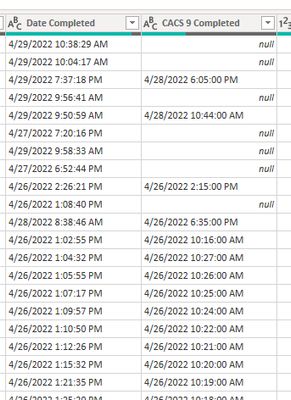
I have been researching to try to get this working and come up with the below coding in order to make this happen:
= Table.ReplaceValue(#"Changed Type", each [CACS 9 Completed], each if [CACS 9 Completed] = "null" then each [Date Completed] else [CACS 9 Completed], Replacer.ReplaceValue,{CACS 9 Completed})
This returns an error:
Expression.SyntaxError: Token Comma expected.
If I adjust the coding to add in a comma:
= Table.ReplaceValue(#"Changed Type", each [CACS 9 Completed], each if [CACS 9 Completed] = "null", then each [Date Completed] else [CACS 9 Completed], Replacer.ReplaceValue,{CACS 9 Completed})
I get:
Expression.SyntaxError: Token Then expected.
Can anyone help with any insight into where I'm going wrong with either coding items to achieve what I need?
= Table.ReplaceValue(#"Changed Type", each [CACS 9 Completed], each if [CACS 9 Completed] = null then [Date Completed] else [CACS 9 Completed], Replacer.ReplaceValue,{CACS 9 Completed})
lose the double quotes around null, and the second each. Or use the COALESCE equivalent in Power Query
= Table.ReplaceValue(#"Changed Type", each [CACS 9 Completed], each [CACS 9 Completed] ?? [Date Completed], Replacer.ReplaceValue,{CACS 9 Completed})
I've tried both of your suggestions, and it is still returning token comma error
please post the sample data in usable form.
If you have recently started exploring Fabric, we'd love to hear how it's going. Your feedback can help with product improvements.
A new Power BI DataViz World Championship is coming this June! Don't miss out on submitting your entry.
Share feedback directly with Fabric product managers, participate in targeted research studies and influence the Fabric roadmap.
| User | Count |
|---|---|
| 48 | |
| 43 | |
| 39 | |
| 19 | |
| 17 |
| User | Count |
|---|---|
| 69 | |
| 63 | |
| 32 | |
| 30 | |
| 23 |