cancel
Showing results for 
Search instead for 
Did you mean: 

Get Fabric Certified for FREE during Fabric Data Days. Don't miss your chance! Request now

Reply
oneuser
New Member

Lost all my DAX formulas when refreshing

Hello,


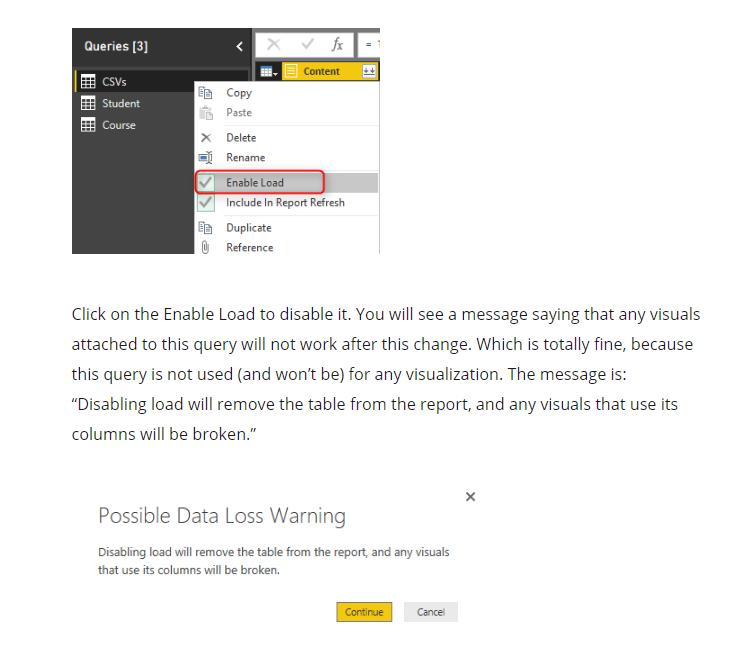
When refreshing my Power BI model, I unchecked "enable load" and "include in report refresh" options to only load some of the model's tables, and then rechecked them again, so I could make a faster refresh (this is a big model). The queries are the SAME in the advanced editor before and after this "partial" refresh.


Now, I am back on the report & table view : every calculated measure, column, grouping from these tables is gone, all my visuals have problems and can't display.


Why is that ? I would like to understand what is going under the hood to avoid that situation in the future, especially since there might be some corrections/change on the model queries that will probably needed.

I have lost hours of work and I am quite disappointed.


Is there a way to "save" or "recall" the DAX formulas and columns I created ?


1 REPLY 1
v-cherch-msft
Microsoft Employee
Microsoft Employee

Hi @oneuser 

I'm afraid there's no better way to recall them.For further,please have a look at this article.1.png

Regards,


Community Support Team _ Cherie Chen
If this post helps, then please consider Accept it as the solution to help the other members find it more quickly.

Helpful resources

Announcements
November Power BI Update Carousel

Power BI Monthly Update - November 2025

Check out the November 2025 Power BI update to learn about new features.

Fabric Data Days Carousel

Fabric Data Days

Advance your Data & AI career with 50 days of live learning, contests, hands-on challenges, study groups & certifications and more!

FabCon Atlanta 2026 carousel

FabCon Atlanta 2026

Join us at FabCon Atlanta, March 16-20, for the ultimate Fabric, Power BI, AI and SQL community-led event. Save $200 with code FABCOMM.

Top Solution Authors
Top Kudoed Authors