cancel
Showing results for 
Search instead for 
Did you mean: 

The Power BI Data Visualization World Championships is back! Get ahead of the game and start preparing now! Learn more

Reply
zenton
Helper II
Helper II

Loop though Iteration based on another column

Hi,


Problem 1
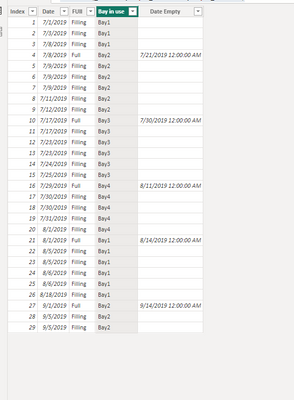
I need help with calculating the Bay in Use column.

Bay in u\Use starts with Bay1
When Column FULL = "Full" Bay in Use = Bay 2, then Bay 3, Bay 4

When Bay 4 is full the cycle starts again back to Bay 1
If possible I would like to make the Bays variable 1 to 4


Problem 2
If the bay is Full go to next bay. If no bays are available Bay in Use = "No Capacity"

The Bay is empty 13 working days after Full status as per Column Date Empty


Note: Running Totals and Loads are calculated in M Query

zenton_1-1675802965564.png

Thanks Rodney

1 ACCEPTED SOLUTION
Anonymous
Not applicable

Hi @zenton 

You can refer to the following column

Bay in use = var _filter=COUNTROWS(FILTER('Table',[Index]<=EARLIER('Table'[Index])&&[FUll]="Full"))
return "Bay"&" "&MOD(_filter,4)+1

Best Regards!

Yolo Zhu

If this post helps, then please consider Accept it as the solution to help the other members find it more quickly.


View solution in original post

3 REPLIES 3
Anonymous
Not applicable

Hi @zenton 

You can create two calculated column


Bay in use = var _filter=COUNTROWS(FILTER('Table',[Index]<=EARLIER('Table'[Index])&&[FUll]="Full"))
return IF(_filter>3,"Bay"&_filter+1-4,"Bay"&_filter+1)

Date Empty = IF([FUll]="Full",[Date]+13)


vxinruzhumsft_0-1675924196647.png


Best Regards!

Yolo Zhu

If this post helps, then please consider Accept it as the solution to help the other members find it more quickly.

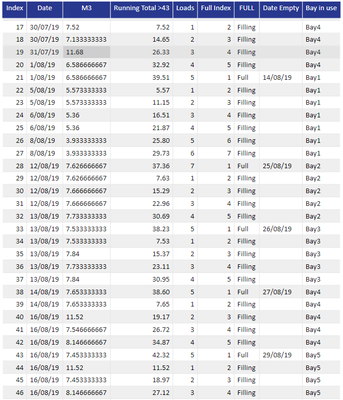
Hi @Anonymous , Thanks fio your help. The calcultion works for the 1st itteration only. Idex row 43 should be Bay1

zenton_0-1675996690845.png

Thanks Rodney

Anonymous
Not applicable

Hi @zenton 

You can refer to the following column

Bay in use = var _filter=COUNTROWS(FILTER('Table',[Index]<=EARLIER('Table'[Index])&&[FUll]="Full"))
return "Bay"&" "&MOD(_filter,4)+1

Best Regards!

Yolo Zhu

If this post helps, then please consider Accept it as the solution to help the other members find it more quickly.


Helpful resources

Announcements
Power BI DataViz World Championships

Power BI Dataviz World Championships

The Power BI Data Visualization World Championships is back! Get ahead of the game and start preparing now!

December 2025 Power BI Update Carousel

Power BI Monthly Update - December 2025

Check out the December 2025 Power BI Holiday Recap!

FabCon Atlanta 2026 carousel

FabCon Atlanta 2026

Join us at FabCon Atlanta, March 16-20, for the ultimate Fabric, Power BI, AI and SQL community-led event. Save $200 with code FABCOMM.