Fabric Data Days starts November 4th!
Advance your Data & AI career with 50 days of live learning, dataviz contests, hands-on challenges, study groups & certifications and more!
Get registered- Power BI forums
- Get Help with Power BI
- Desktop
- Service
- Report Server
- Power Query
- Mobile Apps
- Developer
- DAX Commands and Tips
- Custom Visuals Development Discussion
- Health and Life Sciences
- Power BI Spanish forums
- Translated Spanish Desktop
- Training and Consulting
- Instructor Led Training
- Dashboard in a Day for Women, by Women
- Galleries
- Data Stories Gallery
- Themes Gallery
- Contests Gallery
- Quick Measures Gallery
- Visual Calculations Gallery
- Notebook Gallery
- Translytical Task Flow Gallery
- TMDL Gallery
- R Script Showcase
- Webinars and Video Gallery
- Ideas
- Custom Visuals Ideas (read-only)
- Issues
- Issues
- Events
- Upcoming Events
Get Fabric Certified for FREE during Fabric Data Days. Don't miss your chance! Learn more
- Power BI forums
- Forums
- Get Help with Power BI
- Desktop
- Newly trained ML models don't appear in Power Bi
- Subscribe to RSS Feed
- Mark Topic as New
- Mark Topic as Read
- Float this Topic for Current User
- Bookmark
- Subscribe
- Printer Friendly Page

- Mark as New
- Bookmark
- Subscribe
- Mute
- Subscribe to RSS Feed
- Permalink
- Report Inappropriate Content
Newly trained ML models don't appear in Power Bi
Hey, I'm hoping someone can help me figure this out - it's been a frustrating 8 hours.
My Azure Automated ML models do not appear in Power Bi. When I try to apply AI insights to my data, I get this error notification:
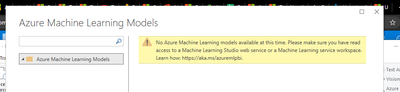
This error message is odd because I'm am the only one + account admin/owner of all Machine Learning workspaces and models. Regardless, I went to the webpage in the error message and followed all of the steps - created an extra read access role for myself for every single resource. Still, nothing.
I see that this was also a posted issue back in 2020 but was never resolved. I'm hoping someone knows what's going on before I move onto trialing another product.
I'm currently using Desktop Bi.
Thanks,
Wes

- Mark as New
- Bookmark
- Subscribe
- Mute
- Subscribe to RSS Feed
- Permalink
- Report Inappropriate Content
Exactly same problem here. Nobody has fixed that?

- Mark as New
- Bookmark
- Subscribe
- Mute
- Subscribe to RSS Feed
- Permalink
- Report Inappropriate Content
Any update guys ? I'm experiencing exact same issue here. the model is healthy, I'm administrator of the workspace. and logged in the same account for both Azure ML and PowerBI. No luck.
Any directions I could give a try ?

- Mark as New
- Bookmark
- Subscribe
- Mute
- Subscribe to RSS Feed
- Permalink
- Report Inappropriate Content
- Mark as New
- Bookmark
- Subscribe
- Mute
- Subscribe to RSS Feed
- Permalink
- Report Inappropriate Content
Same here! On Friday my models were visible but today it doesn't work at all. It's not accessible anymore witihin PowerQuery. My user has even owner role as I'm working on some PoC.
- Mark as New
- Bookmark
- Subscribe
- Mute
- Subscribe to RSS Feed
- Permalink
- Report Inappropriate Content
I have the same problem. Even previously shown models are not working anymore since last week.


- Mark as New
- Bookmark
- Subscribe
- Mute
- Subscribe to RSS Feed
- Permalink
- Report Inappropriate Content
Hi @wesfrank ,
Please check if you have read access to Machine Learning workspace, for more information, see: https://docs.microsoft.com/en-us/power-bi/service-machine-learning-integration
Best Regards,
Lucien Wang

- Mark as New
- Bookmark
- Subscribe
- Mute
- Subscribe to RSS Feed
- Permalink
- Report Inappropriate Content
i use the same id for power bi as azure, i deployed a custom model with the help of a notebook (python sdk v2) and i cant view the model in the azure machine learning models in power bi.
- Mark as New
- Bookmark
- Subscribe
- Mute
- Subscribe to RSS Feed
- Permalink
- Report Inappropriate Content
Tried resetting everything and started from scratch - still no luck.
Helpful resources

Fabric Data Days
Advance your Data & AI career with 50 days of live learning, contests, hands-on challenges, study groups & certifications and more!

Power BI Monthly Update - October 2025
Check out the October 2025 Power BI update to learn about new features.

FabCon Atlanta 2026
Join us at FabCon Atlanta, March 16-20, for the ultimate Fabric, Power BI, AI and SQL community-led event. Save $200 with code FABCOMM.


