Don't miss your chance to take the Fabric Data Engineer (DP-600) exam for FREE! Find out how by attending the DP-600 session on April 23rd (pacific time), live or on-demand.
Learn moreNext up in the FabCon + SQLCon recap series: The roadmap for Microsoft SQL and Maximizing Developer experiences in Fabric. All sessions are available on-demand after the live show. Register now
Hi,
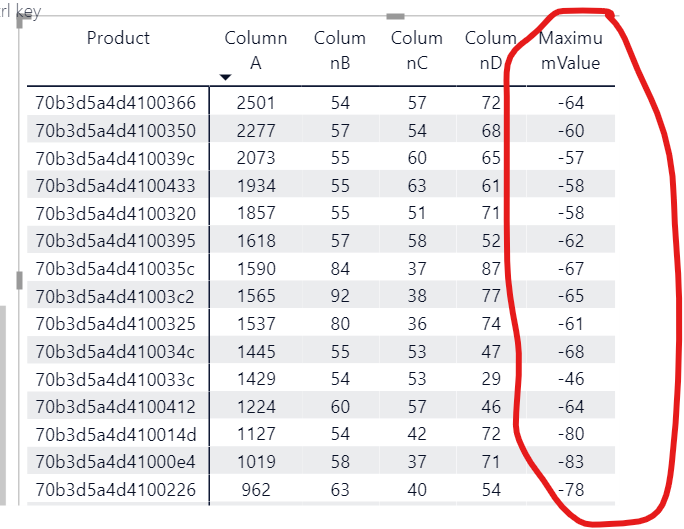
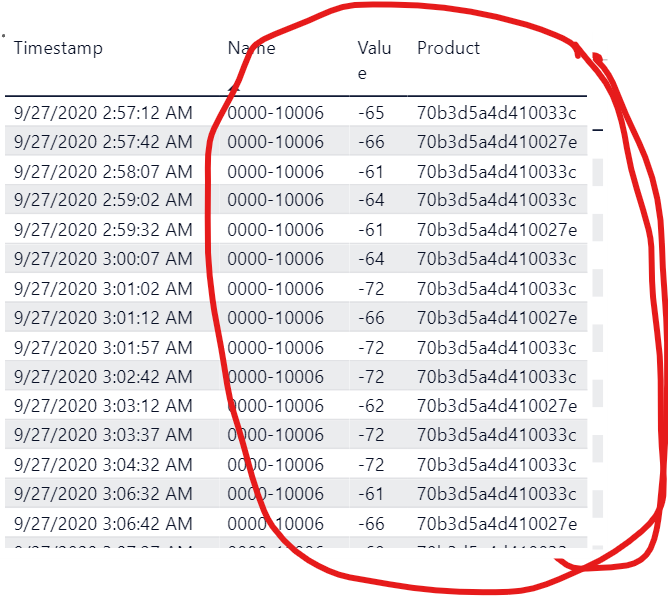
I created a "MaximumValue" column on my first able which pulls the highest "Value" from the second table for a specific Product. However, i also want to add a column to my first table called "NameOfHighestValue" as a DAX function. I used the LookupValue function, but i keep getting an error and wont work. Any help is appreciated.
NameOfHighestValue= lookupvalue(secondtable[name], secondtable[value], max(secontable[value]))
Any guidance will be great. Thank you.
Copying DAX from this post? Click here for a hack to quickly replace it with your own table names
Has this post solved your problem? Please Accept as Solution so that others can find it quickly and to let the community know your problem has been solved.
If you found this post helpful, please give Kudos C
I work as a Microsoft trainer and consultant, specialising in Power BI and Power Query.
www.excelwithallison.com
@miguelsus2000
Here is the formula to add as a column to firsttable to fetch the name:
NameOfHighestValue =
VAR T1 =
FILTER(
secondtable,
secondtable[Product] = firsttable[Product]
)
VAR __MaxValue = MAXX(secondtable[Value],T1)
VAR __Name =
MAXX(
secondtable[Name],
FILTER(
secondtable,
secondtable[Product] = firsttable[Product] && secondtable[Value] = __MaxValue
)
)
RETURN
__Name
________________________
If my answer was helpful, please consider Accept it as the solution to help the other members find it
Click on the Thumbs-Up icon if you like this reply 🙂
⭕ Subscribe and learn Power BI from these videos
⚪ Website ⚪ LinkedIn ⚪ PBI User Group
If you have recently started exploring Fabric, we'd love to hear how it's going. Your feedback can help with product improvements.
A new Power BI DataViz World Championship is coming this June! Don't miss out on submitting your entry.
| User | Count |
|---|---|
| 46 | |
| 43 | |
| 39 | |
| 19 | |
| 15 |
| User | Count |
|---|---|
| 68 | |
| 65 | |
| 31 | |
| 28 | |
| 24 |