FabCon is coming to Atlanta
Join us at FabCon Atlanta from March 16 - 20, 2026, for the ultimate Fabric, Power BI, AI and SQL community-led event. Save $200 with code FABCOMM.
Register now!- Power BI forums
- Get Help with Power BI
- Desktop
- Service
- Report Server
- Power Query
- Mobile Apps
- Developer
- DAX Commands and Tips
- Custom Visuals Development Discussion
- Health and Life Sciences
- Power BI Spanish forums
- Translated Spanish Desktop
- Training and Consulting
- Instructor Led Training
- Dashboard in a Day for Women, by Women
- Galleries
- Data Stories Gallery
- Themes Gallery
- Contests Gallery
- QuickViz Gallery
- Quick Measures Gallery
- Visual Calculations Gallery
- Notebook Gallery
- Translytical Task Flow Gallery
- TMDL Gallery
- R Script Showcase
- Webinars and Video Gallery
- Ideas
- Custom Visuals Ideas (read-only)
- Issues
- Issues
- Events
- Upcoming Events
The Power BI Data Visualization World Championships is back! Get ahead of the game and start preparing now! Learn more
- Power BI forums
- Forums
- Get Help with Power BI
- Desktop
- Re: Lookup a value in other table - DAX
- Subscribe to RSS Feed
- Mark Topic as New
- Mark Topic as Read
- Float this Topic for Current User
- Bookmark
- Subscribe
- Printer Friendly Page


- Mark as New
- Bookmark
- Subscribe
- Mute
- Subscribe to RSS Feed
- Permalink
- Report Inappropriate Content
Lookup a value in other table - DAX
I have a table A with duplicate values in one column. I want to run a vlookup in another table B, and want to return 'TRUE' if it exists in table A. eg below-
TABLE A ::
ID amount
1 10
2 15
1 25
3 38
TABLE B ::
1 TRUE
4 FALSE
Someone please help ASAP. Thanks a ton!
Abhishek

- Mark as New
- Bookmark
- Subscribe
- Mute
- Subscribe to RSS Feed
- Permalink
- Report Inappropriate Content
HI @abhitiwa,
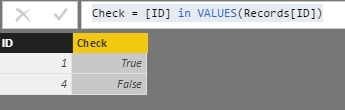
You can add a calculated column with below formula to check exist item based on other table:
Check = [ID] in VALUES(Records[ID])
Regards,
Xiaoxin Sheng


- Mark as New
- Bookmark
- Subscribe
- Mute
- Subscribe to RSS Feed
- Permalink
- Report Inappropriate Content
@Anonymous
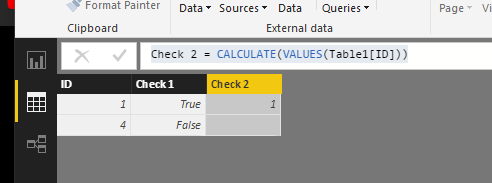
That's great. Another way is to wrap VALUES() into a CALCULATE() for context transition.
*** works with relationship only, though


- Mark as New
- Bookmark
- Subscribe
- Mute
- Subscribe to RSS Feed
- Permalink
- Report Inappropriate Content
=calculate(countrows(tableA), filter(tableA, tableA[I'd] =tableB[I'd])) >0
Regards
Zubair
Please try my custom visuals
- Mark as New
- Bookmark
- Subscribe
- Mute
- Subscribe to RSS Feed
- Permalink
- Report Inappropriate Content
- Mark as New
- Bookmark
- Subscribe
- Mute
- Subscribe to RSS Feed
- Permalink
- Report Inappropriate Content
If @abhitiwa wants to just check if ID exists then it should be >0
Else if he is checking for duplicates then it should be>1
Regards
Zubair
Please try my custom visuals
- Mark as New
- Bookmark
- Subscribe
- Mute
- Subscribe to RSS Feed
- Permalink
- Report Inappropriate Content
thanks guys for such a quick response. @Zubair_Muhammad your solution doesn't give any error, but it only returns FALSE as the value. However, most of the values are present in Table A. Can you please look?
is_sell = CALCULATE(COUNTROWS(prop),FILTER(prop,prop[user_id]=VALUE(c_users[id]))) > 0
- Mark as New
- Bookmark
- Subscribe
- Mute
- Subscribe to RSS Feed
- Permalink
- Report Inappropriate Content
If it is a calculated colum, remove VALUES
Simply use
C_users[I'd]
Regards
Zubair
Please try my custom visuals
- Mark as New
- Bookmark
- Subscribe
- Mute
- Subscribe to RSS Feed
- Permalink
- Report Inappropriate Content
Hi
yes, its a calculated column. And, I have used VALUE (not VALUES) to convert Text (c_users) to number. Not sure what am I missing here. I then tried to change the data type of this field to Number from Text, and then I receive a diff error as below -
this expression refers to 'sddsaggv-fgjkg-gfgmk' which has an error
- Mark as New
- Bookmark
- Subscribe
- Mute
- Subscribe to RSS Feed
- Permalink
- Report Inappropriate Content
What happens when you wrap both IDs in VALUE() ?
is_sell =
CALCULATE (
    COUNTROWS ( prop ),
    FILTER ( prop, VALUE (prop[user_id]) = VALUE ( c_users[id] ) )
)
    > 0
- Mark as New
- Bookmark
- Subscribe
- Mute
- Subscribe to RSS Feed
- Permalink
- Report Inappropriate Content
- Mark as New
- Bookmark
- Subscribe
- Mute
- Subscribe to RSS Feed
- Permalink
- Report Inappropriate Content


- Mark as New
- Bookmark
- Subscribe
- Mute
- Subscribe to RSS Feed
- Permalink
- Report Inappropriate Content
One way to do this would be:
- Start on Table B within your Query Editor
- Choose Merge Queries on the Home tab and select Table A as the table to merge, selecting ID as the relationship
- Join Kind = Left Outer
- This will return a new column into Table B called "TABLE A"
- Add a custom column with this statement: if Table.First([TABLE A]) = null then "FALSE" else "TRUE"
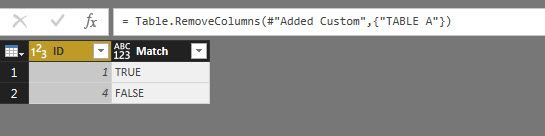
- Delete the "TABLE A" column, and your table should now look like this:
let
Source = Table.FromRows(Json.Document(Binary.Decompress(Binary.FromText("i45WMlSK1YlWMlGKjQUA", BinaryEncoding.Base64), Compression.Deflate)), let _t = ((type text) meta [Serialized.Text = true]) in type table [ID = _t]),
#"Changed Type" = Table.TransformColumnTypes(Source,{{"ID", Int64.Type}}),
#"Merged Queries" = Table.NestedJoin(#"Changed Type",{"ID"},#"TABLE A",{"ID"},"TABLE A",JoinKind.LeftOuter),
#"Added Custom" = Table.AddColumn(#"Merged Queries", "Match", each if Table.First([TABLE A]) = null then "FALSE" else "TRUE"),
#"Removed Columns" = Table.RemoveColumns(#"Added Custom",{"TABLE A"})
in
#"Removed Columns"
Helpful resources

Power BI Dataviz World Championships
The Power BI Data Visualization World Championships is back! Get ahead of the game and start preparing now!

Power BI Monthly Update - December 2025
Check out the December 2025 Power BI Holiday Recap!

FabCon Atlanta 2026
Join us at FabCon Atlanta, March 16-20, for the ultimate Fabric, Power BI, AI and SQL community-led event. Save $200 with code FABCOMM.

| User | Count |
|---|---|
| 38 | |
| 36 | |
| 33 | |
| 30 | |
| 28 |


| User | Count |
|---|---|
| 126 | |
| 88 | |
| 78 | |
| 66 | |
| 65 |


