Join us at FabCon Atlanta from March 16 - 20, 2026, for the ultimate Fabric, Power BI, AI and SQL community-led event. Save $200 with code FABCOMM.
Register now!The Power BI Data Visualization World Championships is back! Get ahead of the game and start preparing now! Learn more
Hello Community,
I have 2 tables and in Table-1 i have columns called ID, Name, address and in second table i have ID column and i want to do lookup on table-2 and create a calculated column in table-1 that if any ID matching then i need "IDYes" and if its not matching i need "IDNo".
| Table-1 | ||
| ID | Name | Address |
| 1 | Abc | 123fva |
| 1 | def | 4rfsa |
| 2 | Abcd | asdd |
| 4 | josg | iedsd |
| Table-2 |
| ID |
| 1 |
| 2 |
| 3 |
| 5 |
| Out put | |||
| Table-1 | |||
| ID | Name | Address | New Column |
| 1 | Abc | 123fva | 1Yes |
| 1 | def | 4rfsa | 1Yes |
| 2 | Abcd | asdd | 2Yes |
| 4 | josg | iedsd | 4No |
How can i achieve this?
Thanks
Hi,
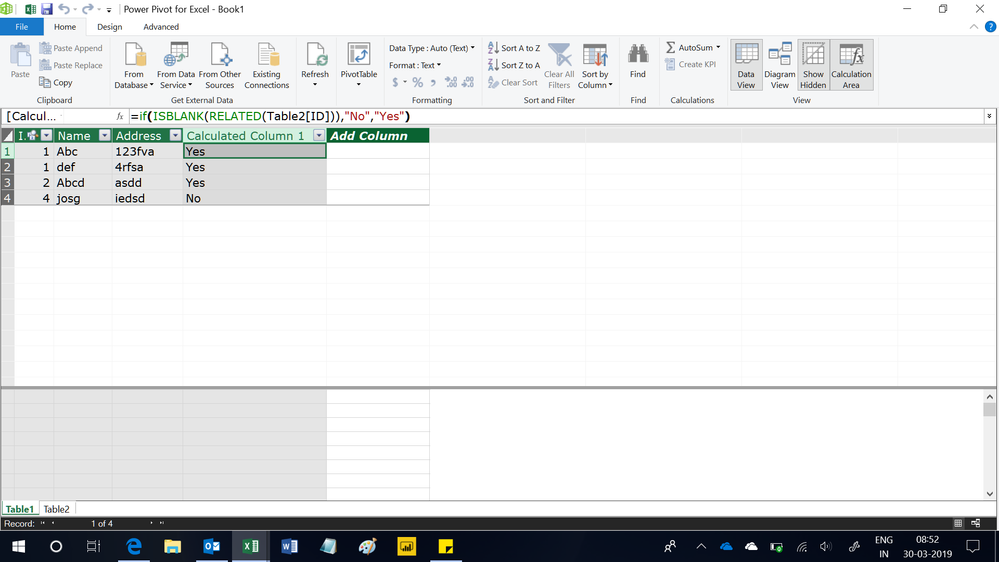
Create a relationship from the ID column of Table1 to the ID column of Table2. In Table, write this calculated column formula
=if(ISBLANK(RELATED(Table2[ID])),"No","Yes")
Hope this helps.
Hello,
You can try something like this:
Its is not taking 2nd table. Table2[ID]
@ElenaN wrote:Hello,
You can try something like this:
Column = IF(LOOKUPVALUE(Table1[ID], Table2[ID], Table1[ID]) = Table1[ID], Table1[ID]&"Yes", Table1[ID]&"No")Regards,ElenaN
@ElenaN wrote:Hello,
You can try something like this:
Column = IF(LOOKUPVALUE(Table1[ID], Table2[ID], Table1[ID]) = Table1[ID], Table1[ID]&"Yes", Table1[ID]&"No")Regards,ElenaN
Hello,
I am sorry but i do not understand your reply. What error message do you receive?
Regards,
ElenaN
The Power BI Data Visualization World Championships is back! Get ahead of the game and start preparing now!
| User | Count |
|---|---|
| 39 | |
| 37 | |
| 33 | |
| 33 | |
| 29 |
| User | Count |
|---|---|
| 132 | |
| 90 | |
| 78 | |
| 66 | |
| 65 |