This time we’re going bigger than ever. Fabric, Power BI, SQL, AI and more. We're covering it all. You won't want to miss it.
Learn moreJoin the FabCon + SQLCon recap series. Up next: Power BI, Real-Time Intelligence, IQ and AI, and Data Factory take center stage. All sessions are available on-demand after the live show. Register now
Hello Community,
I have 2 tables and in Table-1 i have columns called ID, Name, address and in second table i have ID column and i want to do lookup on table-2 and create a calculated column in table-1 that if any ID matching then i need "IDYes" and if its not matching i need "IDNo".
| Table-1 | ||
| ID | Name | Address |
| 1 | Abc | 123fva |
| 1 | def | 4rfsa |
| 2 | Abcd | asdd |
| 4 | josg | iedsd |
| Table-2 |
| ID |
| 1 |
| 2 |
| 3 |
| 5 |
| Out put | |||
| Table-1 | |||
| ID | Name | Address | New Column |
| 1 | Abc | 123fva | 1Yes |
| 1 | def | 4rfsa | 1Yes |
| 2 | Abcd | asdd | 2Yes |
| 4 | josg | iedsd | 4No |
How can i achieve this?
Thanks
Hi,
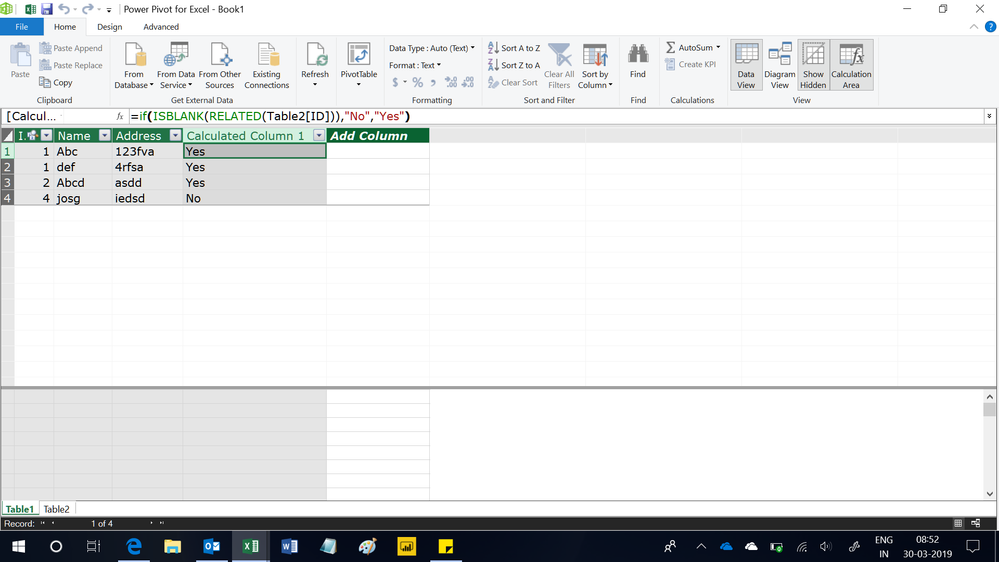
Create a relationship from the ID column of Table1 to the ID column of Table2. In Table, write this calculated column formula
=if(ISBLANK(RELATED(Table2[ID])),"No","Yes")
Hope this helps.
Hello,
You can try something like this:
Its is not taking 2nd table. Table2[ID]
@ElenaN wrote:Hello,
You can try something like this:
Column = IF(LOOKUPVALUE(Table1[ID], Table2[ID], Table1[ID]) = Table1[ID], Table1[ID]&"Yes", Table1[ID]&"No")Regards,ElenaN
@ElenaN wrote:Hello,
You can try something like this:
Column = IF(LOOKUPVALUE(Table1[ID], Table2[ID], Table1[ID]) = Table1[ID], Table1[ID]&"Yes", Table1[ID]&"No")Regards,ElenaN
Hello,
I am sorry but i do not understand your reply. What error message do you receive?
Regards,
ElenaN
Check out the April 2026 Power BI update to learn about new features.
If you have recently started exploring Fabric, we'd love to hear how it's going. Your feedback can help with product improvements.
A new Power BI DataViz World Championship is coming this June! Don't miss out on submitting your entry.
| User | Count |
|---|---|
| 39 | |
| 37 | |
| 31 | |
| 23 | |
| 15 |
| User | Count |
|---|---|
| 76 | |
| 59 | |
| 32 | |
| 31 | |
| 26 |