Join us at FabCon Atlanta from March 16 - 20, 2026, for the ultimate Fabric, Power BI, AI and SQL community-led event. Save $200 with code FABCOMM.
Register now!The Power BI Data Visualization World Championships is back! It's time to submit your entry. Live now!
Hello Community,
I have 2 tables and in Table-1 i have columns called ID, Name, address and in second table i have ID column and i want to do lookup on table-2 and create a calculated column in table-1 that if any ID matching then i need "IDYes" and if its not matching i need "IDNo".
| Table-1 | ||
| ID | Name | Address |
| 1 | Abc | 123fva |
| 1 | def | 4rfsa |
| 2 | Abcd | asdd |
| 4 | josg | iedsd |
| Table-2 |
| ID |
| 1 |
| 2 |
| 3 |
| 5 |
| Out put | |||
| Table-1 | |||
| ID | Name | Address | New Column |
| 1 | Abc | 123fva | 1Yes |
| 1 | def | 4rfsa | 1Yes |
| 2 | Abcd | asdd | 2Yes |
| 4 | josg | iedsd | 4No |
How can i achieve this?
Thanks
Hi,
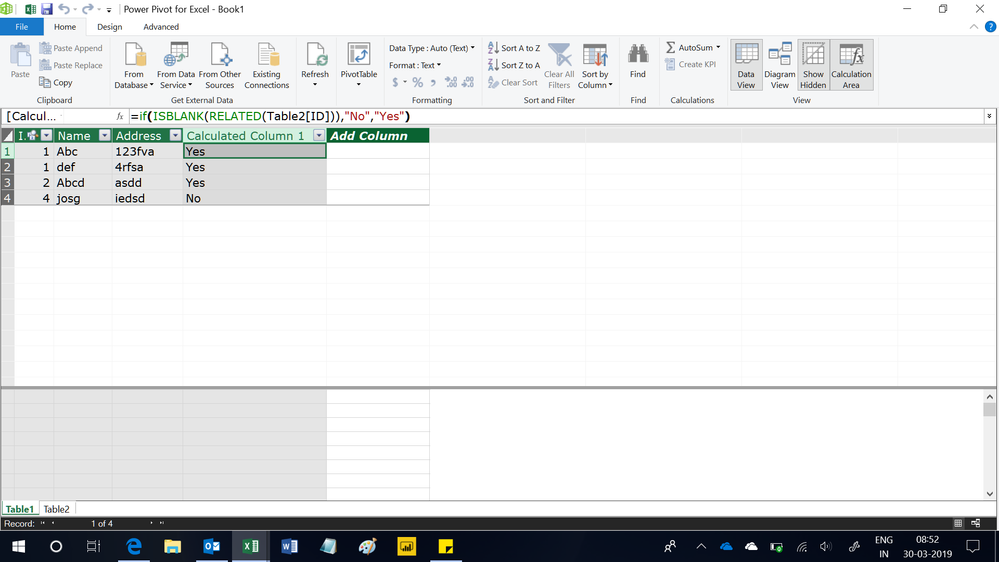
Create a relationship from the ID column of Table1 to the ID column of Table2. In Table, write this calculated column formula
=if(ISBLANK(RELATED(Table2[ID])),"No","Yes")
Hope this helps.
Hello,
You can try something like this:
Its is not taking 2nd table. Table2[ID]
@ElenaN wrote:Hello,
You can try something like this:
Column = IF(LOOKUPVALUE(Table1[ID], Table2[ID], Table1[ID]) = Table1[ID], Table1[ID]&"Yes", Table1[ID]&"No")Regards,ElenaN
@ElenaN wrote:Hello,
You can try something like this:
Column = IF(LOOKUPVALUE(Table1[ID], Table2[ID], Table1[ID]) = Table1[ID], Table1[ID]&"Yes", Table1[ID]&"No")Regards,ElenaN
Hello,
I am sorry but i do not understand your reply. What error message do you receive?
Regards,
ElenaN
The Power BI Data Visualization World Championships is back! It's time to submit your entry.
Check out the January 2026 Power BI update to learn about new features.
| User | Count |
|---|---|
| 61 | |
| 49 | |
| 30 | |
| 25 | |
| 23 |
| User | Count |
|---|---|
| 128 | |
| 102 | |
| 56 | |
| 39 | |
| 31 |