Don't miss your chance to take the Fabric Data Engineer (DP-600) exam for FREE! Find out how by watching the DP-600 session on-demand now through April 28th.
Learn moreJoin the FabCon + SQLCon recap series. Up next: Power BI, Real-Time Intelligence, IQ and AI, and Data Factory take center stage. All sessions are available on-demand after the live show. Register now
Hi,
I have a problem with loading data in one particular file. I have several tables loaded from Oracle server in DirectQuery mode and when I try to import anything - from simple excel file to another table from Oracle server I just get stuck in the loading screen.
When I open a new file and load the same data there it all works well.
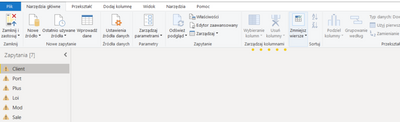
In my main file, when I open Query Editor I see something like this:
I think this might me a problem, however, I have no idea how to fix it.
I would be grateful for any the help - unfortunetly I cannot delete the file and move onto the new one.
The exclamation marks indicate that loading of the preview for these queries has been interrupted (did you get impatient?). Select each query one by one, and refresh its preview. After all are refreshed, make a small change somewhere and then close and apply.
I left refreshing for several hours and nothing has changed. Stuck as it previously was
Do you see the same issue when starting fresh (in a separate pbix), with just a single import table from Oracle?
Sorry, I forgot to answer.
No, the issue was only with this file. No matter what we tried the loading was always stuck. When we started a new file, imported one table, then next one, then next one - there was no problem.
In the end we just created a new file
Check out the April 2026 Power BI update to learn about new features.
If you have recently started exploring Fabric, we'd love to hear how it's going. Your feedback can help with product improvements.
A new Power BI DataViz World Championship is coming this June! Don't miss out on submitting your entry.
| User | Count |
|---|---|
| 48 | |
| 40 | |
| 38 | |
| 20 | |
| 17 |
| User | Count |
|---|---|
| 68 | |
| 65 | |
| 30 | |
| 26 | |
| 25 |