cancel
Showing results for 
Search instead for 
Did you mean: 

Data Days is here! Join us now for 60+ days of learning, challenges, and connection. Learn more

Reply
ronaldbalza2023
Continued Contributor

Loading SharePoint folder files without combining - efficient way

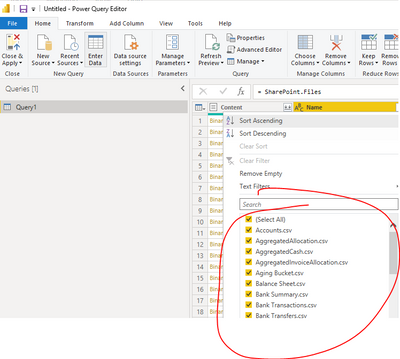
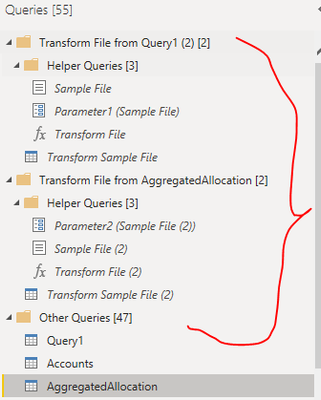
Hi everyone, how can load files in sharepoint folder without combining them? Every file has its own table/columns/content and all of them reside in the sharepoint folder. Im asking this as I think there should be a more efficient way to load tables to my data model rather than creating a new connection for each one of the files. Is this even possible? Copying creates an enormous transformation file. Thanks in advance 🙂

ronaldbalza2023_0-1653612291215.png

ronaldbalza2023_0-1653611557948.png


3 REPLIES 3
danextian
Super User
Super User

Hi @ronaldbalza2023 ,

You can have a single main query that is connected to a Sharepoint Folder and reference to that query to that connect to each file. This main query doesn't need to be loaded to the data model.

Query: SharepointMain

let
    Source = SharePoint.Files(SharepointSite, [ApiVersion = 15])
in
    Source 


ReferencingQuery:

let
    Source = SharePointMain,
    #"Filtered Rows" = Table.SelectRows(Source, each [Name] = "MyFile.xlsx"),
   
in
    Source 


Dane Belarmino | Microsoft MVP | Proud to be a Super User!

Did I answer your question? Mark my post as a solution!


"Tell me and I’ll forget; show me and I may remember; involve me and I’ll understand."
Need Power BI consultation, get in touch with me on LinkedIn or hire me on UpWork.
Learn with me on YouTube @DAXJutsu or follow my page on Facebook @DAXJutsuPBI.

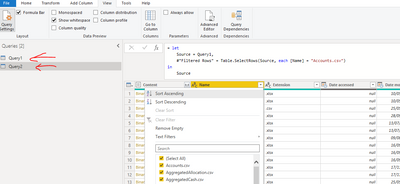
Hi @danextian thanks for taking the time on this. However, nothing really happen.

ronaldbalza2023_0-1653626352363.png


Hi @ronaldbalza2023 ,


What do you mean by nothing? If you wan to connect to a file, you can just click on Binary right before the filename. Power BI then will try to figure out what the file type is and use the necessary data source function (Csv.Document, Excel.Workbook, etc).


Dane Belarmino | Microsoft MVP | Proud to be a Super User!

Did I answer your question? Mark my post as a solution!


"Tell me and I’ll forget; show me and I may remember; involve me and I’ll understand."
Need Power BI consultation, get in touch with me on LinkedIn or hire me on UpWork.
Learn with me on YouTube @DAXJutsu or follow my page on Facebook @DAXJutsuPBI.

Helpful resources

Announcements
Fabric Data Days is here Carousel

Fabric Data Days 2026

Don't miss out on Data Days, June 15 through August 7. Learn Fabric, Power BI, SQL, AI and more.

May Power BI Update Carousel

Power BI Monthly Update - May 2026

Check out the May 2026 Power BI update to learn about new features.

Power BI DataViz World Championships carousel

Power BI DataViz World Championships - June 2026

A new Power BI DataViz World Championship is coming this June! Don't miss out on submitting your entry.