Join us at FabCon Atlanta from March 16 - 20, 2026, for the ultimate Fabric, Power BI, AI and SQL community-led event. Save $200 with code FABCOMM.
Register now!The Power BI Data Visualization World Championships is back! It's time to submit your entry. Live now!
Hello everyone,
I'm new to this community so I hope that I got the location right..
New in PowerBI, despite a few hours of research I can not find the solution.
I want to load multiple tables from my database with Power Query.
Situation :
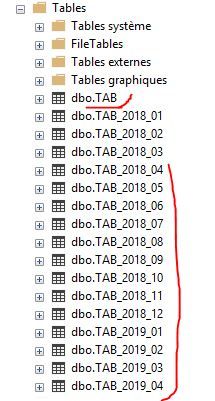
Every end of the day, my table TAB which contains the daily productions data is archived with the name TAB_YYYY_MM, with YYYY curent year and MM curent month.
All the data of the month MM are stored in this table, for example for April 2019, the archive will be TAB_2019_04, for June-2018 => TAB_2018_06
With this concept, can someone help me how to load the rolling 12 months tables of history from curent date, in a dynamic way of course.
For today for example, it will be tables TAB_2018_04, TAB_2018_05, ..., TAB_2019_04 and TAB
Thanks for your help.
Solved! Go to Solution.
@BBL
You can use the concept of "Invoking Custom Functions" to achieve this.
I tried using Excel files and it works fine. You can use the similar approach with your database.
Create custom function as -
(YearMonth as text) =>
let
Source = Excel.Workbook(File.Contents("C:\Users\VMakhij\" & YearMonth & ".xlsx"), null, true),
Sheet1_Sheet = Source{[Item="Sheet1",Kind="Sheet"]}[Data],
#"Promoted Headers" = Table.PromoteHeaders(Sheet1_Sheet, [PromoteAllScalars=true]),
#"Changed Type" = Table.TransformColumnTypes(#"Promoted Headers",{{"Category", type text}, {"YearMonth", Int64.Type}, {"Sales", Int64.Type}})
in
#"Changed Type"
Next, create your table which will be using the above function -
let
StartDate= #date(2018,01,01),
EndDate = DateTime.LocalNow(),
DateList = List.Dates(StartDate, Number.From(EndDate)- Number.From(StartDate)+1 ,#duration(1,0,0,0)),
#"Sorted Items" = List.Sort(DateList,Order.Ascending),
#"Converted to Table" = Table.FromList(#"Sorted Items", Splitter.SplitByNothing(), null, null, ExtraValues.Error),
#"Changed Type" = Table.TransformColumnTypes(#"Converted to Table",{{"Column1", type date}}),
#"Renamed Columns" = Table.RenameColumns(#"Changed Type",{{"Column1", "Date"}}),
#"Added Custom" = Table.AddColumn(#"Renamed Columns", "YearMonth", each Number.ToText(Date.Year([Date])) &
Text.PadStart(Number.ToText(Date.Month([Date])),2,"0")),
#"Changed Type1" = Table.TransformColumnTypes(#"Added Custom",{{"YearMonth", Int64.Type}}),
#"Removed Columns" = Table.RemoveColumns(#"Changed Type1",{"Date"}),
#"Removed Duplicates" = Table.Distinct(#"Removed Columns"),
YearMonth = #"Removed Duplicates"[YearMonth],
#"Sorted Items1" = List.Sort(YearMonth,Order.Descending),
#"Converted to Table1" = Table.FromList(#"Sorted Items1", Splitter.SplitByNothing(), null, null, ExtraValues.Error),
#"Renamed Columns1" = Table.RenameColumns(#"Converted to Table1",{{"Column1", "YearMonth"}}),
#"Added Index" = Table.AddIndexColumn(#"Renamed Columns1", "Index", 1, 1),
#"Filtered Rows" = Table.SelectRows(#"Added Index", each [Index] < 13),
#"Changed Type2" = Table.TransformColumnTypes(#"Filtered Rows",{{"YearMonth", type text}}),
#"Invoked Custom Function" = Table.AddColumn(#"Changed Type2", "DataColumn", each Sheet1([YearMonth])),
#"Expanded DataColumn" = Table.ExpandTableColumn(#"Invoked Custom Function", "DataColumn", {"Category", "YearMonth", "Sales"}, {"Category", "YearMonth.1", "Sales"})
in
#"Expanded DataColumn"
I wanted to share the PBIX file with you, but don't have a way to upload it from my corporate network.
Regards
Vicky
up
@BBL
You can use the concept of "Invoking Custom Functions" to achieve this.
I tried using Excel files and it works fine. You can use the similar approach with your database.
Create custom function as -
(YearMonth as text) =>
let
Source = Excel.Workbook(File.Contents("C:\Users\VMakhij\" & YearMonth & ".xlsx"), null, true),
Sheet1_Sheet = Source{[Item="Sheet1",Kind="Sheet"]}[Data],
#"Promoted Headers" = Table.PromoteHeaders(Sheet1_Sheet, [PromoteAllScalars=true]),
#"Changed Type" = Table.TransformColumnTypes(#"Promoted Headers",{{"Category", type text}, {"YearMonth", Int64.Type}, {"Sales", Int64.Type}})
in
#"Changed Type"
Next, create your table which will be using the above function -
let
StartDate= #date(2018,01,01),
EndDate = DateTime.LocalNow(),
DateList = List.Dates(StartDate, Number.From(EndDate)- Number.From(StartDate)+1 ,#duration(1,0,0,0)),
#"Sorted Items" = List.Sort(DateList,Order.Ascending),
#"Converted to Table" = Table.FromList(#"Sorted Items", Splitter.SplitByNothing(), null, null, ExtraValues.Error),
#"Changed Type" = Table.TransformColumnTypes(#"Converted to Table",{{"Column1", type date}}),
#"Renamed Columns" = Table.RenameColumns(#"Changed Type",{{"Column1", "Date"}}),
#"Added Custom" = Table.AddColumn(#"Renamed Columns", "YearMonth", each Number.ToText(Date.Year([Date])) &
Text.PadStart(Number.ToText(Date.Month([Date])),2,"0")),
#"Changed Type1" = Table.TransformColumnTypes(#"Added Custom",{{"YearMonth", Int64.Type}}),
#"Removed Columns" = Table.RemoveColumns(#"Changed Type1",{"Date"}),
#"Removed Duplicates" = Table.Distinct(#"Removed Columns"),
YearMonth = #"Removed Duplicates"[YearMonth],
#"Sorted Items1" = List.Sort(YearMonth,Order.Descending),
#"Converted to Table1" = Table.FromList(#"Sorted Items1", Splitter.SplitByNothing(), null, null, ExtraValues.Error),
#"Renamed Columns1" = Table.RenameColumns(#"Converted to Table1",{{"Column1", "YearMonth"}}),
#"Added Index" = Table.AddIndexColumn(#"Renamed Columns1", "Index", 1, 1),
#"Filtered Rows" = Table.SelectRows(#"Added Index", each [Index] < 13),
#"Changed Type2" = Table.TransformColumnTypes(#"Filtered Rows",{{"YearMonth", type text}}),
#"Invoked Custom Function" = Table.AddColumn(#"Changed Type2", "DataColumn", each Sheet1([YearMonth])),
#"Expanded DataColumn" = Table.ExpandTableColumn(#"Invoked Custom Function", "DataColumn", {"Category", "YearMonth", "Sales"}, {"Category", "YearMonth.1", "Sales"})
in
#"Expanded DataColumn"
I wanted to share the PBIX file with you, but don't have a way to upload it from my corporate network.
Regards
Vicky
| User | Count |
|---|---|
| 51 | |
| 40 | |
| 35 | |
| 23 | |
| 22 |
| User | Count |
|---|---|
| 133 | |
| 99 | |
| 57 | |
| 39 | |
| 38 |