cancel
Showing results for 
Search instead for 
Did you mean: 

The Power BI Data Visualization World Championships is back! Get ahead of the game and start preparing now! Learn more

Reply
BBL
Frequent Visitor

Load multiple tables in Power Query with loop

Hello everyone,

I'm new to this community so I hope that I got the location right..

New in PowerBI, despite a few hours of research I can not find the solution.

I want to load multiple tables from my database with Power Query.

Situation :

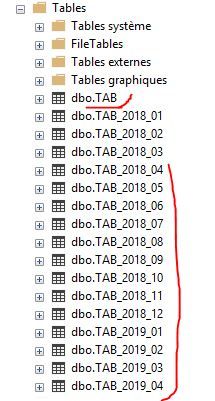
Every end of the day, my table TAB which contains the daily productions data is archived with the name TAB_YYYY_MM, with YYYY curent year and MM curent month.
All the data of the month MM are stored in this table, for example for April 2019, the archive will be TAB_2019_04, for June-2018 => TAB_2018_06


Capture.JPG


With this concept, can someone help me how to load the rolling 12 months tables of history from curent date, in a dynamic way of course.
For today for example, it will be tables TAB_2018_04, TAB_2018_05, ..., TAB_2019_04 and TAB


Thanks for your help.

1 ACCEPTED SOLUTION
Anonymous
Not applicable

@BBL 
You can use the concept of "Invoking Custom Functions" to achieve this.

I tried using Excel files and it works fine. You can use the similar approach with your database.


Create custom function as -

(YearMonth as text) =>
let
Source = Excel.Workbook(File.Contents("C:\Users\VMakhij\" & YearMonth & ".xlsx"), null, true),
Sheet1_Sheet = Source{[Item="Sheet1",Kind="Sheet"]}[Data],
#"Promoted Headers" = Table.PromoteHeaders(Sheet1_Sheet, [PromoteAllScalars=true]),
#"Changed Type" = Table.TransformColumnTypes(#"Promoted Headers",{{"Category", type text}, {"YearMonth", Int64.Type}, {"Sales", Int64.Type}})
in
#"Changed Type"


Next, create your table which will be using the above function -

let
StartDate= #date(2018,01,01), 
EndDate = DateTime.LocalNow(), 
DateList = List.Dates(StartDate, Number.From(EndDate)- Number.From(StartDate)+1 ,#duration(1,0,0,0)),
#"Sorted Items" = List.Sort(DateList,Order.Ascending),
#"Converted to Table" = Table.FromList(#"Sorted Items", Splitter.SplitByNothing(), null, null, ExtraValues.Error),
#"Changed Type" = Table.TransformColumnTypes(#"Converted to Table",{{"Column1", type date}}),
#"Renamed Columns" = Table.RenameColumns(#"Changed Type",{{"Column1", "Date"}}),
#"Added Custom" = Table.AddColumn(#"Renamed Columns", "YearMonth", each Number.ToText(Date.Year([Date])) &
Text.PadStart(Number.ToText(Date.Month([Date])),2,"0")),
#"Changed Type1" = Table.TransformColumnTypes(#"Added Custom",{{"YearMonth", Int64.Type}}),
#"Removed Columns" = Table.RemoveColumns(#"Changed Type1",{"Date"}),
#"Removed Duplicates" = Table.Distinct(#"Removed Columns"),
YearMonth = #"Removed Duplicates"[YearMonth],
#"Sorted Items1" = List.Sort(YearMonth,Order.Descending),
#"Converted to Table1" = Table.FromList(#"Sorted Items1", Splitter.SplitByNothing(), null, null, ExtraValues.Error),
#"Renamed Columns1" = Table.RenameColumns(#"Converted to Table1",{{"Column1", "YearMonth"}}),
#"Added Index" = Table.AddIndexColumn(#"Renamed Columns1", "Index", 1, 1),
#"Filtered Rows" = Table.SelectRows(#"Added Index", each [Index] < 13),
#"Changed Type2" = Table.TransformColumnTypes(#"Filtered Rows",{{"YearMonth", type text}}),
#"Invoked Custom Function" = Table.AddColumn(#"Changed Type2", "DataColumn", each Sheet1([YearMonth])),
#"Expanded DataColumn" = Table.ExpandTableColumn(#"Invoked Custom Function", "DataColumn", {"Category", "YearMonth", "Sales"}, {"Category", "YearMonth.1", "Sales"})
in
#"Expanded DataColumn"


I wanted to share the PBIX file with you, but don't have a way to upload it from my corporate network.


Regards

Vicky

View solution in original post

2 REPLIES 2
BBL
Frequent Visitor

up

Anonymous
Not applicable

@BBL 
You can use the concept of "Invoking Custom Functions" to achieve this.

I tried using Excel files and it works fine. You can use the similar approach with your database.


Create custom function as -

(YearMonth as text) =>
let
Source = Excel.Workbook(File.Contents("C:\Users\VMakhij\" & YearMonth & ".xlsx"), null, true),
Sheet1_Sheet = Source{[Item="Sheet1",Kind="Sheet"]}[Data],
#"Promoted Headers" = Table.PromoteHeaders(Sheet1_Sheet, [PromoteAllScalars=true]),
#"Changed Type" = Table.TransformColumnTypes(#"Promoted Headers",{{"Category", type text}, {"YearMonth", Int64.Type}, {"Sales", Int64.Type}})
in
#"Changed Type"


Next, create your table which will be using the above function -

let
StartDate= #date(2018,01,01), 
EndDate = DateTime.LocalNow(), 
DateList = List.Dates(StartDate, Number.From(EndDate)- Number.From(StartDate)+1 ,#duration(1,0,0,0)),
#"Sorted Items" = List.Sort(DateList,Order.Ascending),
#"Converted to Table" = Table.FromList(#"Sorted Items", Splitter.SplitByNothing(), null, null, ExtraValues.Error),
#"Changed Type" = Table.TransformColumnTypes(#"Converted to Table",{{"Column1", type date}}),
#"Renamed Columns" = Table.RenameColumns(#"Changed Type",{{"Column1", "Date"}}),
#"Added Custom" = Table.AddColumn(#"Renamed Columns", "YearMonth", each Number.ToText(Date.Year([Date])) &
Text.PadStart(Number.ToText(Date.Month([Date])),2,"0")),
#"Changed Type1" = Table.TransformColumnTypes(#"Added Custom",{{"YearMonth", Int64.Type}}),
#"Removed Columns" = Table.RemoveColumns(#"Changed Type1",{"Date"}),
#"Removed Duplicates" = Table.Distinct(#"Removed Columns"),
YearMonth = #"Removed Duplicates"[YearMonth],
#"Sorted Items1" = List.Sort(YearMonth,Order.Descending),
#"Converted to Table1" = Table.FromList(#"Sorted Items1", Splitter.SplitByNothing(), null, null, ExtraValues.Error),
#"Renamed Columns1" = Table.RenameColumns(#"Converted to Table1",{{"Column1", "YearMonth"}}),
#"Added Index" = Table.AddIndexColumn(#"Renamed Columns1", "Index", 1, 1),
#"Filtered Rows" = Table.SelectRows(#"Added Index", each [Index] < 13),
#"Changed Type2" = Table.TransformColumnTypes(#"Filtered Rows",{{"YearMonth", type text}}),
#"Invoked Custom Function" = Table.AddColumn(#"Changed Type2", "DataColumn", each Sheet1([YearMonth])),
#"Expanded DataColumn" = Table.ExpandTableColumn(#"Invoked Custom Function", "DataColumn", {"Category", "YearMonth", "Sales"}, {"Category", "YearMonth.1", "Sales"})
in
#"Expanded DataColumn"


I wanted to share the PBIX file with you, but don't have a way to upload it from my corporate network.


Regards

Vicky
Helpful resources

Announcements
November Power BI Update Carousel

Power BI Monthly Update - November 2025

Check out the November 2025 Power BI update to learn about new features.

Fabric Data Days Carousel

Fabric Data Days

Advance your Data & AI career with 50 days of live learning, contests, hands-on challenges, study groups & certifications and more!

FabCon Atlanta 2026 carousel

FabCon Atlanta 2026

Join us at FabCon Atlanta, March 16-20, for the ultimate Fabric, Power BI, AI and SQL community-led event. Save $200 with code FABCOMM.