We've captured the moments from FabCon & SQLCon that everyone is talking about, and we are bringing them to the community, live and on-demand. Starts on April 14th. Register now
Hi there,
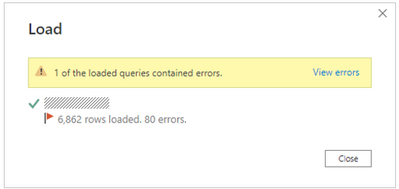
when the data is loading, I got following error:
After clicking "View errors", following window comes out:
these steps seemed automatically added.
Then if I remove all the steps and keep only Source, click Close and apply, all data can be loaded without error.
Could you please advise the reason? any impact? how to avoid the error comes again?
Thanks in advance.
H
You are supposed to consume the result of "View errors" and identify the column that caused the error. Once you corrected the issue you can delete the error group.
Hi @lbendlin , thanks for reply, however, there is no error (IMO) in any columns. I assume it's because some column type are automatically identified by the PowerBI so that while loading data, power bi considers some "errors" are in the columns?
Do you have advice how to change the setting so that power bi will not automatically identify the type of data?
Thanks.
H
however, there is no error (IMO) in any columns
Well, Power Query disagrees with you. There are errors. Look at the error table, scroll horizontally through all columns and one of them with say "Error". Click next to the Error to see the detailed explanation.
Hi @lbendlin , thanks for your reply.
After clicking on "error" in the new opened window, there was an error with warning icon, but it does not existing after I remove the steps, all the "Errors in" are common table, once click to any of the table, only 1 step "Source" since all the rest steps have been removed.
Later the "warning icon" comes again, I will paste here and ask for further help.
If you have recently started exploring Fabric, we'd love to hear how it's going. Your feedback can help with product improvements.
A new Power BI DataViz World Championship is coming this June! Don't miss out on submitting your entry.
| User | Count |
|---|---|
| 56 | |
| 40 | |
| 35 | |
| 18 | |
| 18 |
| User | Count |
|---|---|
| 69 | |
| 64 | |
| 38 | |
| 34 | |
| 23 |