Don't miss your chance to take the Fabric Data Engineer (DP-600) exam for FREE! Find out how by attending the DP-600 session on April 23rd (pacific time), live or on-demand.
Learn moreJoin the FabCon + SQLCon recap series. Up next: Power BI, Real-Time Intelligence, IQ and AI, and Data Factory take center stage. All sessions are available on-demand after the live show. Register now
Morning. I have a page that allows the user to select multiple products (upto 4).
They then want to chart how the products compare over time by showing them as seperate lines on the chart.
I am maybe a bit thick here but i don't seem to be able to get more than one line on the chart at any one time.
Any idea what i am doing wrong
Solved! Go to Solution.
Hi @JamesCH,
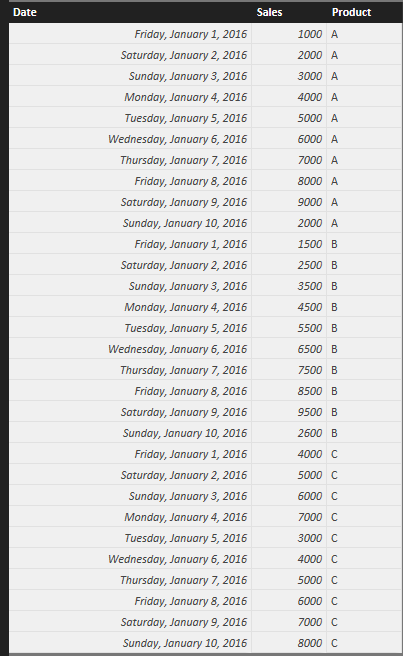
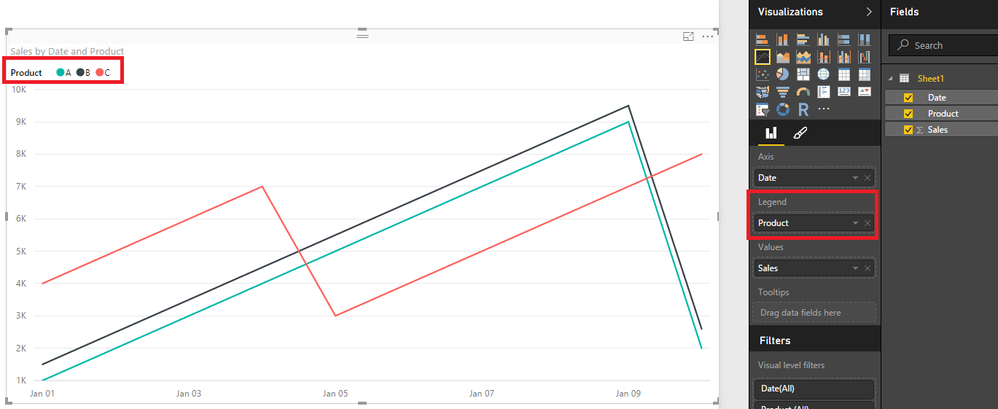
Could you please share sample data of your scenario and show us a screenshot that how you create the Line chart? If you have sample data as below, as ankitpatira’s post, just drag the product type field to Legend as shown in the second screenshot.
Thanks,
Lydia Zhang
Hi @JamesCH,
Could you please share sample data of your scenario and show us a screenshot that how you create the Line chart? If you have sample data as below, as ankitpatira’s post, just drag the product type field to Legend as shown in the second screenshot.
Thanks,
Lydia Zhang
Check out the April 2026 Power BI update to learn about new features.
If you have recently started exploring Fabric, we'd love to hear how it's going. Your feedback can help with product improvements.
A new Power BI DataViz World Championship is coming this June! Don't miss out on submitting your entry.
| User | Count |
|---|---|
| 48 | |
| 46 | |
| 41 | |
| 20 | |
| 17 |
| User | Count |
|---|---|
| 69 | |
| 67 | |
| 32 | |
| 27 | |
| 26 |