Join us at FabCon Atlanta from March 16 - 20, 2026, for the ultimate Fabric, Power BI, AI and SQL community-led event. Save $200 with code FABCOMM.
Register now!Vote for your favorite vizzies from the Power BI Dataviz World Championship submissions. Vote now!
Morning. I have a page that allows the user to select multiple products (upto 4).
They then want to chart how the products compare over time by showing them as seperate lines on the chart.
I am maybe a bit thick here but i don't seem to be able to get more than one line on the chart at any one time.
Any idea what i am doing wrong
Solved! Go to Solution.
Hi @JamesCH,
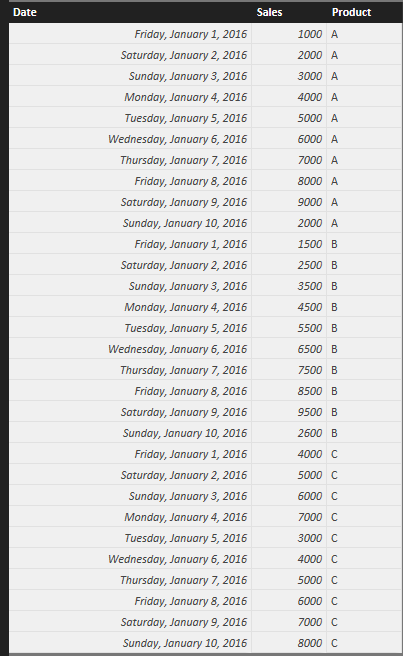
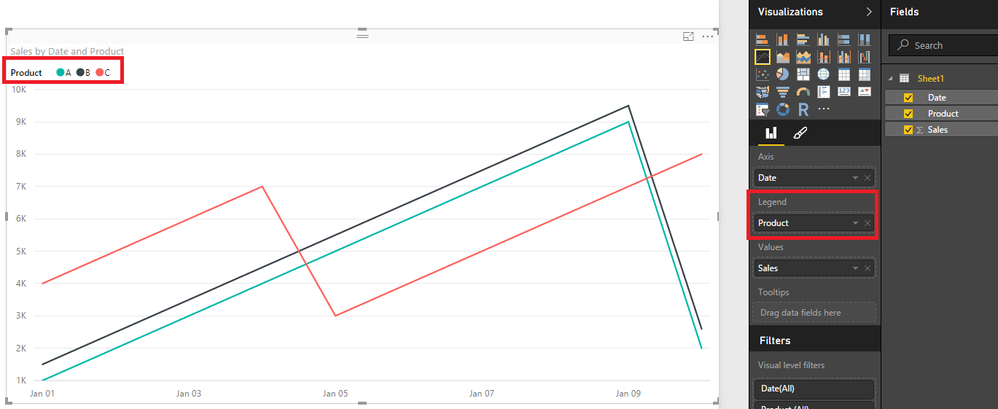
Could you please share sample data of your scenario and show us a screenshot that how you create the Line chart? If you have sample data as below, as ankitpatira’s post, just drag the product type field to Legend as shown in the second screenshot.
Thanks,
Lydia Zhang
Hi @JamesCH,
Could you please share sample data of your scenario and show us a screenshot that how you create the Line chart? If you have sample data as below, as ankitpatira’s post, just drag the product type field to Legend as shown in the second screenshot.
Thanks,
Lydia Zhang
Vote for your favorite vizzies from the Power BI World Championship submissions!
If you love stickers, then you will definitely want to check out our Community Sticker Challenge!
Check out the January 2026 Power BI update to learn about new features.
| User | Count |
|---|---|
| 63 | |
| 51 | |
| 41 | |
| 23 | |
| 18 |
| User | Count |
|---|---|
| 124 | |
| 109 | |
| 47 | |
| 28 | |
| 27 |