cancel
Showing results for 
Search instead for 
Did you mean: 

July 7 - July 17 | Round 2 of the Power BI Dataviz World Championships. Don't miss your chance! Learn more

Reply
JamesCH
Frequent Visitor

Lines Graphs

Morning.  I have a page that allows the user to select multiple products (upto 4).


They then want to chart how the products compare over time by showing them as seperate lines on the chart.


I am maybe a bit thick here but i don't seem to be able to get more than one line on the chart at any one time.


Any idea what i am doing wrong

1 ACCEPTED SOLUTION
Anonymous
Not applicable

Hi @JamesCH,

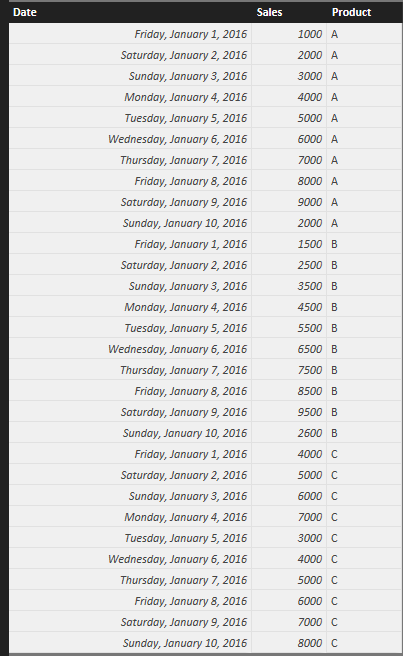
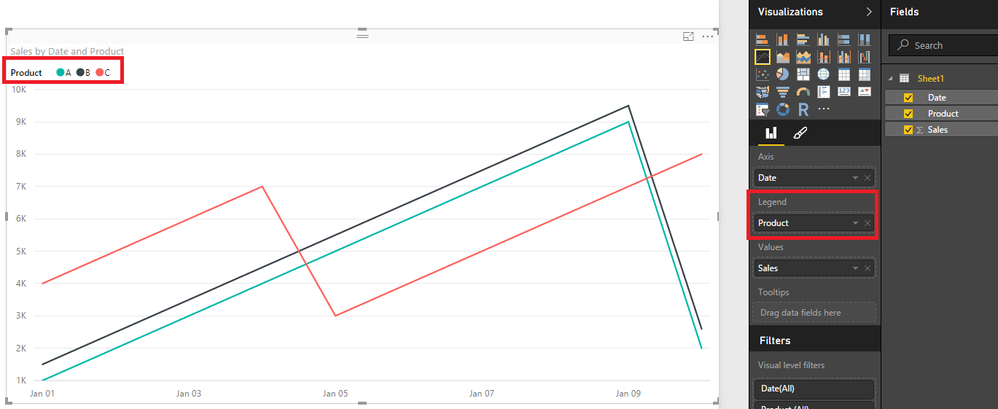
Could you please share sample data of your scenario and show us a screenshot that how you create the Line chart? If you have sample data as below, as ankitpatira’s post, just drag the product type field to Legend as shown in the second screenshot.
1.PNG2.PNG


Thanks,
Lydia Zhang

View solution in original post

2 REPLIES 2
Anonymous
Not applicable

Hi @JamesCH,

Could you please share sample data of your scenario and show us a screenshot that how you create the Line chart? If you have sample data as below, as ankitpatira’s post, just drag the product type field to Legend as shown in the second screenshot.
1.PNG2.PNG


Thanks,
Lydia Zhang

ankitpatira
Community Champion
Community Champion

@JamesCH Drop fields onto Legend section of the visual to get multiple lines.

Helpful resources

Announcements
FabCon and SQLCon Barcelona 2026

FabCon & SQLCon – Barcelona 2026

Join us in Barcelona for FabCon and SQLCon, the Fabric, Power BI, SQL, and AI community event. Save €200 with code FABCMTY200.

60 days of Data Days Carousel

Data Days 2026

Join Fabric Data Days 2026: 60 days of free live/on-demand sessions, challenges, study groups, and certification opportunities.

Power BI DataViz World Championships carousel

Power BI DataViz World Championships - June 2026

A new Power BI DataViz World Championship is coming this June! Don't miss out on submitting your entry.